Mobile video is no longer a shortcut. It’s the starting point.
Most business video today doesn’t begin in a studio. It begins on a phone.
A product update recorded between meetings. A process walkthrough filmed on site. A quick explanation captured while the context is still fresh.
Mobile content has become the most natural way teams document and share knowledge. It’s fast, authentic, and frictionless. And thanks to the editing tools built directly into modern smartphones, it’s easier than ever to turn raw clips into something usable on the spot.
But mobile content on its own has limits. That’s where platforms like Colossyan come in.
What mobile content is genuinely good at
Phones are best used for capture, not perfection.
In practice, mobile video works well when teams need to:
Document how something actually works
Share updates quickly without formal production
Capture environments that are hard to stage later
Communicate internally without slowing things down
Modern smartphones also make light editing easy. A quick trim, basic sequencing, a text label. Enough to clean things up and make the clip usable.
At this stage, the goal isn’t polish. It’s clarity.
A realistic mobile-first workflow
Here’s how mobile video typically shows up in real teams:
Example: operations or L&D
Someone records a short clip showing a process or workflow
They trim the start and end to remove noise
They share it internally or save it for later use
Example: product or marketing
A PM records a feature demo or UI walkthrough
A quick edit removes mistakes
The clip becomes reference material for others
This works well for fast communication. But it breaks down when that content needs to live longer or reach further.
Where mobile-only workflows stop working
Mobile editing tools aren’t designed for scale.
Teams start to struggle when they need to:
Reuse the same clip across multiple audiences
Keep branding consistent across videos
Update content without re-recording
Translate videos for global teams
Turn clips into structured training or onboarding
At this point, mobile video isn’t the problem. The problem is everything that comes after capture.
Elevating mobile content with platforms like Colossyan
This is where platforms like Colossyan come into play.
Instead of replacing mobile video, Colossyan builds on top of it.
A practical workflow looks like this:
Capture on mobile Record real footage where the work happens.
Do a quick first pass Trim the clip so only the useful parts remain.
Bring the footage into Colossyan This is where the content becomes scalable.
Inside Colossyan, teams can:
Add clear, consistent narration without relying on on-site audio
Combine phone footage with presenter-led explanations
Apply brand guidelines automatically
Translate and localize videos into multiple languages
Update content by editing text, not re-filming
Distribute videos as structured training or internal comms
The original clip stays grounded and real. The surrounding structure makes it usable at scale.
Turning clips into repeatable assets
The key shift is how teams treat mobile video.
Instead of asking: “Can we share this clip?”
They start asking: “How many times will we need this, and who else needs it?”
With the right platform in place, a single phone-shot clip can become:
Part of onboarding
A step in a training module
A reference inside documentation
A localized update for regional teams
That’s when mobile content stops being disposable and starts becoming an asset.
Recognizing The Handoff Point
The moment you need to scale, your workflow has to change.
Imagine a learning and development manager who captures a raw process on their phone during a site visit. That clip is invaluable, but it's just the starting point.
To transform it into effective training material, they need to:
Add a professional, clear voiceover—not just a simple text overlay.
Ensure the company logo, colors, and fonts are perfectly aligned with brand guidelines.
Translate the final video into Spanish, German, and Japanese for international teams.
Track which employees have actually completed the training.
This is the natural handoff point. The initial capture on a Samsung device is perfect, but the finishing, scaling, and distribution demand a dedicated platform. The true value of the native Samsung video editor is amplified by its role in a broader ecosystem. Its integration into millions of devices has put it at the heart of a video editing market projected to hit $4.99 billion by 2031, with mobile workflows leading the way. You can read more about the video editing market on Mordor Intelligence.
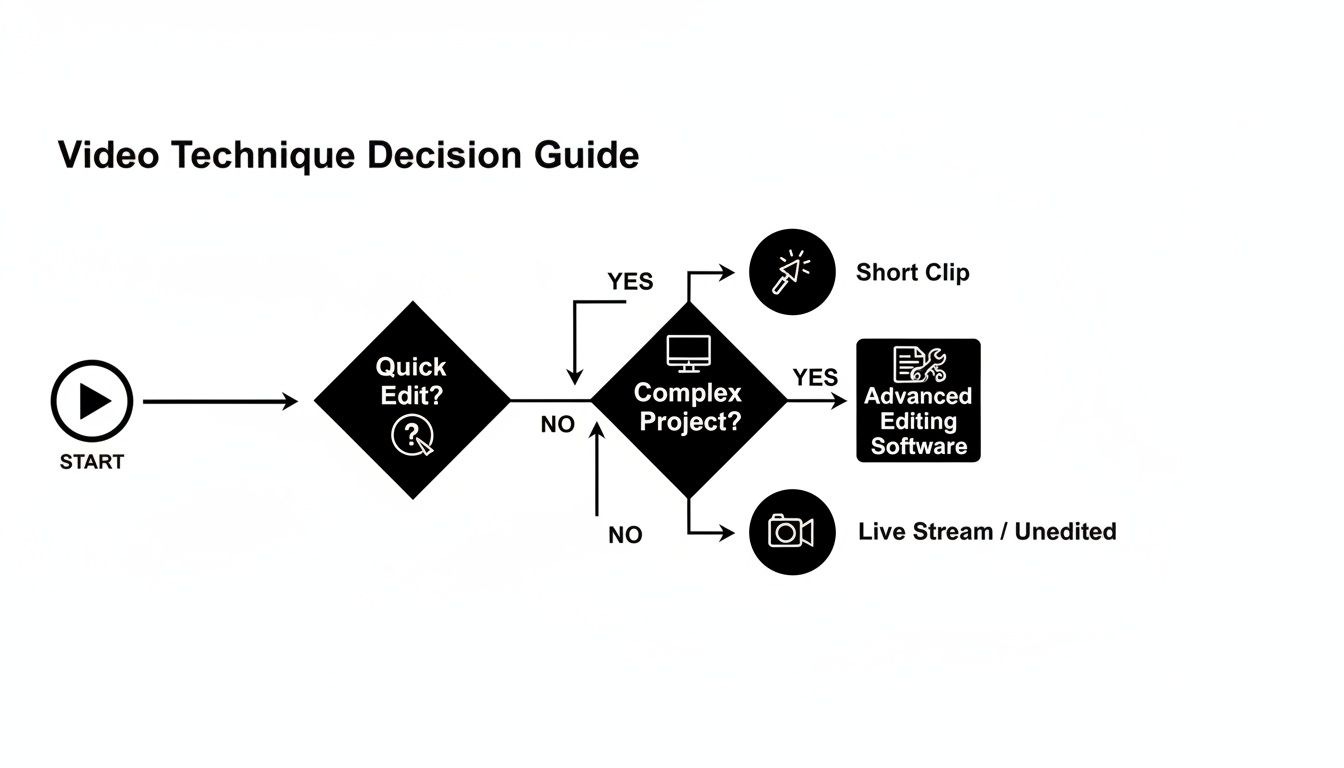
This flowchart helps visualize when to stick with a quick mobile edit versus when it's time to move to a more powerful desktop or cloud-based tool.
When to use mobile tools vs. a platform
A simple rule of thumb:
Use mobile editing when the goal is speed, context, and immediacy
Use a platform like Colossyan when the goal is consistency, reuse, and scale
They solve different parts of the same problem.
Mobile gets you close to the work. Colossyan gets that work to everyone else.
From Mobile Clip to Scalable Asset
Once you have your refined clips, the second part of the process kicks in. You simply upload them directly into your Colossyan project. This is where the magic really happens, transforming your simple mobile video into a polished, professional-grade learning or marketing asset.
Inside Colossyan, you can take that raw footage and build a complete, cohesive narrative around it. This hybrid approach unlocks a ton of possibilities:
Add Professional Narration: Instead of relying on subtitles or spotty on-site audio, you can drop in an AI avatar to deliver a crystal-clear, studio-quality voiceover.
Ensure Brand Consistency: Apply your company's official brand kit with a single click. Now every video has the right logos, fonts, and color palette, no matter who shot the original clip.
Localize Content Instantly: Need to reach a global team? You can auto-translate your video and generate new voiceovers in over 80 languages, making worldwide distribution incredibly simple.
By bridging mobile capture with an AI platform, you’re not just making a video; you're building a system that is both agile and scalable. You get the authenticity of phone-shot video combined with the polish and functionality of a dedicated production tool.
This completely removes the friction that usually slows down corporate video production. L&D and marketing teams can suddenly create high-quality, multilingual content faster than ever before.
For those looking to build even more sophisticated systems, it's worth exploring how the Colossyan API can automate parts of this workflow even further.
Your Questions, Answered
Can mobile-edited clips be used for professional content?
Yes, as long as they’re treated as input, not the final output.
Mobile clips work well for internal updates, product walkthroughs, and real-world demonstrations. When those clips need consistency, narration, or scale, platforms like Colossyan handle the finishing layer.
Does mobile capture limit video quality?
Not necessarily.
Modern phones capture high-resolution video that’s more than suitable for professional use. The key is what happens after capture: structuring, narrating, branding, and distributing the content properly.
How do teams move clips into Colossyan?
Most teams use a simple cloud handoff.
Trim the clip on your phone, upload it to a shared drive, then import it into Colossyan from desktop. It keeps the workflow simple and avoids unnecessary file handling.
Nikitas leads brand and content at Colossyan, shaping how knowledge is communicated, experienced, and scaled. He spends most of his time fighting unnecessary complexity and reminding people that clarity is not boring.
Networking and Relationship Building
Use this template to produce videos on best practices for relationship building at work.
Oops! Something went wrong while submitting the form.
example
Thank you - your video is on its way!
If you’d like to try out Colossyan and create a video yourself, just visit our website on your desktop and sign up for a free account in seconds. Until then, feel free to check out our examples.









.avif)





%20(1).avif)




.webp)
.webp)





