Let's be real: the demand for fresh video content is a treadmill that never stops, while budgets and deadlines get tighter every year. The traditional approach, creating every single video from scratch, is an expensive, draining cycle. But what if you could bypass that entire process?
There's a much smarter way to work: use AI to extend your existing videos. This isn't just about tweaking old content; it's about transforming your slightly dated assets into a modern, scalable library for learning and marketing with tools you already have.
Why Extending Video Is Smarter Than Starting Over
Your company is likely sitting on a goldmine of video content, product demos, old training modules, and marketing clips. This content was valuable, but it gets stale fast. Products get updated, policies change, or the branding gets a facelift. The old-school solution? Schedule a new video shoot, a process everyone knows is painfully slow and expensive. This outdated model is precisely where a new strategy, becomes an obvious win.
Instead of tossing out good footage, you can breathe new life into it by strategically adding new segments, updating key information, or localizing content for a global team. This approach respects the time and money you've already invested and integrates seamlessly with your existing assets, like PowerPoint decks or screen recordings. For a deeper dive, explore our AI video extender business guide.
Overcoming Common Production Hurdles with Colossyan
Most L&D and marketing teams fight the same battles, making the "start from scratch" model completely impractical. Using a tool like Colossyan Creator to AI extend video is a direct answer to these common headaches, working with the tools you already use:
Outdated Training Modules: Software got a new feature? You don't need to reshoot the entire tutorial. Simply insert a new scene with an AI avatar walking users through the update. It’s a surgical fix that takes minutes.
Tight Budgets: Forget the high costs of studio rentals, crews, and talent. Extending an existing video with Colossyan is a fraction of the cost of a full production.
Time Constraints: Sidestep long production cycles. Add updates or translate content and roll out a new version in hours, not weeks, helping you hit impossible deadlines.
By reimagining your content library, you shift from being a content creator on a hamster wheel to a strategic manager of valuable assets. Colossyan provides the tools to work smarter, not harder.
The difference in approach is stark when you lay it all out.
Traditional Video Production vs AI Video Extension
Traditional video production
Time to complete: Weeks or months
Cost: High, crews, equipment, talent, locations
Flexibility: Low, updates require reshoots
Scalability: Difficult and expensive
Resources: Full production team
AI video extension
Time to complete: Hours or days
Cost: Low, software-based
Flexibility: High, edit scripts and regenerate scenes
Scalability: Easy and cost-effective
Resources: One person with a clear goal
This shift is part of a massive industry trend. The AI video generator market is seeing explosive growth as businesses scramble to create training content that can keep up. Valued at USD 788.5 million in 2025, it's projected to hit USD 3.4 billion by 2033. This surge shows the huge demand for tools that slash manual editing time while making content more engaging, allowing you to meet the constant demand for video with unprecedented speed and efficiency.
Getting Your Content Ready for an AI Upgrade
Before you can work your magic, a little prep work goes a long way. Think of it like cooking: you organize your ingredients before you start. This initial effort makes the process inside a tool like Colossyan incredibly smooth, letting you focus on creativity instead of hunting down files.
A disorganized content library is a huge bottleneck. You might have killer product demos, but if they're squirreled away in different folders, they're useless. The first step is always a content audit.
Find Your Best Videos for an AI Refresh
Not every video is a good candidate for an AI-powered extension. The sweet spot is high-value content that’s still mostly solid but just a bit dated. This is where you can score major strategic wins without the expense of a full reshoot.
The best candidates usually fall into a few key categories:
Product Demos with Minor Updates: Your software has a new UI? Perfect. You don't need to scrap the whole tutorial. These are prime for swapping in a few new scenes.
Onboarding Videos That Need a Personal Touch: Take a general onboarding video and easily extend it with role-specific details using an AI avatar. It’s a quick way to make new hires feel seen.
Compliance Training That Needs to Go Global: That single English-language compliance video can be translated and adapted for dozens of global teams. This used to be a massive budget item; now it's incredibly efficient.
The secret is to look for content that is 80% right but just needs that extra 20% to be perfect. This mindset turns your video library from a static archive into a dynamic, adaptable asset.
Once you've flagged your top videos, it's time to gather the necessary pieces. This organizational step is non-negotiable for keeping your brand consistent. For a more structured approach, our guide on creating an AI video checklist can streamline this process.
Organize Your Scripts and Brand Assets
You absolutely need your assets ready to go. When you open up Colossyan, you want to be building, not searching. Create one central folder for each video project you're updating.
Here’s what you should pull together:
Original Scripts: Having the text on hand makes it easy to pinpoint which sections need an update or a new translation.
Brand Assets: This means your logos, brand fonts, and official color palette. Colossyan's Brand Kit feature pulls from these directly, so every new scene is perfectly on-brand.
Key Messages: Quickly jot down the main takeaways from the original video. This ensures any new AI-generated segments stay aligned with the original goal.
This prep work transforms a tedious task into a creative session. With your best videos picked out and assets in one place, you're ready to see what AI can do to extend your content.
Putting It Into Practice: Your Colossyan Workflow for Extending Videos
Alright, let's move from theory to action. This is the fun part—walking through the steps inside Colossyan Creator to breathe new life into your existing video assets. This isn't just about clicking buttons; it's a strategic process for turning static videos into dynamic learning tools.
First, get your content into the platform. This could be a PowerPoint deck that needs a voice, a text script, or a screen recording of a software walkthrough. Colossyan is the workshop where these different pieces come together before getting an AI upgrade, integrating smoothly with the assets you already have.
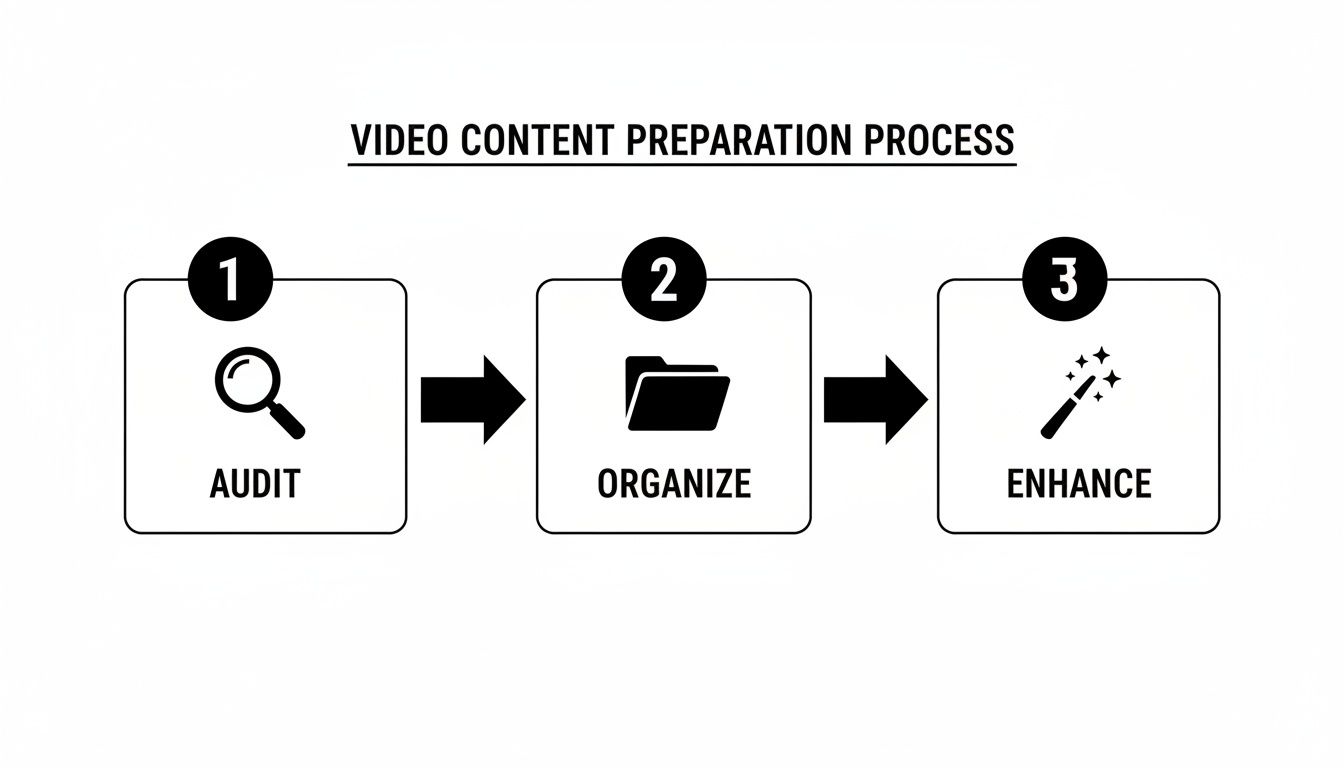
Getting this initial prep right is key to a smooth process. A solid foundation saves a ton of time.
As you can see, a simple Audit, Organize, and Enhance approach sets you up for success.
Weaving In New Context with AI Avatars
Once your base content is loaded, the real magic begins. The core technique is dropping in new scenes with an AI avatar to add fresh context, offer deeper explanations, or deliver critical updates. This is how you fill the gaps in your original video without booking a studio.
Imagine a software tutorial that's dated because of a UI update. Instead of a reshoot, just insert a new scene. An AI avatar pops in, explains the change, and walks the viewer through the new interface before cutting back to the original footage. It’s a surgical, fast, and incredibly cost-effective fix.
The goal isn't just to make a video longer; it's to make it better. Every new scene should have a clear purpose—clarifying a complex idea, updating old info, or tailoring the message for a new audience.
This agility is a massive win for large organizations. It's no surprise that big companies are the main drivers of AI video adoption. In 2025, enterprises accounted for a whopping 62.2% of the market revenue, and they're projected to hold a dominant 50.86% share in 2026. Their huge scale for training demands efficient solutions like Colossyan that can create and localize videos in a snap.
Taking It Global and Making It Interactive
Extending a video isn't just about adding information. It's about expanding its reach and making it more effective. Colossyan's auto-translation feature is a perfect example. You can take one training video and instantly create versions for your global teams in over 80 languages, complete with localized voiceovers.
Beyond translation, you can turn a passive video into an active learning experience. By inserting interactive elements like quizzes or branching scenarios, you can test comprehension and make key concepts stick. For instance, after an AI avatar explains a new HR policy, pop in a quick quiz to ensure everyone understood the critical details.
This creates a more engaging experience, tackling "presentation fatigue." For teams looking to bake this into their core processes, learning how to auto-create videos with Colossyan’s API is the next step toward full automation.
Taking it to the Next Level for Maximum Engagement
You've got the basics down for extending your videos with AI. That’s a great start. But the real magic happens when you move past simple updates and start using sophisticated strategies that actually boost viewer engagement and make your content stick.
This is where you graduate from just pushing out information to creating dynamic, interactive experiences that solve bigger business problems.
These advanced techniques are built to solve issues like keeping your brand image airtight across a global company or delivering personalized training at a scale that used to be pure fantasy. It’s all about tapping into the full potential of AI to forge a genuine connection with your audience.
Keep Your Brand Perfectly Consistent
For any large company, brand consistency is the foundation of trust. When you're pumping out dozens of videos, keeping that uniform look and feel can quickly turn into a logistical nightmare.
That's where a feature like Colossyan's Brand Kits becomes a lifesaver.
Instead of manually fiddling with logos and hex codes for every video, you set up your brand kit once. From then on, the kit automatically applies your company’s visual identity to any new scene. When an AI avatar pops in with an update, they appear against a background with your exact brand colors, and your official logo is right where it should be.
This simple step ensures every piece of content—old and new—feels like it belongs to the same family.
Think of it as your digital brand guardian. It eliminates the risk of someone using a rogue color palette or an outdated logo, making sure every video you extend reinforces your brand, rather than watering it down.
That level of control is absolutely critical for maintaining a professional image, especially with different departments or global teams creating content.
Create Interactive Learning with Conversational AI
Let's be honest: static, one-way video is losing its punch. Today's learners are used to interactive, responsive experiences. This is where conversational AI avatars completely change the game.
Instead of just reciting a script, these avatars can actually have a two-way conversation with the viewer.
Imagine a compliance training module where an employee can ask the AI avatar for clarification on a specific policy and get an answer instantly. Or picture a sales training video where a new rep can practice handling objections by talking to a responsive AI "customer."
This approach fosters an active learning environment that adapts to each person's needs. These avatars can:
Answer questions in real-time, clearing up complex topics on the spot.
Guide learners through branching scenarios, where their choices affect the outcome.
Provide personalized feedback, helping to lock in key concepts.
It transforms a passive viewing session into an active, engaging conversation that makes a huge difference in knowledge retention.
Personalize Content at Scale with API Integration
One of the toughest challenges for enterprise L&D teams is delivering content that feels relevant to every employee. A generic onboarding video might cover the basics, but it won’t land with the same impact for someone in a specialized role.
Personalization is the answer, but doing it manually across an entire organization is impossible.
This is where API integration becomes your secret weapon. By connecting Colossyan to your existing systems—like an HR database or CRM—you can automatically generate thousands of customized video variations.
For example, you could create personalized onboarding videos that greet new hires by name, mention their specific department, and highlight training relevant to their role. You could also generate tailored sales videos for different customer segments, with an AI avatar speaking directly to their unique pain points.
This ability to extend videos with personalized data turns your content from a one-size-fits-all broadcast into a powerful one-to-one conversation.
From Creation To Distribution And Measuring Success
So, you’ve created a fantastic, enriched training video. That's a huge win, but the job isn't done. An expertly extended video is only valuable if it gets to the right people and you can prove it worked.
This is the final, crucial step where all your effort pays off. With a platform like Colossyan Creator, you're not just making videos; you're closing the loop from creation to measurable results, making the case for AI-driven video undeniable. The goal was never just to hit "render"—it's about getting improved content into the hands of your learners seamlessly.
Integrating with Your Learning Ecosystem
One of the biggest headaches in corporate learning is getting new content to play nicely with existing systems. That's where Colossyan really shines. Instead of the old routine of downloading an MP4 and manually uploading it, you can export your videos with SCORM (Sharable Content Object Reference Model) support.
This is a complete game-changer for any Learning and Development team.
A SCORM package lets your video communicate directly with your Learning Management System (LMS). This seamless integration means your updated training modules slot right into your existing courses without any technical nightmares.
This isn’t just about convenience. It’s about transforming your video from a simple asset into a fully integrated, trackable piece of your educational strategy—all within the systems your organization already relies on.
Once that connection is live, you unlock the ability to gather real, concrete data on how your content is performing. You're no longer guessing if your videos are effective; you're measuring it.
Proving ROI with Built-In Analytics
How do you show stakeholders that your investment in an AI video strategy is paying off? The answer is data. Colossyan’s built-in analytics give you the hard numbers you need to demonstrate a tangible return.
You can monitor key metrics directly within the platform, giving you a crystal-clear picture of viewer behavior. This includes:
Completion Rates: See exactly how many employees are watching your training videos all the way through.
Engagement Scores: Pinpoint which parts of your content are resonating and where viewers might be dropping off.
Quiz Performance: If you’ve added interactive quizzes, you can track comprehension and immediately identify knowledge gaps.
This data is your most powerful tool. When you can walk into a meeting and show a 15% increase in completion rates for a newly updated compliance module, you’re not just talking about saving time. You're demonstrating improved learning outcomes and reduced business risk.
This is how you close the loop, proving that using AI to extend video isn't just about efficiency—it's about effectiveness.
AI Video Extension FAQs
Whenever we start talking about using AI to extend video, a few key questions always pop up. It makes sense. These tools look great, promising to make our lives easier, but you need to know the practical stuff—security, integrations, branding—before you can jump in.
Let's get into the most common concerns.
How Secure Is Our Content with Colossyan?
This is usually the first question, and for good reason. Handing over proprietary training materials requires a huge amount of trust. Platforms like Colossyan are built from the ground up with enterprise-level security to protect your intellectual property.
Your content is always yours. It is never used to train any AI models. On top of that, you've got robust security protocols like SOC 2 and GDPR compliance, which means your data is handled according to the strictest industry standards. Features like SAML single sign-on (SSO) add another layer of protection that slots right into your company's existing security setup.
The core principle is simple: your assets remain your assets. The platform provides the tools for extension, but the ownership and security of your content are never compromised.
This focus on security means you can confidently update sensitive materials—like compliance training or internal financial reports—without losing sleep over data privacy.
Can AI-Extended Videos Integrate with Our LMS?
What's the point of a powerful video if you can't get it into your learning ecosystem? A great video sitting on a hard drive is useless. The answer is a firm yes. Modern AI video platforms are designed to play nice with your other systems.
Colossyan offers full SCORM (Sharable Content Object Reference Model) support. This is the universal language that lets your video content talk directly to your Learning Management System (LMS).
So, what does that actually mean for you?
You can export your newly extended videos as a SCORM package.
You can upload them straight into your LMS courses.
You can track important metrics like completion rates and quiz scores without any clunky workarounds.
This direct integration ensures your AI-enhanced content becomes a measurable, trackable piece of your official training programs.
How Do We Maintain Brand Consistency?
Keeping a consistent brand identity across all content is non-negotiable. When different people or departments are extending videos, it's easy for things to go off-brand—the wrong logo, an off color, an old font.
This is where features like Brand Kits save the day. You set up your organization’s official branding just once: your logos, fonts, and color palettes. From that moment on, any new scene or AI avatar segment you add will automatically pull from those guidelines. It acts as a brand safeguard, making sure every single video looks professional and aligns perfectly with your company's visual identity, no matter who created it.
Ready to see how easy it is to update, localize, and enrich your existing video library? Explore Colossyan and discover a smarter way to scale your training content. Get started at https://colossyan.com.
Nikitas leads brand and content at Colossyan, shaping how knowledge is communicated, experienced, and scaled. He spends most of his time fighting unnecessary complexity and reminding people that clarity is not boring.
Networking and Relationship Building
Use this template to produce videos on best practices for relationship building at work.
Oops! Something went wrong while submitting the form.
example
Thank you - your video is on its way!
If you’d like to try out Colossyan and create a video yourself, just visit our website on your desktop and sign up for a free account in seconds. Until then, feel free to check out our examples.









.avif)





%20(1).avif)




.webp)
.webp)





