
Elearning authoring tools are the backbone of every corporate training program, yet picking the right one still trips up even experienced L&D teams. The market hit $1.43 billion in 2026, according to Research Nester, and the options have multiplied. Some tools now generate full courses from a PDF upload. Others still crash when you export a 50-slide module to SCORM 1.2.
The comparison below cuts through the noise. If you need to build training content with AI, start a free Colossyan account to see how AI avatars fit alongside these authoring tools.
Below, you will find 12 elearning authoring tools ranked by use case, pricing, standards support, and AI capabilities, plus a section on where AI-powered video training (like Colossyan’s training video maker) fits into the stack.
What elearning authoring tools actually do
Elearning authoring tools let instructional designers build interactive digital training content without writing code. The output is typically a packaged file (SCORM, xAPI, or cmi5) that runs inside a learning management system.
At their simplest, these tools convert slides or text into structured courses with navigation, quizzes, and progress tracking. At their most advanced, they generate adaptive learning paths from raw documents, translate content into dozens of languages, and track granular learner behavior through xAPI statements.
The category splits roughly into three groups:
- Desktop authoring suites (Articulate Storyline, Adobe Captivate, Lectora): Installed software with deep interactivity, timeline-based editing, and full creative control. Steeper learning curve, but maximum flexibility for branching scenarios and simulations.
- Cloud-based authoring platforms (Elucidat, Easygenerator, 360Learning, DominKnow ONE): Browser-first tools built for collaboration, speed, and scale. Most include review workflows and multi-author editing.
- AI-native authoring tools (Mindsmith, Coursebox): New entrants that use AI to generate course structures, content, and assessments from prompts or uploaded documents. Fastest time-to-publish, but output quality varies.
The choice between them depends on your team’s technical skill, how much interactivity your training requires, and whether speed or customization matters more.
How these tools were evaluated
Every tool on this list was assessed across six dimensions, weighted by what L&D teams actually care about based on practitioner feedback from instructional design communities and Gartner Peer Insights reviews.
- Content creation speed: How fast can a competent user go from blank page to published course? This ranking prioritizes tools that reduce production cycles without sacrificing quality.
- Interactivity depth: Does the tool support branching scenarios, drag-and-drop activities, simulations, and adaptive paths? Or is it limited to linear slide decks with quizzes?
- Standards compliance: SCORM 1.2, SCORM 2004, xAPI, and cmi5 support. According to xAPI.com (2025), SCORM still handles 56.3% of all content imports. Any tool that cannot reliably export SCORM is a dealbreaker for most enterprises.
- Collaboration and review: Can multiple authors work simultaneously? Are there built-in review and approval workflows? This is a persistent pain point. As one instructional designer put it, “Real-time collab? Dream on.”
- AI capabilities: Content generation from documents, auto-translation, quiz generation, text-to-speech, and adaptive learning features.
- Total cost of ownership: Not just the license price, but hosting requirements, LMS compatibility costs, add-on fees, and the time investment to train your team.
The 12 best elearning authoring tools
1. Articulate 360
Articulate 360 is the industry default for a reason: it ships two distinct authoring tools (Storyline and Rise 360) that together cover almost every training format an L&D team needs.
Storyline remains the gold standard for complex branching scenarios and interactive simulations. Its timeline-based editor gives instructional designers pixel-level control over triggers, states, and variables. Rise 360, by contrast, is a responsive web-based builder that produces clean, mobile-first microlearning in a fraction of the time.
The 2026 update added an AI-powered course outline builder and generative suggestions for images and text. These features are useful for first drafts but, like most AI authoring features right now, the output needs significant editing.
The biggest objection is price. At $1,499/year per seat on the Teams plan (or $1,749 for the AI-enhanced tier), Articulate 360 is the most expensive option on this list. Solo consultants and small teams regularly cite cost as the reason they switch to alternatives. There is no free tier and no monthly billing.
Best for: Enterprise L&D teams building complex interactive courses with branching logic.
Pricing: $1,499/year per user (Teams); $1,749/year (AI Teams).
SCORM/xAPI: SCORM 1.2, SCORM 2004, xAPI, cmi5.
2. Adobe Captivate
If your training requires VR/AR simulations or software walkthroughs, Adobe Captivate is one of the few authoring tools that handles both natively. The 2026 version added AI-powered captioning and continued to expand its immersive content capabilities.
The problem is complexity. Captivate’s timeline editor rivals After Effects in its learning curve, and practitioners flag recurring performance issues: 4K rendering is slow, Mac stability is inconsistent with large projects, and the UI feels dated compared to cloud-native competitors.
Captivate makes sense for teams that already live in the Adobe ecosystem and need advanced quiz types, responsive content, and VR output from a single tool. For teams that just need to build clean SCORM courses quickly, it is overkill.
At $33.99/month through Creative Cloud (or a perpetual license), Captivate makes sense if you already pay for the Adobe ecosystem and need VR/AR output, advanced quizzes, or software simulations from one tool. It supports SCORM 1.2, SCORM 2004, and xAPI.
3. Elucidat
Elucidat produces courses 3x to 5x faster than desktop authoring tools, according to its customer case studies, and that speed claim holds up under scrutiny. Its template library and guided authoring workflow mean subject matter experts (not just instructional designers) can create compliant courses.
The 2026 update introduced AI shortcuts for draft content generation, automated translation, and quiz creation, plus an adaptive AI engine that adjusts content paths based on learner responses. The parent-child course linking feature is particularly valuable for enterprises managing localized versions of the same training across 20+ countries.
Where Elucidat falls short is interactivity depth. You cannot build Storyline-level branching scenarios or custom simulations. It trades that flexibility for speed and scale, which is the right tradeoff for high-volume compliance and onboarding programs, but wrong for teams building complex soft skills training.
Best for: Enterprise teams that need to produce and localize large volumes of courses fast.
Pricing: Starting from $1,650/user/year (Growth plan); Team and Enterprise pricing on request.
SCORM/xAPI: SCORM 1.2, SCORM 2004, xAPI.

Elucidat’s authoring interface with course pages, badges, and learner analytics. Source: elucidat.com.
4. iSpring Suite
If your team already uses PowerPoint daily, iSpring Suite removes the tool-switching friction entirely. It installs as a PowerPoint add-in, turning every .pptx file into a SCORM-compliant course with quizzes, interactions, and narration.
The PowerPoint integration is both iSpring’s strength and its ceiling. iSpring cannot match the interactivity of Storyline or the collaboration features of cloud platforms. What it can do is get a non-technical subject matter expert from slides to published course in under an hour.
The 2026 update added AI-driven text-to-speech narration with natural voice options and smart translation for localization. At $770/year per user (or $670 for the Max plan with an included LMS), it sits at the mid-range price point and includes a 14-day free trial.
Best for: Teams that want to convert PowerPoint presentations into SCORM courses with minimal ramp-up.
Pricing: $770/year per user (Suite), $670/year per user (Max, includes LMS).
SCORM/xAPI: SCORM 1.2, SCORM 2004, xAPI, cmi5.
5. Colossyan
Most authoring tools on this list produce slide-based, text-heavy courses. Colossyan takes a different approach: it is an AI Platform for Training and Enablement that combines video-led course authoring with interactive elements in one editor. You write a script, pick an AI avatar, and the platform generates a presenter-led training video in any of 100+ languages with natural lip sync.
What makes Colossyan Learn an authoring tool (not just a video tool) is the course structure built around the video. Pages, quizzes, branching scenarios, and clickable hotspots are part of the authoring workflow. Finished courses export as SCORM and xAPI packages for direct LMS delivery. Organizations like Paramount, Cisco, and Johnson & Johnson use it to create training videos at scale.
The tradeoff is interactivity depth. Colossyan does not offer Storyline-level variable logic or drag-and-drop simulations. If your training requires complex branching beyond video-led scenarios, you will need a traditional authoring tool alongside it. Many enterprise L&D teams use both: Colossyan for video modules, Articulate or Elucidat for interactive assessments, packaged together in their LMS.
Best for: L&D teams that need video-led training with course authoring, quizzes, and multilingual delivery built in.
Pricing: 14-day free trial. Starter from $27/month. Enterprise with custom avatars, SSO, and priority support. See full pricing.
SCORM/xAPI: SCORM, xAPI.
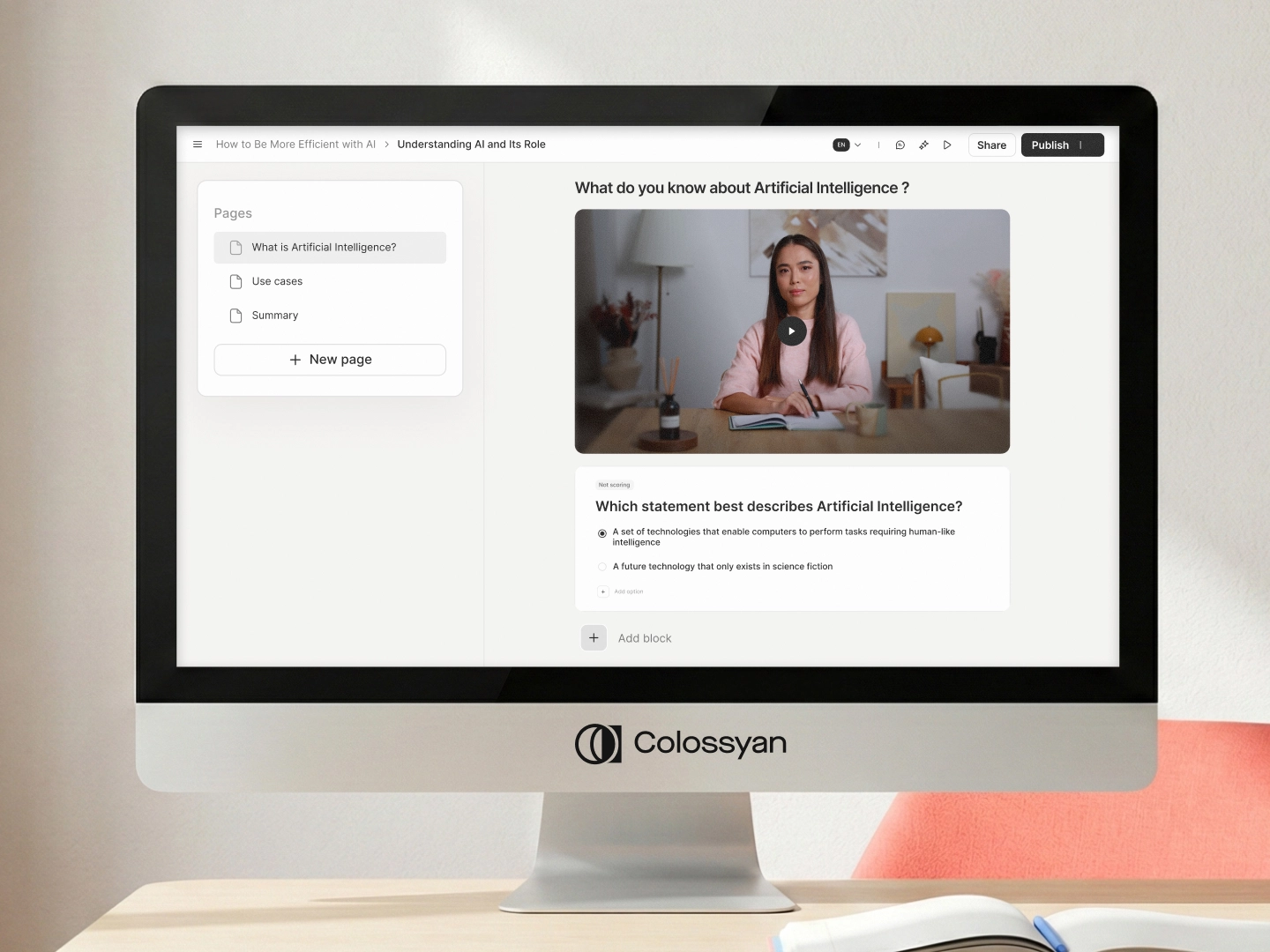
Colossyan Learn: video-led course authoring with AI avatars, page structure, and built-in quizzes. Source: Colossyan product.
6. 360Learning
Unlike every other tool on this list, 360Learning was built around collaborative learning from the start. Its core thesis is that courses should be co-created by subject matter experts, peer-reviewed, and iterated on based on learner feedback, not built in isolation by an instructional designer.
This makes it the strongest option for organizations running peer learning or social learning programs. The built-in discussion threads, upvoting, and feedback loops create a dynamic that other tools bolt on as an afterthought.
The tradeoff is interactivity. 360Learning courses are primarily text, video, and quiz-based. You will not build complex branching scenarios or drag-and-drop simulations here. If your compliance training requires a 15-step branching simulation, this is not the right tool.
Starting at $8 per registered user per month, 360Learning is the cheapest commercial option on this list. It supports SCORM 1.2, SCORM 2004, and xAPI, and because it doubles as an LMS, it also imports SCORM packages built in other tools.
7. Easygenerator
Easygenerator is the tool you hand to a subject matter expert who has never heard of SCORM and needs a course published by Friday. Its drag-and-drop editor requires zero training. The interface is intentionally simple, which limits what power users can build but dramatically lowers the barrier to entry.
For L&D teams that spend more time chasing SMEs for content than actually building courses, Easygenerator flips the model: let the SME build the first draft, then have the instructional designer refine it. The built-in review workflow supports this handoff cleanly.
It does not support advanced interactions, branching, or simulations. The course formats are linear and template-driven. For teams producing high volumes of straightforward knowledge-transfer content (product training, process documentation, policy updates), that simplicity is an advantage, not a limitation.
Best for: Enabling subject matter experts to self-author simple courses without L&D bottlenecks.
Pricing: $116/month per author (Pro), $582/month per author (Team), enterprise custom.
SCORM/xAPI: SCORM 1.2, SCORM 2004, xAPI.
8. Lectora Online
Lectora has been shipping elearning authoring software since 1999, and that history shows in its accessibility compliance. It is one of the few tools that produces WCAG 2.1 AA-compliant output by default, making it the clear choice for government agencies, healthcare organizations, and any enterprise with strict accessibility mandates.
The desktop version (Lectora Desktop) offers Storyline-level interactivity with variables, triggers, and conditional actions. The cloud version (Lectora Online) adds collaboration features and browser-based editing. The downside is that the interface feels its age: newer tools are simply faster to work in.
If accessibility is a non-negotiable requirement, Lectora belongs on your shortlist. According to practitioners, WCAG compliance in most other authoring tools is “half-baked” at best.
Best for: Organizations with strict accessibility (WCAG 2.1 AA) requirements.
Pricing: Custom (contact sales); previously around $1,299/year.
SCORM/xAPI: SCORM 1.2, SCORM 2004, xAPI, AICC.
9. DominKnow ONE
DominKnow ONE bundles three authoring modes (responsive, Storyline-style interactive, and document-based) into a single cloud platform with a shared asset library. For enterprise teams running multiple authoring workflows, that consolidation eliminates the need to license separate tools.
The shared asset library is the real differentiator. If your team reuses templates, brand assets, characters, and media across hundreds of courses, DominKnow’s centralized repository with version control saves hours of duplicate work.
The catch is adoption. DominKnow has a smaller user community than Articulate or Adobe, which means fewer third-party tutorials, templates, and forum answers when you hit a roadblock. Teams that value ecosystem support should factor this in.
Best for: Enterprise L&D teams that need multiple authoring modes and centralized asset management in one platform.
Pricing: $997/year per user (Individual), $1,497/year per user (Team).
SCORM/xAPI: SCORM 1.2, SCORM 2004, xAPI.
10. Mindsmith
Mindsmith raised $4.1 million in seed funding in November 2025, according to BusinessWire, and its pitch is bold: AI-native authoring that is 12x faster than traditional tools. You describe what the course should teach, and Mindsmith generates a structured course with content, assessments, and navigation.
The “causal AI” approach tracks learner cognition in real-time and adapts content paths accordingly. Early practitioner feedback is enthusiastic: some users report it “beats Storyline for personalized training” in scenarios where adaptive paths matter more than visual polish.
The reality check: Mindsmith is young. The content it generates needs editing (a common complaint about all AI authoring tools in 2026). The template library is limited compared to established players, and the user community is small. But if AI-first authoring aligns with your roadmap, Mindsmith is the most interesting new entrant in the category.
A free tier lets you test it before committing. Pro runs $39/month per user. SCORM, xAPI, and cmi5 export are all supported. If AI-first authoring is where your team is headed, Mindsmith is the most interesting new entrant to evaluate.
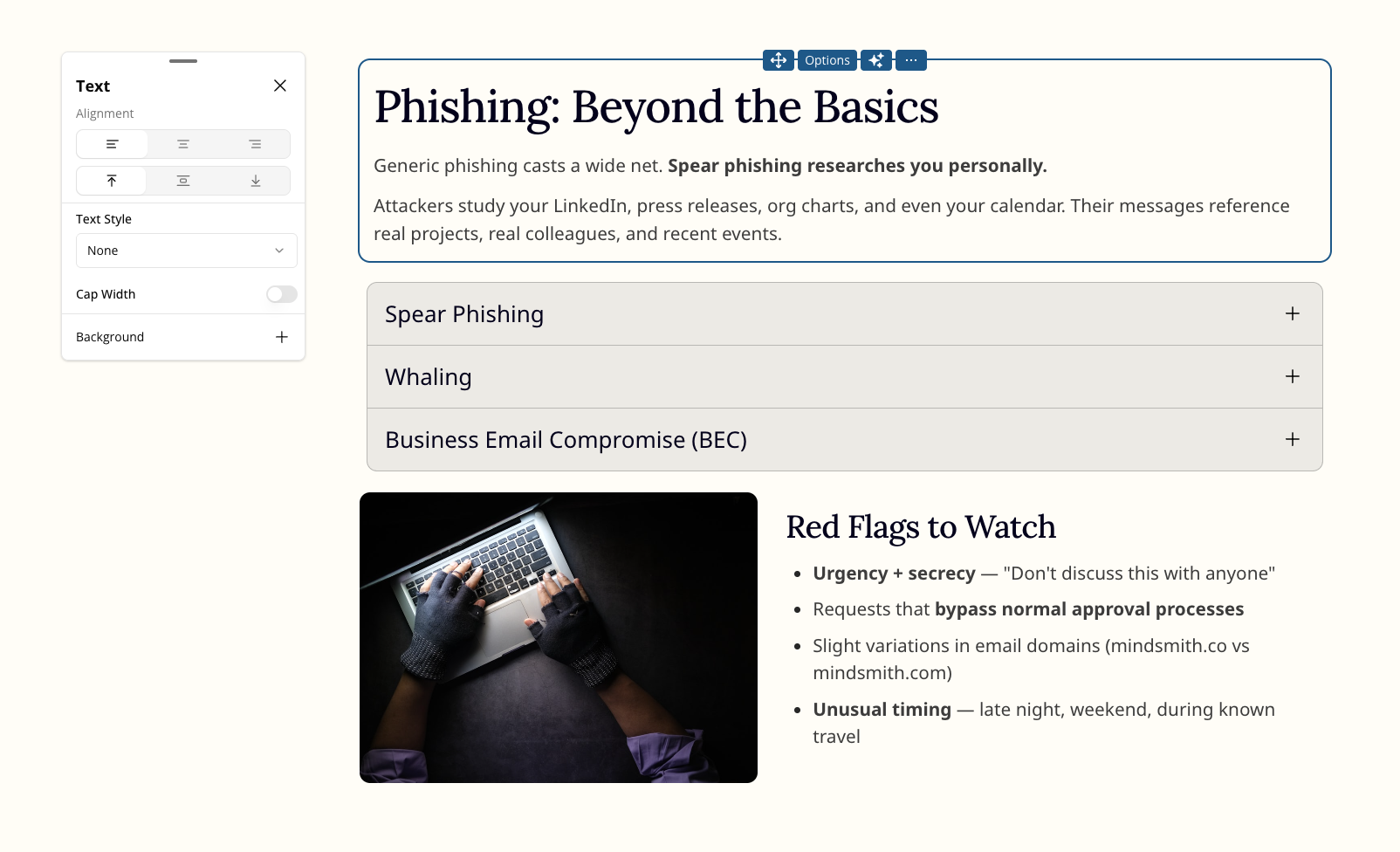
Mindsmith’s AI-generated course on phishing training. The platform builds structured content with expandable sections from a text prompt. Source: mindsmith.ai.
11. Coursebox
Coursebox takes a different AI approach than Mindsmith: instead of adaptive learning paths, it focuses on speed-to-SCORM. Upload a script, PDF, or video, and Coursebox generates a structured course with an AI tutor trained on the content. Multiple users report going from script to published SCORM package in under 10 minutes.
The AI tutor feature is notable. It creates a chatbot that learners can query about the course material, which adds an interactive layer without requiring manual branching design. The platform also includes learner analytics and a white-label option for resellers.
The limitation is depth. Coursebox courses are structurally simple (text, video, quiz, AI tutor). For teams that need drag-and-drop interactions, simulations, or complex branching, this will not be enough. It is best suited for solopreneurs, small training companies, and teams that prioritize speed over interactivity.
Best for: Solopreneurs and small teams that need to turn existing content into SCORM courses fast.
Pricing: Free tier available; Expert at $33.25/month, Branded LMS at $99/month.
SCORM/xAPI: SCORM 1.2, xAPI.
12. H5P
H5P is the only fully open-source option on this list, and for budget-constrained teams, it is the most capable free elearning authoring tool available. It supports 50+ interactive content types (flashcards, branching scenarios, interactive video, course presentations) and integrates directly with Moodle, WordPress, Drupal, and Canvas via LTI.
The community around H5P is large and active. New content types get contributed regularly, and the documentation is solid. For nonprofits, universities, and small training teams that cannot justify $1,000+/year per seat, H5P removes the financial barrier entirely.
The tradeoffs are real. There is no native SCORM export (you need an LTI integration or a third-party plugin). There is no built-in collaboration, no analytics dashboard, and no support team to call when something breaks. The hosted version (H5P.com) adds some of these features for a fee, but at that point you are comparing it against commercial tools that offer more.
The cost is zero. H5P is fully open-source, and the community keeps it current. The hosted version at H5P.com adds managed features starting at $55/month, but at that price you are comparing against commercial tools. On standards: xAPI is native, but SCORM export requires a third-party plugin.
Comparison chart
Features and pricing
| Tool | Best for | Starting price | SCORM/xAPI |
|---|---|---|---|
| Articulate 360 | Complex interactive courses | $1,499/yr per user | SCORM 1.2, 2004, xAPI, cmi5 |
| Adobe Captivate | VR/AR simulations | $33.99/mo | SCORM 1.2, 2004, xAPI |
| Elucidat | Enterprise-scale rapid authoring | From $1,650/yr | SCORM 1.2, 2004, xAPI |
| iSpring Suite | PowerPoint-to-SCORM conversion | $770/yr per user | SCORM 1.2, 2004, xAPI, cmi5 |
| 360Learning | Collaborative peer learning | $8/user/mo | SCORM 1.2, 2004, xAPI |
| Easygenerator | SME self-authoring | $116/mo per author | SCORM 1.2, 2004, xAPI |
| Lectora Online | Accessibility compliance | ~$1,299/yr | SCORM 1.2, 2004, xAPI, AICC |
| DominKnow ONE | Multi-mode enterprise authoring | $997/yr per user | SCORM 1.2, 2004, xAPI |
| Mindsmith | AI-generated adaptive courses | Free; Pro $39/mo | SCORM, xAPI, cmi5 |
| Coursebox | Script-to-SCORM speed | Free; Expert $33.25/mo | SCORM 1.2, xAPI |
| H5P | Free/open-source interactive content | Free (open-source) | xAPI native; SCORM via plugins |
| Colossyan | Video-led training + course authoring | Free trial; $27/mo | SCORM, xAPI |
AI features and collaboration
| Tool | AI features | Collaboration | Free tier |
|---|---|---|---|
| Articulate 360 | AI outline builder, generative text/image suggestions | Review sharing (not real-time co-editing) | No |
| Adobe Captivate | AI captioning, smart templates | Limited | No |
| Elucidat | AI drafts, auto-translation, quiz gen, adaptive engine | Real-time multi-author, review workflows | No |
| iSpring Suite | AI text-to-speech, smart translation | Limited | 14-day trial |
| 360Learning | AI quiz suggestions | Built-in co-creation, peer review, discussion threads | No |
| Easygenerator | Basic AI writing assistant | Review and approval workflow | No |
| Lectora Online | Limited AI features | Cloud version supports multi-author | No |
| DominKnow ONE | Basic AI assist | Shared asset library, multi-author | No |
| Mindsmith | Full AI course generation, causal AI adaptive paths | Basic | Yes |
| Coursebox | AI script-to-course, AI tutor chatbot, auto-assessment | Basic | Yes |
| H5P | None | Community contributions (not real-time) | Yes (open-source) |
| Colossyan | AI avatars, script-to-video, auto-translation (70+ langs) | Multi-author, review workflow | 14-day trial |
How to choose the right authoring tool
How Paramount cut training video production from weeks to hours
Paramount replaced manual video production with Colossyan's AI avatars, cutting production time from weeks to hours across their global L&D team.
Read the full story →The “best” elearning authoring tool does not exist. The right choice depends on five factors that vary by organization.
Team technical skill
If your authors are instructional designers comfortable with timeline editors and variables, Articulate Storyline, Adobe Captivate, or Lectora will give them full creative control. If your authors are subject matter experts with no technical background, Easygenerator or iSpring Suite (via PowerPoint) will get them producing content without a training program.
Interactivity requirements
Branching scenarios, drag-and-drop simulations, and variable-driven logic require desktop authoring suites. Linear courses with quizzes and video can be built faster in cloud tools. Map your training catalog: what percentage of courses actually needs complex interactivity? Most teams overestimate this number.
Collaboration model
If courses are built by solo designers, collaboration features do not matter. If courses are co-created by SMEs, reviewed by compliance teams, and localized by regional offices, tools like Elucidat, 360Learning, and DominKnow ONE will save significant coordination time.
LMS and standards requirements
Check your LMS compatibility before committing to a tool. According to xAPI.com, SCORM still accounts for 56.3% of all content imports. If your LMS only supports SCORM 1.2, tools like H5P (which relies on xAPI/LTI natively) will require workarounds. If you are moving toward xAPI for richer analytics, confirm that your authoring tool and LMS both support it.
Budget reality
Licensing costs are only part of the equation. Factor in:
- Training time: Complex tools like Captivate or Storyline take weeks to learn. Easygenerator takes hours.
- Hosting: Some tools require separate hosting or cloud subscriptions.
- Scale: Per-user pricing (Articulate, iSpring) adds up fast for large teams. Per-learner pricing (360Learning) scales differently.
- Migration cost: Switching authoring tools means rebuilding courses. SCORM packages are not editable across tools.
Free and open-source options
For teams that cannot justify commercial licensing, two categories of free elearning software exist.
Fully free and open-source:
- H5P: 50+ interactive content types, LMS-agnostic via LTI, active community. No native SCORM export, no built-in analytics, no support. Best for teams comfortable with self-hosting and community forums.
- Adapt Learning: Open-source responsive authoring framework. Requires technical setup (Node.js, command line). Produces accessible, mobile-first courses. Strong for technically skilled teams; not practical for non-developers.
Free tiers on commercial tools:
- Mindsmith: Free plan with AI course generation. Limited exports and features.
- Coursebox: Free plan with basic AI course creation. SCORM export available on paid plans.
- 360Learning: No free tier, but $8/user/month is the lowest commercial entry point on this list.
The honest assessment: free tools work well for simple interactive content and small-scale training. Once you need reliable SCORM export, collaboration workflows, enterprise support, or accessibility compliance, you will hit the ceiling and need to upgrade.
Using Colossyan alongside traditional authoring tools
Many enterprise L&D teams combine Colossyan with a traditional authoring tool. The typical stack: Colossyan for video-led modules (onboarding, compliance walkthroughs, multilingual content), and a tool like Articulate or Elucidat for interactive assessments and simulations. Both export to SCORM, so they package together in the same LMS.
This matters because the split between video-led and interactive training is growing. Teams that try to force everything into one tool end up with either mediocre video (from slide-based tools) or limited interactivity (from video-first tools). A two-tool stack covers both without compromise.
To see how AI video fits your training workflow, explore Colossyan’s learning solutions or check pricing.
Next steps
The elearning authoring tools market is splitting into two clear directions. Established players like Articulate, Adobe, and iSpring are adding AI features to their existing workflows. New entrants like Mindsmith and Coursebox are building AI-first from the ground up. Meanwhile, the demand for video-based training is growing alongside interactive courseware, not replacing it.
The best approach for most teams in 2026 is matching the tool to the content type, not forcing everything into one platform. For a deeper look at how AI is changing training video production specifically, see the guide on AI training video generators.
Start with the selection criteria above, map them to your actual training catalog (not an ideal future state), and trial two or three options. Every tool on this list offers either a free tier or a trial period. Two weeks with each will tell you more than any comparison article.

