Syncing audio to video is all about making sure what you see lines up perfectly with what you hear. When a sound plays at the exact same time as its on-screen action, everything feels right. But when it's off, even by a little, the whole experience can feel cheap and unprofessional.
While viewers might not notice tiny imperfections, a noticeable delay can make a video completely unwatchable. The real problem isn't just the annoyance; it's that manual synchronization is a relic of an old workflow, creating bottlenecks that modern tools like Colossyan are designed to eliminate entirely.
Why Perfect Audio Sync Matters for Professional Video
In the world of professional video, especially for corporate L&D, getting the audio sync right isn't just a technical check-box—it’s the bedrock of your credibility. Even a slight mismatch creates a jarring, uncanny feeling that instantly makes viewers question the quality and trustworthiness of your content.
This mental hiccup is a huge problem for learning materials. It pulls the learner's focus away from your message and forces them to concentrate on the technical glitch.
Think about an employee watching a compliance video. If the speaker's lips are even a fraction of a second off from the audio, their brain flags it as an error. Suddenly, the perceived authority of the entire presentation plummets. For any business using video to share critical information, that's a risk you just can't afford to take. The manual effort required to fix these issues in traditional software is a hidden cost that drains resources better spent on content creation.
The Unforgiving Standard of Professional Sync
The tolerance for sync errors is razor-thin. Broadcast and film industries have known this for decades, which is why their standards are so strict. In fact, studies have shown that 80-90% of viewers notice sync errors that are off by more than just 45 milliseconds.
To put that in context, major broadcasting bodies like the EBU and ATSC mandate that audio and video stay within a nearly imperceptible range of each other—often less than a single frame of video.
This level of precision is about more than just getting lip-sync right. Imagine these scenarios:
Product Demos: A "click" sound that doesn't match the on-screen action makes the whole demonstration feel fake and staged.
Safety Training: An instructional video on heavy machinery becomes confusing and potentially dangerous if audio cues don't line up with the actions.
Global Communication: The need for perfect timing is even more critical when you dub videos for international teams. The slightest slip can shatter the illusion and make the content feel foreign and poorly produced.
Perfect synchronization is an invisible art. When done correctly, no one notices it. When done poorly, it's the only thing people remember. This is why maintaining broadcast-level standards is no longer optional for serious enterprise content.
As video becomes the go-to medium for corporate communication, the demand for high-quality, perfectly synced content is skyrocketing. The old-school methods—manually lining up waveforms, fighting with frame rates, and re-syncing audio for every language version—are quickly becoming a huge bottleneck. These manual processes are slow, costly, and simply don't scale. This is where a platform like Colossyan, which generates perfectly synced audio and video from the start, fundamentally changes the equation.
And speaking of accessibility, once your audio is locked in, you might also want to explore how to add subtitles to your AI videos.
Mastering the Manual Toolkit for Syncing Audio and Video
For decades, video editors have relied on a tried-and-true set of skills to marry audio and video. That classic image of a clapperboard snapping shut on a film set isn't just for show. It creates a sharp, unmistakable spike on both the visual timeline and the audio waveform, serving as the universal reference point for synchronization in post-production.
This old-school process demands a keen eye and a steady hand. Inside editing software like Adobe Premiere Pro or Final Cut Pro, the editor’s main job is to visually line up the audio waveforms. They zoom way into the timeline, find that peak from the clapperboard in both the camera's scratch audio and the separately recorded high-quality track, and nudge them until they are perfectly aligned.
The Art and Labor of Waveform Matching
What happens when there's no clapperboard? Editors have to get creative, hunting for other distinct sounds—a sudden cough, a door slamming, or even a hard consonant in someone's speech—to use as a makeshift sync marker. It's a meticulous, almost artisanal craft that can be incredibly satisfying when you nail it.
But let's be honest: this artistry quickly becomes a liability when you're up against real-world production challenges.
Imagine trying to sync audio from a multi-camera interview shot on a noisy trade show floor. The constant background hum can muddy the waveforms, making it nearly impossible to find a clean, reliable sync point. Each clip becomes a time-consuming puzzle you have to solve before you can even start editing. This reactive, problem-solving approach is precisely what platforms like Colossyan are designed to avoid.
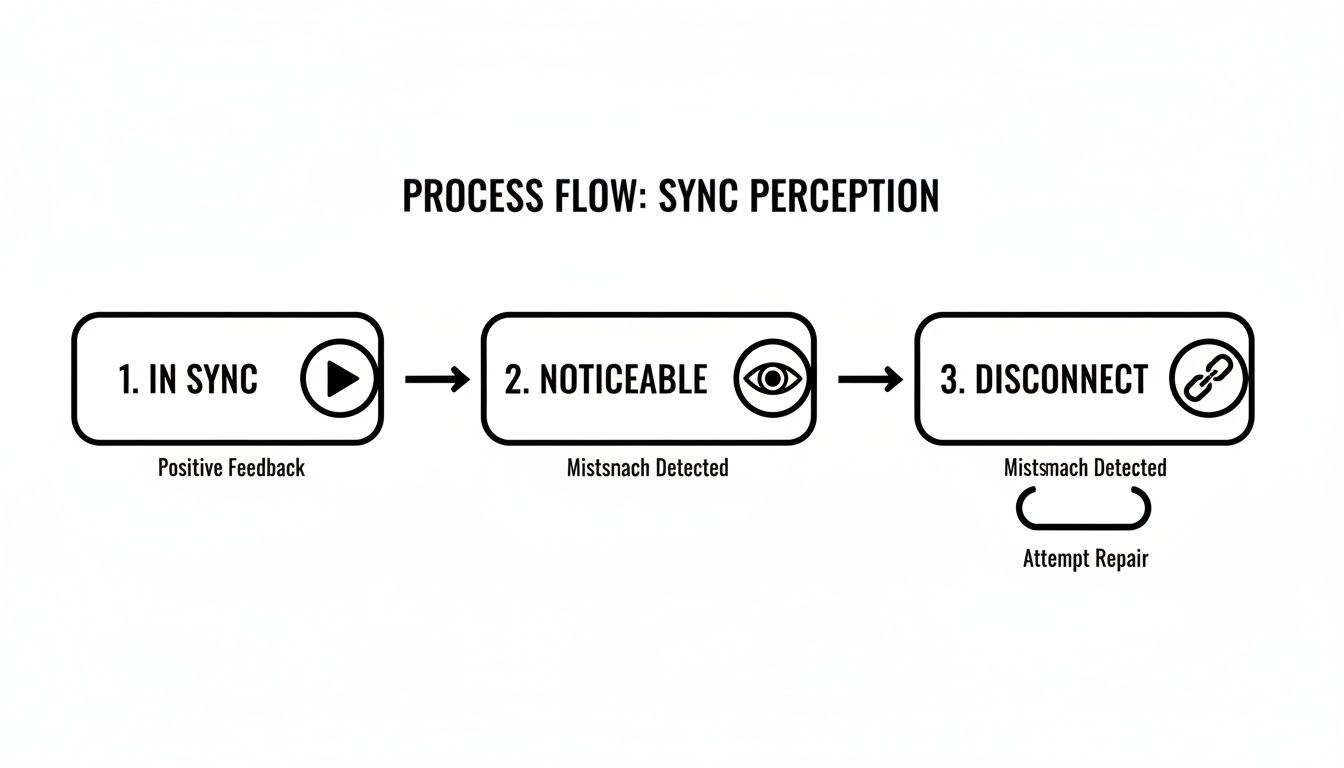
The diagram below shows just how quickly a viewer's perception shifts when the sync is even slightly off.
As you can see, perfect sync goes completely unnoticed—which is the goal. But even a minor drift can lead to a total disconnect for the viewer, tanking the video's credibility in seconds.
When Manual Methods Fall Short
Modern editing suites have certainly tried to speed things up. For instance, Adobe Premiere Pro's 'Synchronize Clips' function can reportedly save editors an average of 2-4 hours on a given project. However, this automation is far from a silver bullet.
Waveform mismatches still happen in about 10% of recordings from noisy locations, forcing editors right back to the tedious manual adjustments. While these tools might boost throughput by around 35%, the scalability needed for enterprise-level video production just isn't there. For a deeper dive, check out the discussions on Premiere Pro’s sync capabilities on Creative Cow.
The table below breaks down how these traditional methods stack up against the demands of a modern enterprise.
Traditional Sync Methods vs Enterprise Needs
Traditional audio and video sync techniques work in controlled environments. Enterprise production rarely is.
Below is how common methods perform in real corporate workflows.
Clapperboard / Slate Sync
Best for: Single-camera cinematic shoots in controlled environments Enterprise challenge: Impractical for fast-paced corporate shoots, interviews, or distributed teams. It adds friction and slows production.
Manual Waveform Matching
Best for: Short clips with clear, distinct audio peaks Enterprise challenge: Extremely time-consuming and unreliable in noisy office environments. Not scalable.
Timecode Sync
Best for: Professional multi-camera setups with dedicated gear Enterprise challenge: Requires expensive, specialized equipment that most enterprise teams do not have access to.
Software-Assisted Sync
Best for: Well-recorded audio with minimal background noise Enterprise challenge: Often fails in real-world conditions with ambient noise, forcing manual corrections and rework.
At the end of the day, these methods were designed for a different era of video production. They simply can't keep up with the volume, speed, and resource constraints of corporate L&D.
While manual sync skills are valuable for a single cinematic project, they create significant bottlenecks in a corporate environment. The time spent fixing sync issues on one video is time not spent creating the next ten.
For L&D teams tasked with producing dozens of training modules, the manual approach is a non-starter. It’s too slow, too prone to error, and requires a technical skill set that not every content creator possesses. This reality makes a powerful case for a new workflow—one where perfect sync isn't a problem to solve, but a feature that's built-in from the very beginning, a core benefit of platforms like Colossyan. The rise of smart tools like a transcript generator from video also points toward this more integrated, efficient future.
Troubleshooting Common Sync Problems and Their Causes
We’ve all been there. You’ve spent hours editing, only to find the audio and video have mysteriously drifted apart. It’s one of the most frustrating parts of post-production, but it's rarely a random glitch. More often than not, it’s the result of hidden technical conflicts between your source files.
To successfully sync audio to video, you have to put on your detective hat and figure out what’s causing the problem. These issues are almost always predictable outcomes of mismatched technical specs. The moment you start mixing media—say, a professionally shot camera feed with a simple screen recording—you're introducing variables that can throw your entire project out of whack.
Mismatched Frame Rates
One of the most common culprits behind sync drift is a simple frame rate mismatch. This is what happens when your video footage and your project’s timeline are set to different frames per second (fps). For example, if you drop a 24 fps video clip into a 30 fps timeline, your editing software has to guess how to make it fit, either by duplicating or dropping frames.
This digital guesswork introduces tiny, cumulative errors. It might not be noticeable at first, but over a few minutes, that slight discrepancy can cause a significant delay, with the audio leading or lagging the video. It's a subtle but maddening problem that forces you to transcode files before you even begin editing, adding another tedious step to your process.
The Chaos of Variable Frame Rates
Even more troublesome is the infamous Variable Frame Rate (VFR). You’ll find this in recordings from non-professional sources all the time—smartphones, webcams, and screen capture software are notorious for it. VFR is designed to save file space by lowering the frame rate during simple scenes and cranking it up during moments of complex motion.
While that might be efficient for recording, VFR is a complete nightmare for professional editing software, which is built to work with a constant, predictable frame rate. When an editor tries to import a VFR clip, the software struggles to read the fluctuating timecode. The result? Audio that drifts progressively and painfully out of sync.
Think about a common L&D scenario: a subject matter expert records a software tutorial using a screen recorder. Manually fixing the VFR-induced sync drift that follows requires deep technical know-how, specialized conversion tools, and valuable hours that training teams just don’t have.
Conflicting Audio Sample Rates
The problem isn't just limited to the video side of things. A similar issue pops up with audio sample rates, measured in kilohertz (kHz). The professional standard for video is typically 48 kHz. But some audio recorders or source files might be set to 44.1 kHz, which is the standard for music CDs.
When you force these different sample rates into the same editing timeline, the software has to "resample" the audio. This process can introduce microscopic timing errors. Just like with mismatched frame rates, this tiny drift compounds over the length of the video, making a clip that started in perfect sync feel completely off by the end.
Each of these issues—frame rates, VFR, and sample rates—points to a fundamental challenge in traditional video production. The workflow is inherently reactive, forcing you to spend a huge chunk of time diagnosing and fixing technical problems after they've already happened. This is exactly the kind of complexity a modern, generative AI workflow is built to eliminate, ensuring perfect sync from the very start.
When Your Manual Sync Workflow Hits a Wall
The ability to manually fix sync issues is a badge of honor for any video editor. We've all been there—nudging waveforms frame by frame, transcoding files, and breathing a sigh of relief when it finally lines up. It's an invaluable skill for one-off projects.
But what happens when your work scales from a single video to a massive library of corporate training content? That's when the manual workflow doesn't just slow down. It breaks. Completely.
The real challenge for enterprise teams isn’t about syncing one video perfectly. It’s about keeping that perfection across hundreds of assets, frequent updates, and multiple languages—without bringing the entire operation to a standstill. Manual syncing audio to video just wasn't built for that kind of pressure.
The True Cost of Manual Sync at Scale
Let's step away from the technical side for a moment and look at some real-world business scenarios where old-school methods just can't keep up. These situations reveal the hidden costs that go way beyond an editor's hourly rate.
Think about these common enterprise headaches:
Localizing Training Content: Your company has a 20-part safety course that needs to roll out to teams in eight different countries. Every single new voiceover—German, Japanese, Spanish, you name it—has to be painstakingly re-synced to the original video. That isn't one sync job; it's 160 of them, and each one is a new opportunity for something to go wrong.
Quarterly Compliance Updates: A mandatory compliance video needs an update every quarter to reflect new regulations. A tiny change, like adding one sentence of narration, can throw off the timing for the rest of the video. An editor now has to re-sync the entire back half, a tedious task that holds up critical training for thousands of employees and puts the company at risk.
The bottleneck isn't getting the new audio recorded; it's the laborious, frame-by-frame process of forcing it to fit the old video. Every manual tweak introduces risk, from blown project timelines to inconsistent quality across different versions.
This is where you start to see the need for a totally new approach. The manual workflow locks you into a reactive cycle of constantly fixing problems. But what if you could prevent them from ever happening in the first place?
Quantifying the Hidden Business Drain
When you actually add it all up, the cost of this inefficiency is staggering. Wasted editor hours are just the tip of the iceberg. The real damage comes from project delays that derail business goals and the risk of inconsistent quality that slowly erodes the credibility of your training materials.
Imagine a major product launch being delayed because the localized "how-to" videos aren't ready. Or picture the lost productivity when employees have to retake a training module because the audio was so distractingly out of sync they couldn't focus.
These aren't just editing problems; they are significant business problems. For corporate L&D teams, the manual approach to syncing audio to video creates a system that is inherently slow, expensive, and fragile.
This reality makes one thing crystal clear: for any organization serious about producing video at scale, a more integrated and automated solution isn't a luxury. It's a necessity for staying competitive and agile. That's where platforms like Colossyan change the game entirely, by generating perfectly synced video and audio together from the very start.
The Modern Solution: AI-Powered Automated Synchronization
If you've ever found yourself nudging an audio waveform a few milliseconds at a time or battling mismatched frame rates, you know the frustration. The endless cycle of fixing sync issues is a core flaw in traditional video workflows. You're always reacting, cleaning up technical messes after the fact.
But what if you could sidestep the problem entirely? That's the idea behind AI video generation platforms like Colossyan Creator.
The logic is simple: instead of trying to sync audio to video as two separate, often conflicting, elements, why not generate them together from a single source?
This generative approach is a complete shift in mindset. You move from tedious repair work to effortless prevention—a workflow built for the speed and scale modern enterprise teams need.
From Fixing Problems to Preventing Them
With an AI platform like Colossyan, the whole process starts with text. You write or paste your script, and the AI generates both the narration and the perfectly matched avatar video at the same time. The AI avatar's lip movements are flawless from the very first frame because they were created in lockstep with the audio.
This approach completely eliminates the usual suspects behind sync drift:
No Mismatched Rates: You can forget about reconciling separate frame rates and audio sample rates. The platform handles all the technical specs under the hood.
No VFR Headaches: The chaos of variable frame rates from screen recordings or mobile clips is a non-issue because the video is generated cleanly from scratch.
Instantaneous Updates: Need to tweak a sentence? Just edit the text. The video and audio regenerate in perfect sync automatically, turning what could be an hour-long editing task into a five-minute fix.
This generative workflow really proves its worth when you need to scale content. Imagine translating a training module into five different languages. In a traditional workflow, that means five new voiceover tracks, each presenting its own complex sync challenge.
With Colossyan, the process is incredibly straightforward. You can auto-translate your script into over 80 languages, and the platform generates a new version with the AI avatar speaking the new language, maintaining perfect lip-sync every single time.
By making text the single source of truth, AI video generation ensures that perfect sync is the default, not an outcome you have to fight for. This removes the technical barrier to entry for video creation.
The platform is designed to be intuitive. As you can see, the Colossyan editor lets users manage scenes and scripts in a simple, browser-based interface.
This means team members without a technical background—from instructional designers to product marketers—can create, update, and localize professional videos without ever having to touch a complex editing timeline. Curious about the magic behind it? You can learn more about our advanced text-to-speech technology and how it guarantees natural, perfectly timed narration.
Still Have Questions About Audio & Video Sync?
Even when you know the ropes, getting audio and video to play nice can still throw you a curveball. Let's tackle some of the most common questions that pop up during the sync process and shed some light on how modern tools are changing the game.
What Is the Most Common Cause of Audio Sync Issues?
Nine times out of ten, the culprit is a mismatched frame rate. This classic mistake happens when your video footage is shot at one speed (say, 24 fps) but you drop it into an editing timeline set to another (like 30 fps). The software has to guess what to do with the extra frames, and your audio pays the price.
Another huge headache is Variable Frame Rate (VFR). This is super common in recordings from smartphones or screen capture software. Professional editing tools expect a steady, constant frame rate, so when they encounter VFR, they often struggle to keep everything aligned.
Can Sync Issues Be Fixed After Exporting a Video?
Honestly, trying to fix sync issues after you've exported the final video is a nightmare. It’s difficult, time-consuming, and rarely gives you a perfect result. Think of it like trying to un-bake a cake.
If the exported file is truly all you have, your only real option is to run it through a video converter. You can try re-encoding it to a standard format like MP4 with a constant frame rate, but it's a band-aid solution at best. This is a reactive fix that’s far less effective than getting it right before you export.
Why Does My Audio Drift Over Time?
Ah, the dreaded audio drift. This is when your audio and video start out perfectly matched but slowly, almost imperceptibly, fall out of sync. By the end of a long video, the timing is noticeably off.
This is a textbook symptom of a technical mismatch. Usually, it's either a subtle conflict in video frame rates (like editing 29.97 fps footage in a 30 fps timeline) or a mismatch in audio sample rates (e.g., 44.1 kHz vs. 48 kHz). Those tiny, fractional differences compound with every passing second until the drift becomes impossible to ignore.
The fundamental problem with traditional video production is that audio and video are treated as two separate files you have to wrestle into alignment. This approach opens the door to all sorts of technical conflicts that can derail your project.
How Does an AI Platform Prevent Sync Problems?
This is where AI video generation platforms like Colossyan completely flip the script. Instead of forcing separate audio and video files together, they generate both simultaneously from a single source: your text script.
Because the AI avatar’s lip movements and the narration are created as a single, unified asset, they are inherently, perfectly synchronized from the very first frame. There's no drift, no mismatch, and no manual tweaking required.
This generative method eliminates the entire troubleshooting process, which is a massive win for enterprise teams who need to create content quickly and reliably. Perfect sync is no longer something you have to fight for—it's the default.
Instead of spending hours fixing sync issues, what if you could eliminate them entirely? With Colossyan, you can create perfectly synchronized, professional-quality videos just by typing out a script. It’s time to transform your L&D content workflow.
Nikitas leads brand and content at Colossyan, shaping how knowledge is communicated, experienced, and scaled. He spends most of his time fighting unnecessary complexity and reminding people that clarity is not boring.
Networking and Relationship Building
Use this template to produce videos on best practices for relationship building at work.
Oops! Something went wrong while submitting the form.
example
Thank you - your video is on its way!
If you’d like to try out Colossyan and create a video yourself, just visit our website on your desktop and sign up for a free account in seconds. Until then, feel free to check out our examples.









.avif)





%20(1).avif)




.webp)
.webp)





