Let’s be honest—your traditional training manuals and static slide decks are struggling to hold anyone's attention. This isn't just a hunch; it's a core business problem. When training fails to engage, it fails to deliver results, leading to slower onboarding, inconsistent knowledge, and wasted resources. This is where video training software comes in, not just as a new tool, but as a strategic solution that integrates with your existing workflow to deliver training that actually works.
Moving Beyond Manuals to Dynamic Video Training
For decades, learning and development (L&D) teams leaned on thick binders and endless PDFs. While these materials served as a library of information, they failed to deliver a learning experience that sticks. The core issue? They lack the interactivity and real-world context needed to make knowledge sink in.
Think of it this way: a static PDF is a paper map. It shows you the layout, but it's flat and rigid. In contrast, modern video training software is a real-time GPS for your team, offering interactive guidance that adjusts to each person's needs. The problem is, how do you create this dynamic content without a Hollywood budget or derailing your subject matter experts for weeks on end?
The Problem with Old-School Training
The cracks in traditional training methods become glaringly obvious when you’re up against common L&D hurdles. These static formats create friction for both learners and content creators.
Low Engagement and Retention: It's no secret that passive reading leads to zoned-out employees. People simply remember a tiny fraction of what they read.
Scalability Issues: Trying to update a 100-page manual across an entire company is a logistical headache. Keeping everyone on the same version is nearly impossible.
Inaccessibility for a Distributed Workforce: For remote or global teams, static documents just can't provide the consistent, easy-to-access training needed to keep everyone aligned.
That’s why this move toward video isn’t just about adopting new tech; it's a strategic answer to the modern workforce's demand for engaging, scalable, and accessible learning.
The biggest challenge for L&D today isn't a lack of information—it's a lack of engagement. The right software can turn training from a passive chore into an active, memorable experience that actually drives performance.
A New Approach to Empowering Employees
When you embrace dynamic video training, you're changing the game for how you empower your people. The goal shifts from just dumping information to actually building real skills and confidence. But here's the argument: the real transformation happens when you can create this content from your existing materials. That complicated software update that used to require a dry, text-heavy manual can now be explained in a quick, two-minute video featuring a friendly AI avatar, generated directly from your PowerPoint slides or documents.
This approach makes crucial knowledge easier to digest and always on hand. To really make this shift work, mastering effective training video creation is key to producing content that grabs attention and delivers real results.
AI tools like Colossyan are designed to supercharge this evolution, letting L&D teams create professional-quality videos without needing a film crew. These platforms fit right into your existing workflows, turning your current assets—like slide decks and scripts—into powerful training tools. You can see how this works for critical processes like employee onboarding in our detailed guide. It all sets the stage for a corporate learning culture that’s more agile, responsive, and, ultimately, way more effective.
Key Features That Drive Training Efficiency
Great video training software is way more than a simple video library. Think of it as a complete workshop that integrates with your current tools to create, deliver, and measure effective learning. The best platforms don't force you to start from scratch; they enhance what you already have, simplifying every step of the training process.
These features aren't just shiny objects. They're built to solve the real-world headaches L&D teams face daily. By handling the tedious, time-consuming tasks, the software frees up your L&D pros to focus on great content and strategy, not production logistics.
Seamless Content Creation And Management
Let’s be honest: the biggest hurdle in corporate training is often the sheer time and cost it takes to create good content. Modern software tackles this by building creation tools right into the platform, slashing production timelines from weeks to hours.
Instead of needing a full-blown studio, L&D teams can produce professional-looking videos right from their desks. The real power lies in repurposing existing materials. For example, platforms like Colossyan let you upload a PowerPoint deck and instantly transform it into a polished video, complete with a realistic AI presenter.
This is a total game-changer. That slide deck your subject matter expert poured weeks into can become a dynamic video lesson in minutes. Other must-have creation features include:
Screen Recording: The go-to for software tutorials and process walkthroughs. Instructors can capture their screen and voiceover in one simple click.
Intuitive Video Editors: Forget complicated software. Modern browser-based editors use drag-and-drop interfaces that make arranging scenes and adding visuals a breeze, no film degree required.
Brand Kits: Keep everything looking sharp and consistent. Pre-load your company logos, colors, and fonts to ensure every video is perfectly on-brand.
Boosting Engagement With Interactive Elements
Passive viewing is the enemy of learning. We all know it. To fight this, the top video training platforms embed interactive features directly into the video, turning your employees from passive viewers into active participants.
Even simple additions like quizzes and knowledge checks can make a huge difference in engagement. They break up the monologue and prompt learners to recall what they’ve just seen, locking in key concepts. The best tools take it a step further with features like conversational AI avatars that can answer employee questions on the spot.
By shifting training from a one-way lecture to a two-way conversation, these interactive features make sure learners are actively processing and applying information—not just watching a screen. That’s how you build real competence and confidence.
For companies with a global footprint, delivering consistent training across languages and cultures is a monumental task. Translating and re-recording videos for every single market is not just slow and expensive—it's a logistical nightmare.
This is where your existing content becomes a global asset. Modern video training software can take your master script, translate it, and generate a new voiceover in dozens of languages automatically. With a platform like Colossyan, you can produce one master video and then, with a few clicks, create localized versions for your teams around the world.
This capability ensures every single employee gets the same high-quality training experience, no matter where they are. It closes the consistency gap and lets you scale your learning programs globally without your budget spiraling out of control.
Powerful Analytics For Measuring Impact
At the end of the day, you can't improve what you don't measure. A solid analytics dashboard is non-negotiable for understanding how your training is landing and where learners might be getting stuck.
Today's platforms go way beyond simple view counts. L&D managers can get granular data and track:
Completion Rates: See exactly who has finished a course and who needs a nudge.
Engagement Metrics: Pinpoint which parts of a video viewers are re-watching or where they're dropping off.
Quiz Scores: Quickly assess knowledge retention and spot common areas of confusion.
This isn't just data for data's sake. These are actionable insights that help you fine-tune your content and, most importantly, prove the tangible ROI of your training efforts to stakeholders.
How AI Is Reshaping Corporate Learning
The shift from static training manuals to dynamic video was a huge step forward. Now, AI is driving the next leap by changing how learning content gets created, personalized, and scaled. The key argument here is that AI acts as a multiplier for your existing L&D team and content library, augmenting human expertise, not replacing it.
Platforms like Colossyan use this technology to act as a powerful creative partner. Just picture this: your instructional designer takes a dense, 50-page technical document and, in a few hours, turns it into a compelling video series led by a realistic AI avatar. A project like that used to take weeks of coordinating with video crews, actors, and editors. Now, it can be done before lunch, using the source material you already have.
Augmenting L&D Teams With AI Avatars
The most striking change AI brings to video training software is the introduction of AI avatars and text-to-video technology. Instead of hiring actors or pulling busy subject matter experts away from their work, L&D teams can now generate a professional presenter from a simple script.
This solves several classic production headaches:
Consistency: An AI avatar delivers the exact same perfect take every time, guaranteeing a uniform, high-quality training experience for every employee.
Speed and Agility: When a process changes, you don’t need a reshoot. Just edit the script, hit generate, and the avatar creates an updated video in minutes.
Localization at Scale: An avatar can deliver the same content in dozens of languages without the massive cost and coordination of traditional translation and voiceover work.
This newfound efficiency gets your L&D pros out of the weeds of video production. They can stop managing project timelines and instead focus on what really matters: high-level instructional design and learning strategy.
AI doesn't diminish the role of the L&D expert; it elevates it. By automating the tedious production tasks, it allows teams to focus on creating more impactful and strategic learning experiences that drive business outcomes.
AI as a Strategic Driver Of Innovation
Make no mistake, adopting AI in video creation isn't just a passing trend. It has become a core driver of innovation that gives companies a real competitive edge. The market data tells a clear story, showing a massive acceleration in this specific area.
The AI video generation and editing software market is the fastest-growing part of the entire video software landscape. It's projected to explode from USD 3.67 billion in 2026 to USD 24.89 billion by 2036, which is a compound annual growth rate of 21.4%. This growth completely eclipses traditional video markets, showing just how profoundly AI is changing content creation. You can explore more of these market trends and the future of AI video generation.
For businesses, this translates into an ability to respond faster to training needs, deliver more personalized content, and do it all at a fraction of the old-school cost. This technology gives organizations the power to build a more agile and responsive learning culture. You can read more about how AI is transforming learning across the employee lifecycle in our dedicated post. By embracing these tools, companies aren't just improving their training—they're future-proofing their workforce.
Integrating Video Software Into Your Existing Workflow
Adopting new technology should feel like adding a powerful new gear to a well-oiled machine, not rebuilding the engine from scratch. The best video training software is designed to connect with the tools your team already relies on every single day. This isn't just a technical perk; it's a strategic necessity that ensures a smooth rollout and immediate value.
Instead of forcing your organization to bend to its processes, modern software adapts to yours. This approach respects your existing ecosystem, making the new platform an extension of your current capabilities rather than a disruptive replacement. The goal is a connected, efficient learning environment where information flows effortlessly between systems.
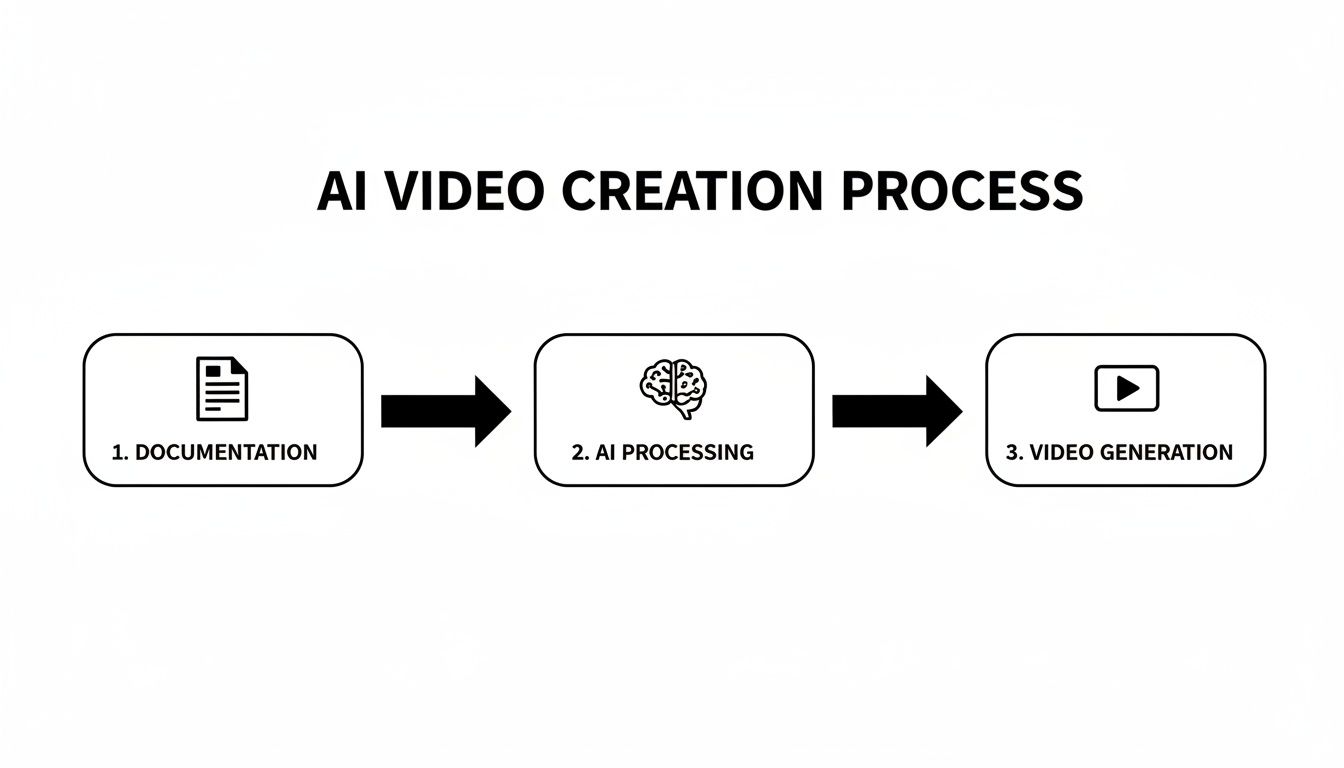
This visual shows just how simple and powerful the process becomes. You can turn existing documents into engaging video content with just a few steps.
The key insight here is how radically this simplifies video production. What used to be a complex, multi-stage workflow is now reduced to a few straightforward actions.
Connecting Seamlessly with Your Learning Management System
For most L&D departments, the Learning Management System (LMS) is the central nervous system of their entire training operation. It’s where employees find courses, track their progress, and manage their development. Any new video training platform must be able to communicate flawlessly with your LMS.
This is where standards like SCORM (Sharable Content Object Reference Model) become critical. A SCORM-compliant platform like Colossyan lets you create your video content, then export it as a neat package that can be instantly uploaded into your LMS.
This makes life easier for everyone involved:
For Admins: Uploading content becomes simple and standardized, wiping out technical headaches and compatibility issues.
For Learners: Videos appear natively within the familiar LMS interface, and their progress and quiz results are automatically tracked and recorded.
That direct line of communication means your video content becomes a natural part of your established training programs—not a separate, siloed resource that employees have to go hunting for.
Automating Workflows with API and HRIS Integrations
But true integration goes beyond just delivering content. The most advanced video platforms offer robust API (Application Programming Interface) access, which opens up a whole world of automation possibilities. Think of an API as a bridge that allows different software systems to talk to each other and share data automatically.
Imagine connecting your video training software to your Human Resource Information System (HRIS). When a new employee is added to the HRIS, a personalized welcome video could be automatically generated and assigned to them. This creates a timely, custom onboarding experience with zero manual effort from your team.
Integration is about more than just convenience. It’s about building an intelligent, automated learning ecosystem that responds in real-time to the needs of your organization and its people.
For instance, Colossyan's API allows for video personalization at a massive scale. You can create customized training modules for different roles, departments, or regions automatically. This level of automation frees up your team to focus on strategic initiatives instead of repetitive administrative tasks, fundamentally changing how you scale your training efforts.
Ensuring Secure and Simple Access with SSO
In any enterprise environment, managing dozens of different logins is not only a headache for employees but also a significant security risk. This is why Single Sign-On (SSO) support is a non-negotiable feature for any new software.
SSO allows your team members to log in to the video platform using their existing company credentials, like their Microsoft or Google account. This is usually managed through a protocol called SAML (Security Assertion Markup Language).
Putting SSO in place brings two huge benefits:
Enhanced Security: It centralizes access control with your IT department, making it far easier to manage permissions and revoke access when an employee leaves the company.
Frictionless User Experience: Employees don't have to remember yet another password. This removes a common barrier to adoption and encourages people to actually use the platform more often.
By fitting neatly into your existing security and IT framework, the right video training software proves it’s built for the enterprise—improving your workflow without ever compromising on safety.
Building the Business Case for Video Training Software
Getting executive buy-in for new technology requires speaking the language of the C-suite: return on investment (ROI). The argument isn't about buying another tool; it's about making a strategic investment that drives efficiency, cuts costs, and fuels growth. You have to connect the dots between the software’s features and the concrete, measurable financial benefits leadership cares about.
Quantifying the Return on Investment
The most persuasive arguments are always backed by hard numbers. Here's how to build your case by focusing on how video training software leverages your existing resources to create value.
Slash Training and Travel Costs: For any company with distributed teams, in-person training is a massive expense. Video-based training completely wipes these costs off the board, allowing you to reach every employee without booking a single flight or hotel.
Cut Instructor and Production Expenses: Instead of hiring external trainers or video crews, AI-powered platforms like Colossyan empower your internal subject matter experts to create polished, avatar-led videos in-house. This transforms your existing knowledge into scalable training assets, dramatically shrinking your production budget.
Shrink Time-to-Competency: Every day a new hire isn't fully productive is a day of lost value. Self-paced video onboarding lets them get up to speed on their own schedule, meaning they start contributing to business goals much faster. That’s a direct boost to departmental productivity and revenue.
A Tangible Example of AI Video Savings
Let's make this real. Imagine your company runs a mandatory, week-long compliance workshop for 100 new hires every year. The bill for instructors, travel, and the lost productivity of having those employees off the floor for a full week is staggering.
Now, what if you converted that workshop into a self-paced video series using AI avatars? Your subject matter expert provides the script, and your L&D team generates the entire course in just a few days. The savings are immediate and massive. Instructor fees, travel costs, and venue rentals are all gone. Even better, new hires can complete the training around their actual work, minimizing downtime.
By transforming a single high-cost, in-person event into a scalable digital asset, you not only save money but also create a reusable training resource. This resource can be updated instantly and deployed to thousands of employees at a near-zero marginal cost.
Aligning with Market Trends
A truly solid business case goes beyond internal ROI. It also shows that this investment is a strategic necessity to stay competitive. The move to digital-first training isn’t just a trend; it's a massive industry-wide shift.
The video training software market has seen explosive growth. The sector was valued at USD 16.14 billion in 2025 and is projected to hit USD 50.63 billion by 2033, growing at a compound annual rate of 17.74%. This boom is largely driven by the universal adoption of remote and hybrid work, which demands scalable training platforms that can actually reach distributed teams. You can dive deeper into this rapid market expansion and its drivers.
When you present this data to stakeholders, you're doing more than just justifying a purchase. You're framing the adoption of video training software as a forward-thinking move that keeps the organization in sync with the modern workforce. It shows you’re not just buying a tool—you’re investing in a future-proof learning infrastructure that’s essential for attracting and keeping top talent.
Ensuring Your Training Content Is Secure and Compliant
For any large organization—especially in regulated fields like finance or healthcare—security isn't just a nice-to-have. It’s the bedrock of your operations. When you bring in new video training software, you're handling sensitive company data, from internal processes to employee details.
Bringing innovation to your training programs should never come at the expense of security. That's why any enterprise-grade platform worth its salt is built with serious security protocols from the ground up. This gives your IT and compliance teams the peace of mind they need to get behind your L&D initiatives.
Meeting Enterprise-Grade Security Standards
To even be considered for an enterprise tech stack, a platform has to prove it can keep your data locked down. This means sticking to internationally recognized standards that verify its security measures. Keep an eye out for certifications and frameworks that actually matter to your business.
Here are a few key security benchmarks to look for:
SOC 2 Compliance: This is a big one. It's a tough auditing process ensuring a service provider manages your data securely, protecting both your organization's interests and your clients' privacy.
GDPR Adherence: If you're a global company, General Data Protection Regulation (GDPR) compliance isn't optional. It dictates exactly how personal data must be handled.
SAML SSO: Single Sign-On (SSO) using SAML offers a secure and straightforward login process. It authenticates users through your own company's identity provider, keeping access control centralized and tight.
Platforms like Colossyan are designed with these standards at their core, providing the safeguards necessary to operate securely within a corporate environment.
Securing Mandatory Compliance Training
The need for secure video really clicks into high gear with mandatory compliance training. This area is exploding, particularly in sectors like healthcare, which is the fastest-growing vertical in video streaming with a projected 23.1% CAGR.
A secure video platform guarantees that sensitive compliance material—from new regulatory updates to internal policy changes—reaches only the eyes it's intended for. It also provides an auditable trail of who completed what, which is absolutely critical for meeting industry regulations.
Making sure your content follows all the legal rules is non-negotiable. Getting a handle on best practices for employee training incident reporting and compliance is a huge part of this. The right video training software helps you create, deliver, and track this training in a secure, verifiable way, turning a compliance headache into a smooth, manageable workflow.
Frequently Asked Questions
When you're looking at bringing in new video training software, it's natural for L&D and IT leaders to have some practical questions. You need to know how it will fit into your company, how quickly you can get going, and—most importantly—how to prove it was a smart investment.
Let's tackle some of the most common questions head-on.
How Does AI Video Training Software Scale With Our Organization?
Scalability isn't just about adding more users. It’s about keeping up with the speed of your business without your training quality or delivery time taking a hit. This is exactly where AI-powered platforms shine.
Think about the old way: more courses meant a direct, linear increase in work for your L&D team. AI tools completely break that cycle. With a platform like Colossyan, you can create one core training video and instantly translate it into over 80 languages. Just like that, you’ve deployed consistent training to your global teams without multiplying your production time by 80.
And when things change? Instead of a massive reshoot, you just edit a few lines of text and regenerate the video. This means your entire training library stays current with almost no effort. Your training capacity finally grows with the company, instead of holding it back.
What Is The Typical Implementation Time?
Moving to a new platform doesn't have to be a months-long headache. Modern, browser-based video training software is built for speed. Since there's nothing to install on-premise, your teams can jump in almost immediately.
Getting started usually just involves a few simple steps:
Setting up your account and adding your company's branding.
Plugging into your existing systems, like connecting to your LMS with SCORM or enabling SSO for secure login.
Onboarding your L&D team, which is surprisingly fast thanks to intuitive, slide-based editors that feel familiar from day one.
The whole point of these tools is to fit into your workflow, not blow it up. Most organizations go from purchase to producing their first real training video in a matter of days, not weeks.
This quick time-to-value means you start seeing a return on your investment right away.
How Do We Measure The ROI Of Video Training?
Proving the value of any new tool is absolutely critical. To measure the ROI on video training, you need to track concrete metrics that tie directly to business goals. It's not as fuzzy as you might think.
First, calculate the hard cost savings. Add up everything you're no longer spending on in-person training—travel, hotel rooms, venue rentals, and external instructor fees. That's your baseline.
Next, look at efficiency gains. Track how much you've cut down on production time and costs for creating and updating your training. Finally, measure the impact on your people. Are new hires getting up to speed faster? Are compliance quiz scores improving? You can track all of this right inside the software’s analytics dashboard, giving you clear data to show stakeholders.
Oops! Something went wrong while submitting the form.
example
Thank you - your video is on its way!
If you’d like to try out Colossyan and create a video yourself, just visit our website on your desktop and sign up for a free account in seconds. Until then, feel free to check out our examples.











.avif)





%20(1).avif)




.webp)
.webp)





