When you're writing a script for a video, remember this: your script is the strategic blueprint for the entire project. Seriously. A solid script is what clarifies your message, grabs your audience, and keeps the production process from going off the rails. It’s the single most important piece of the puzzle.
Why Your Script Is the Most Critical Production Asset
So many teams treat scripting like a chore—something to rush through before the "real" work of filming begins. I've seen it happen time and again, and honestly, that mindset misses the point completely. In the world of corporate video, especially for training and product demos, your script isn't just dialogue. It's the foundation for everything that follows.
A great script is often the only thing separating a video that hits its business goals from one that’s a total waste of time and budget. When you nail the wording, you create a clear path for the viewer, guiding them from confusion to understanding. That clarity is gold, whether you're trying to explain a dense compliance policy or show off a new software feature.
The Foundation of Efficient Production
Think of a finalized script as the single source of truth for your project. It locks in the story, defines the scene-by-scene flow, and dictates exactly what visuals you'll need. Getting this stuff locked down upfront is how you avoid those painful, costly changes and endless revision cycles later on.
Just picture the classic video workflow: reshoots, scheduling nightmares, location logistics. A seemingly small script change can throw a massive wrench into the whole operation. This is where modern AI video platforms completely change the game.
Your script is no longer just a document you hand off to a production crew. It becomes a direct input that you control, turning your text into a finished video in minutes, not weeks.
How Colossyan Amplifies a Great Script
Platforms like Colossyan Creator are built to take a strong script and execute it with incredible precision and scale. Because the script is the primary input, its quality directly translates to the quality of your final video.
Direct Control: You paste your text, and an AI avatar performs it. Every word, every pause, every sentence you write is exactly what appears on screen. This puts you in the driver's seat.
Rapid Iteration: Realize a line doesn't quite land right? Instead of the headache of booking another studio session, you just tweak the text in your script and regenerate the scene. Refining your message becomes incredibly fast and simple.
Effortless Scaling: A polished script can be instantly translated into over 80 languages or tweaked for different audiences. The core message stays the same, but the delivery is localized—a task that would be a logistical nightmare with traditional methods.
Ultimately, writing the script is where you make your most important strategic calls. When you treat it like the critical asset it is, you're setting yourself up to create content that actually delivers results and connects with your audience. Your words become your most powerful production tool.
Defining Your Video’s Mission Before You Write a Word
Jumping straight into writing a script without a clear plan is a recipe for disaster. It’s the fastest way to create a video that just doesn't land. Before you even think about that killer opening line, you need to lay some groundwork. This isn’t about adding bureaucracy to your process; it’s about making the actual writing part faster, easier, and way more effective.
Think of it as creating a simple but powerful "Script Brief." This brief becomes your North Star, a one-page guide that keeps every decision—from word choice to visuals—locked onto your main goal. It's the difference between a video that feels sharp and purposeful, and one that just… rambles.
Answering the Critical Questions First
Your brief needs to nail down the answers to a few fundamental questions. If your video has a business goal, getting these right is non-negotiable. It all starts with defining exactly who you're talking to and what you need from them.
Who is the specific audience? Are you talking to a new software engineer who’s already fluent in technical jargon, or are you explaining a safety protocol to a diverse warehouse team? The language, tone, and examples you’ll use for each are worlds apart.
What is the core message? If your viewer only remembers one thing from this video, what should it be? Force yourself to boil your message down to its absolute essence.
What should they do after watching? Should they take a quiz, click a link to a policy document, or book a meeting? A clear call to action is what turns passive viewing into an active step.
Answering these questions gives your video a clear mission. A script for that new engineer can be direct and technical. But the safety protocol script? That needs to be simple, crystal-clear, and maybe even localized for different languages to ensure everyone gets it.
A well-defined mission acts as a filter. For every scene or line you write, you can ask, "Does this directly support my core message and speak to my specific audience?" If the answer is no, it gets cut.
The Business of Scriptwriting
This upfront strategy reflects a huge shift in how we think about scripts. What used to be a purely creative document is now a critical business asset, designed for ROI. This trend is picking up speed fast; the market for screen and script software is projected to jump from $80.83 million in 2018 to a massive $235.87 million by 2026. This growth isn't coming from Hollywood—it's fueled by L&D teams, universities, and corporations who need to create targeted, effective content at scale. You can find more insights on this market shift over at DataIntellix.
This is where that little bit of planning becomes a massive time-saver, especially with a tool like Colossyan Creator. With a solid script brief, you can build your core video with full confidence that it’s strategically sound from the get-go.
How a Script Brief Powers Colossyan
The real magic of this planning hits home when you need to adapt your content. Let's say you've made a fantastic onboarding video for your US sales team. Awesome. But now you need a version for the UK team and another, slightly different one for customer support.
With traditional video, you'd be looking at new shoots, new actors, and a brand new budget. With Colossyan, that approved script brief becomes your reusable template.
Adapt for New Roles: Just duplicate the original script. Tweak the language and swap out the sales examples for ones that make sense for the support team. Done.
Localize with Confidence: Need that UK version? It’s easy to change terminology ("Q4 goals" to "end-of-year targets") and even switch to an AI avatar with a British accent for a more authentic feel.
Translate for Global Reach: That same core script can be automatically translated into over 80 languages, keeping your core message consistent while the delivery feels completely local.
This kind of agility is only possible because you did the strategic work first. Your script brief ensures every variation you create stays on-message and effective, making that initial planning effort pay off again and again.
Structuring Your Script for Engagement and Clarity
Once you've locked down your video's mission, it's time to build its skeleton. A solid structure is what turns a bunch of good ideas into a story that actually hooks people and keeps them watching. For most corporate and training videos, you can't go wrong with a classic three-act structure.
This simple framework—Hook, Core, and Close—is a reliable blueprint for organizing your thoughts. It’s a proven way to grab your audience's attention right away, deliver your main points in a logical flow, and leave them with a clear, memorable takeaway.
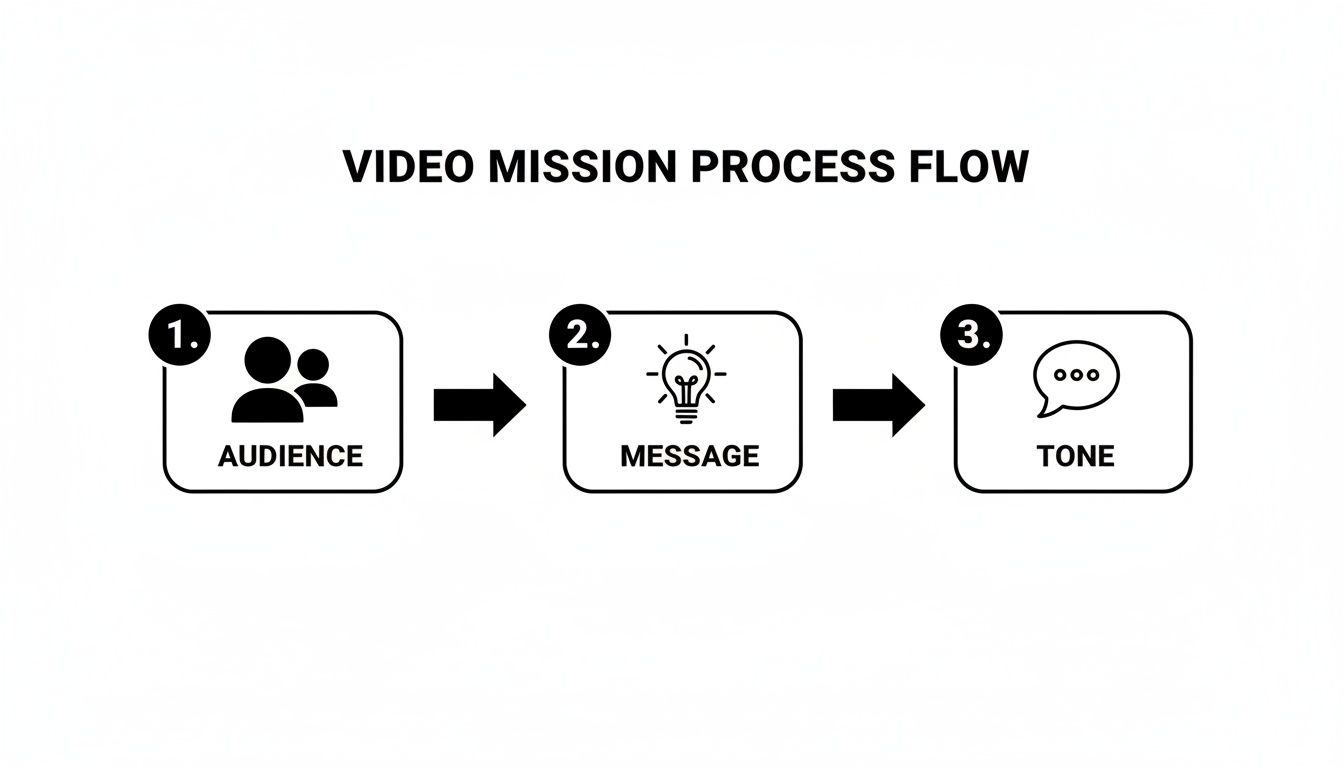
This simple process flow shows how the foundational elements of your mission directly shape the structure of your script.
It all starts with knowing your audience, nailing your message, and setting the right tone. Get those right, and the structure almost builds itself.
Crafting the Three-Part Narrative
Let's break down how this works in the real world. Each part has a very specific job to do.
The Hook: You have just a few seconds to earn their attention. Kick things off with a surprising statistic, a relatable problem they're facing, or a question that makes them lean in. You want them to think, "Yes, this is for me. I need to hear this."
The Core: This is where you deliver the goods. But don't just info-dump. Break your main message into 2-3 key points, giving each one its own space to breathe. Think of them as mini-chapters or distinct scenes.
The Close: Never let your video just trail off. End strong. Reiterate your single most important message and then give a crystal-clear call to action that tells the viewer exactly what to do next.
Thinking and Writing in Scenes
Here's a pro tip that will change how you write video scripts: stop thinking in paragraphs and start thinking in scenes. This is where the two-column A/V (Audio/Visual) script becomes your best friend. One column is for what's said (audio), and the other is for what's seen (visuals).
Laying out your script this way forces you to think visually from the start, making sure your words and images are always working together. It’s the easiest way to avoid the common trap of writing a script that’s just a wall of text. For a deeper dive, check out our guide on how to properly structure your video.
This scene-by-scene method is also why modern tools like Colossyan Creator feel so intuitive. The entire editor is built around this very concept, functioning like a slide deck where each "slide" is a scene.
This isn't a coincidence. When you write your script in a two-column format, scene by scene, you’re literally creating a direct blueprint for building your video in Colossyan. The jump from script to production becomes incredibly smooth.
Here’s a practical example of how you can set up a two-column script. This format makes it incredibly easy to map out your audio and visual elements for each scene, which is perfect for working with Colossyan Creator.
Two-Column Script Format Example for Training Video
Scene 1 – Hook
Visuals (On-Screen Action / Graphics) Animated title card: “Cybersecurity Basics.” Avatar appears on the left, smiling. On the right, a bold statistic appears: “95% of breaches are due to human error.”
Narration (AI Avatar Voice-Over) “Hi everyone. Did you know that 95% of all cybersecurity breaches are caused by human error? Today, we’re going to cover three simple habits that can help keep you safe.”
Scene 2 – Core Point 1
Visuals (On-Screen Action / Graphics) Icon of a strong password (key with a shield). Text overlay: “1. Create Strong Passwords.” Bullet points appear:
12+ characters
Mix of uppercase and lowercase letters
Symbols and numbers
Narration (AI Avatar Voice-Over) “First, let’s talk about passwords. A strong password is your first line of defense. It should be at least twelve characters long and include a mix of uppercase and lowercase letters, numbers, and symbols.”
Scene 3 – Core Point 2
Visuals (On-Screen Action / Graphics) Graphic of an email with a phishing hook icon. A red “X” appears over a suspicious link. Text overlay: “2. Spot Phishing Scams.”
Narration (AI Avatar Voice-Over) “Next up, phishing emails. Never click on links from unknown senders. Always check the sender’s address and hover over links to see the actual URL before clicking.”
Scene 4 – Close
Visuals (On-Screen Action / Graphics) Avatar moves to the center of the screen. A summary slide appears listing the three main points. A call-to-action button graphic appears: “Take the Quiz.”
Narration (AI Avatar Voice-Over) “So remember: use strong passwords, spot phishing attempts, and always lock your screen. Now, click the link below to take a short quiz and test your knowledge.”
This simple layout allows you to copy the narration for Scene 1 directly into the script box for your first slide in Colossyan, then add the visuals you've already planned. It makes the production process fast, organized, and almost foolproof.
Writing for the Ear, Not the Eye
A script is meant to be spoken, not read. This is non-negotiable. What looks good on paper can sound clunky, formal, and totally unnatural when said out loud.
Keep sentences short. They’re easier for the listener to follow and give the narration a better rhythm.
Use simple language. Ditch the corporate jargon. Unless you're speaking to a highly specialized audience, keep it clear and direct.
Read it aloud. This is the acid test. If you stumble over a sentence or it just sounds robotic, rewrite it until it flows naturally.
This push for clarity and brevity isn't just a suggestion; it's driven by how people consume content today. A whopping 71% of marketers agree that videos between 30 seconds and 2 minutes perform best. Even more telling for training teams, 63% of consumers prefer these shorter videos when learning about products.
By pairing a classic three-act structure with a scene-based, conversational writing style, you’ll create a script that not only connects with your audience but is also perfectly built for the speed and efficiency of AI video tools.
Writing Scripts Optimized for AI Avatars
When you're writing a script for an AI avatar, it helps to think a little differently. You’re not just writing dialogue; you’re basically directing a digital performer. All the subtle cues and inflections a human actor adds naturally? You get to build those directly into your script.
This isn't a drawback—it's actually an opportunity for incredible precision. With the right approach, you can guide the AI’s delivery to sound remarkably human and make sure your message lands exactly the way you want. It's all about learning how to "speak the language" of the AI to get a fantastic performance.
Directing Delivery with Punctuation
Punctuation is one of the most powerful, yet overlooked, tools you have. In Colossyan, punctuation doesn’t just frame sentences; it directly controls the pacing and tone of the avatar's narration. Getting this right is the secret to avoiding that flat, robotic sound.
Think of your punctuation marks as director's notes embedded right in the script.
Commas (,) create a short, natural pause. They're perfect for breaking up longer sentences and giving the avatar a moment to "breathe," just like a real person would.
Periods (.) signal a full stop. The pause is slightly longer, giving a clear end to a thought or idea.
Ellipses (...) are great for creating a more dramatic or thoughtful pause. Use them to build a little anticipation before you drop a key piece of information.
For example, a line like "This is important so listen carefully" can feel a bit rushed. But rewriting it as "This is important... so listen carefully" completely changes the delivery, adding a sense of weight and emphasis.
By strategically placing commas and periods, you are essentially choreographing the rhythm of the speech. You can slow things down for complex topics to help with comprehension or pick up the pace for more energetic sections.
Mastering Pronunciation and Jargon
Every industry has its own language filled with acronyms, jargon, and unique product names. A human presenter might occasionally trip over these, but an AI avatar will say exactly what's written. This is where phonetic spelling becomes your best friend.
If you have a unique company name like "AcmeCorp" or a tricky technical term, the AI might not nail the pronunciation on the first go. Instead of just hoping for the best, you can give it a little guidance.
Inside the Colossyan editor, you can spell out words phonetically to guarantee perfect pronunciation every single time. Let's say the AI is mispronouncing "Colossyan." You could experiment by spelling it "Koh-loss-ee-an" in the script to get the inflection just right. This level of control is crucial for maintaining brand consistency and technical accuracy in your videos.
Building Interactive Video Experiences
A script for an AI-powered video doesn't have to be a one-way street. Modern platforms let you build interactivity right in, transforming a passive viewing session into an active learning experience. This is where you can get really creative.
When you structure your script for interactivity, you're planning for audience participation from the get-go.
In-Video Quizzes: Write questions directly into your script. After explaining a key concept, your avatar could say, "Now, let's test your knowledge. Which of the following is the best example of a secure password?" You can then display multiple-choice options on the screen for the viewer to select.
Branching Scenarios: This is where things get really interesting. You can design personalized learning paths by writing different script segments that are triggered by a viewer's choice. For instance: "If you're in sales, click here. If you're in support, click here." Each option leads to a unique scene with content tailored to that audience.
This approach is a game-changer for engagement and knowledge retention because the viewer becomes a participant, not just an observer. To take this even further, you can learn how to write a video script efficiently with AI to streamline your entire development process.
Writing for AI avatars is a skill that blends creative writing with technical precision. You're part writer, part director, and part instructional designer. By using simple tools like punctuation, phonetic spelling, and interactive prompts, you can guide your digital presenter to deliver a flawless, engaging performance every time. For those looking to really dig in, our article on getting the most from an AI script generator offers even more tips.
Turning Your Existing Content Into Video Scripts
Starting a video script doesn't always have to mean staring at a blank page. The argument for AI video production isn't just about creating new content faster; it's about unlocking the value trapped in the assets you already own. Your organization is sitting on a goldmine of untapped material—PowerPoint decks, PDF handbooks, and internal wikis filled with expert knowledge.
The problem? They're static. The argument for leveraging these assets is clear: repurposing is the ultimate efficiency hack. Your role shifts from creator to curator, breathing new life into proven content and getting more ROI from work you've already completed.
Mining Your Existing Assets for Scripts
Think about that slide deck your subject matter expert just presented. The presenter notes are a perfect first draft for a narration script. They already contain the conversational explanations and key details. With traditional video, you'd still face a long production cycle. But with AI tools, this existing content becomes direct input.
PDFs and Whitepapers: Pull out the main takeaways and turn dense paragraphs into spoken lines. You can distill key chapters into concise video segments.
Internal Wikis and Knowledge Bases: Transform step-by-step process documents into clear how-to video guides. Each step becomes a scene with corresponding on-screen action.
Audio and Podcast Recordings: Have expert interviews or webinars already recorded? Just transcribe the audio to create a ready-made script. For a deeper dive, a good podcast repurposing guide can offer more ideas on turning audio into engaging videos.
This approach not only saves time but also guarantees your video content is perfectly aligned with your established documentation.
Automating the Heavy Lifting with Colossyan
This is where the argument for using a platform like Colossyan becomes undeniable. It's built to bridge the gap between your static documents and dynamic video. Instead of manually copying and pasting, modern tools automate the most tedious parts of this process.
By importing your existing materials directly, you shift your role from a content creator to a content director. The AI does the initial assembly, and you provide the final creative polish and strategic oversight.
Imagine this workflow: you upload a 50-slide PowerPoint filled with text and data. Instead of rebuilding it piece by piece, Colossyan can import the file and automatically create a 50-scene video project. The text from each slide lands in the script editor, and the slide itself becomes the visual background.
Your starting point is a fully formed draft video, not just a document. This completely changes the speed and scale at which you can produce content. Our guide on how to convert an article to video using AI explores this concept in more detail.
Scaling Globally with Repurposed Scripts
Once you have a script refined from your source material, the potential for scaling is massive. That single, approved script—originally pulled from a domestic training manual—can be auto-translated into over 80 languages with just a few clicks. The AI avatar will then deliver the narration in a native-sounding voice, giving you global reach with minimal extra effort.
This isn't just a "nice-to-have"; it's a direct response to a growing need. The global market for screen and script writing software, valued at $80.83 million in 2018, is projected to hit $235.87 million by 2026. This 14.4% compound annual growth rate is driven by the demand for scalable content tools—especially cloud-based platforms that make it easy for enterprise teams to turn documents into videos.
By connecting your existing content library to an AI video platform, you build a powerful, efficient, and endlessly scalable production engine.
Answering Your Top Scriptwriting Questions
Even the most well-thought-out plan hits a few snags. When you're in the trenches writing a script, practical questions always pop up. Let's tackle some of the most common concerns we see teams run into. Getting these sorted will help you sidestep common roadblocks and really dial in your process.
How Long Should a Script for a Training Video Be?
Keep it short and sweet for the biggest impact. For the vast majority of corporate training and how-to videos, you should be aiming for a final video length between two and five minutes.
What does that look like on the page? Based on an average speaking pace of about 150 words per minute, you're looking at a script of roughly 300-750 words.
If you're dealing with a really dense topic, fight the temptation to cram it all into one epic video. It’s far more effective to break that content into a series of shorter, laser-focused micro-learning videos. This approach does wonders for learner engagement and actually helps people remember what they watched.
This is where a tool like Colossyan really shines. You can easily assemble these shorter, scripted modules into a complete learning path, serving up digestible chunks of information one at a time.
What's the Biggest Mistake People Make When Writing a Video Script?
The most common mistake, by a long shot, is writing for the page instead of for the ear. Too many scripts read like a formal business document or a whitepaper. They're often bogged down with corporate jargon, convoluted sentences, and a tone that's just plain stiff.
A video script has to be conversational. It needs to sound natural.
Use simple, direct language. And make this your golden rule: read every single line out loud. If it doesn't sound like something a real person would actually say, it's time for a rewrite.
Another huge misstep is simply forgetting about the visuals. A script isn't just dialogue—it's the full blueprint for what's happening on screen. Weaving clear visual cues and descriptions right into your script is critical. It ensures your narration and on-screen action are working together to tell one clear, powerful story.
Can I Just Use AI to Write the Entire Script for Me?
This is a tempting shortcut, but for high-stakes corporate content, it’s a mistake to rely on generative AI for the final product. While it's a fantastic assistant for brainstorming and whipping up a first draft, AI often misses the deep subject matter expertise, the subtle nuances of your brand voice, and the specific learning goals that only a human expert can bring.
The best approach is a human-machine partnership. Here’s a workflow that works:
Use AI for the Rough Draft: Let a tool like ChatGPT get the initial ideas down and structure a basic outline. It’s great for overcoming that blank-page paralysis.
Refine with Human Experts: Hand that draft over to your internal subject matter experts. They’ll refine, edit, and fact-check it to guarantee total accuracy and alignment with your objectives.
Produce with Production AI: Once your script is polished and perfect, that’s when you bring in a production AI like Colossyan. You’re using AI for what it does best—execution, not strategy.
How Do I Manage Script Feedback and Revisions Effectively?
A structured review process is absolutely non-negotiable. Before you even think about production, share your script with every key stakeholder. That means subject matter experts, department heads, and yes, even your legal or compliance teams.
Remember, it is infinitely cheaper, faster, and easier to edit a text document than it is to re-record or recreate a video.
Use a collaborative tool like Google Docs to keep all the feedback in one place and track every change. To avoid chaos, be direct about what you need from each reviewer. For instance, you might ask one person to "please check only for technical accuracy."
Once you have that final, signed-off script, you can move into production with confidence. And when it's time to review the video itself, tools like Colossyan have built-in collaboration features to make that final feedback loop just as smooth.
Ready to turn your perfectly polished scripts into professional-quality videos at scale? With Colossyan, you can transform text into engaging training videos with AI avatars in just minutes. Start creating more effective learning content today. Learn more at Colossyan.com.
Nikitas leads brand and content at Colossyan, shaping how knowledge is communicated, experienced, and scaled. He spends most of his time fighting unnecessary complexity and reminding people that clarity is not boring.
Networking and Relationship Building
Use this template to produce videos on best practices for relationship building at work.
Oops! Something went wrong while submitting the form.
example
Thank you - your video is on its way!
If you’d like to try out Colossyan and create a video yourself, just visit our website on your desktop and sign up for a free account in seconds. Until then, feel free to check out our examples.











.avif)





%20(1).avif)




.webp)
.webp)





