Text to animation AI tools convert written prompts into animated video clips. Three days ago, the highest-profile tool in this category disappeared. OpenAI shut down Sora on March 24, 2026, after the platform burned through roughly $15 million per day in inference costs, according to NBC News. That collapse, paired with Disney pulling out of a $1 billion investment deal (per CNN), leaves a gap in the market and a lot of creators looking for alternatives.
This guide tests nine text to animation AI generators that are still standing, still funded, and still shipping updates. If you need animated content for training, social media, or creative projects, start creating for free with Colossyan or read on for the full breakdown.
The Sora shutdown and what it means for text to animation AI
Sora's closure wasn't a surprise to anyone watching the numbers. According to TechCrunch, downloads collapsed from 3.3 million in November 2025 to 1.1 million by February 2026. The economics never worked: $15 million per day in compute costs against $2.1 million in total lifetime revenue.
What matters for anyone searching for a text to animation AI tool right now is the ripple effect. Sora was the default recommendation on Reddit, YouTube tutorials, and "best of" lists for months. Those recommendations are now dead links. The tools that remain fall into three tiers:
- Professional-grade generators (Runway Gen-4, Google Veo 3.1) that prioritize motion quality and cinematic output at premium prices.
- Speed-optimized generators (Pika 2.5, Kling 3.0) that trade some quality for faster output and lower cost, built for high-volume social content.
- Specialized tools (Colossyan, Animaker, InVideo, CapCut, DomoAI) that target specific use cases like corporate training, 2D animation, YouTube content, or style transfer.
The rest of this article reviews each one.
How these AI animation generators were evaluated
Every tool in this guide was assessed across six dimensions: output quality, animation style range, generation speed, free tier usability, clip length, and pricing transparency. Each dimension maps to a specific pain point that shows up repeatedly in creator communities and buyer reviews.
Output quality covers visual fidelity, motion smoothness, and consistency across frames. Does the animation hold together for the full clip, or do characters morph and backgrounds shift? Animation style range matters because "text to animation" searches skew toward non-realistic output, yet most tools default to photorealistic video. Generation speed ranges from 15 seconds (Pika) to 3+ minutes (Runway at high resolution).
Free tier usability asks what you actually get without paying: watermarks, resolution caps, generation limits, and export restrictions all factor in. Clip length evaluates the maximum generation per run and whether clips can be extended within the platform. Pricing transparency checks whether you can predict your monthly cost before committing. Credit-based pricing makes this harder than it should be on several platforms.
The 9 best text to animation AI tools in 2026
1. Runway Gen-4
Runway Gen-4 scores the highest on temporal consistency of any tool tested. Temporal consistency means characters maintain their appearance, clothing, and proportions across frames. On most AI animation generators, characters start drifting after 3 to 4 seconds. Runway holds for the full 5-second generation window, and extended clips stay coherent through 10+ seconds in most cases.
The motion control system is what separates Runway from the pack. You can specify camera movements, character trajectories, and scene transitions with text prompts alone. Gen-4.5 (currently in limited rollout) adds multi-shot consistency, though even the standard Gen-4 model handles single-scene animation better than any competitor tested.
The tradeoff is speed and cost. A single 5-second clip at 1080p takes 2 to 3 minutes to generate. The Standard plan starts at $15/month with 125 generation credits. Heavy users burn through credits fast, and the credit-to-cost math isn't immediately obvious.
Best for: Professional creators and studios that need the highest quality output and can absorb the higher cost and slower turnaround.
Pricing: Free tier (limited credits, watermarked), Standard $15/month, Pro $35/month, Unlimited $95/month.

Runway Gen-4's character consistency across multiple scenes. The same character maintains appearance, clothing, and proportions across different shots. Source: runwayml.com.
2. Pika 2.5
If speed is the only variable that matters, Pika 2.5 wins. A standard generation completes in 15 to 30 seconds, which is 3 to 5 times faster than Runway or Kling at comparable settings. For social media teams producing 10+ clips per day, that speed difference compounds into hours saved per week.
Pika 2.5 leans toward stylized animation rather than photorealism. That's actually an advantage for text to animation use cases, where users typically want illustrated or cartoon output rather than video that looks like footage from a camera. The style control has improved significantly from version 2.0, with better handling of character proportions and more consistent background rendering.
The quality ceiling is lower than Runway or Veo. Complex scenes with multiple characters sometimes produce artifacts, and fine details like hands and text within the animation remain unreliable. For quick social clips and animated explainers, though, the speed-to-quality ratio is hard to beat.
Best for: Social media creators and marketing teams that need volume over perfection.
Pricing: Free tier (watermarked), Basic $8/month (annual), Pro $28/month (annual), Fancy $76/month (annual).
3. Kling 3.0
If you're producing animation at volume and Runway's pricing makes you wince, Kling 3.0 is the comparison to run. Built by Chinese tech company Kuaishou, it produces output roughly 80% as good as Runway Gen-4 at approximately 40% less cost per second of generated video.
The standout feature is physics-aware generation. Kling uses what Kuaishou calls "Spatial-Temporal Attention," a mechanism that mimics gravity, fluid dynamics, and inertia in generated clips. Drop an object in your prompt and it falls correctly. Pour liquid and it behaves like liquid. This makes Kling particularly strong for product demonstrations and explainer animations where physical accuracy sells credibility.
Lip-sync quality also leads the field. If your animation includes characters speaking, Kling handles mouth movements and timing better than any other generator tested. Narrative consistency for multi-clip projects is strong, though not quite at Runway Gen-4.5 levels. The free tier offers limited daily generations, and standard plan pricing varies by region but typically runs 30-40% below Runway equivalent tiers.
4. Google Veo 3.1
The strongest option for cinematic quality among the tools tested. Google Veo 3.1 outputs 4K video, handles long-duration clips better than any competitor, and demonstrates the best prompt adherence tested. If you describe a specific scene with lighting conditions, camera angles, and character actions, Veo delivers closer to what you described than any other tool.
After Sora's exit, Google is positioned as what TechCrunch called "essentially the only player with scale" in the premium AI video generation space. Google's infrastructure advantage is real: its compute capacity means generation times stay reasonable even at 4K resolution.
The catch is access. Veo 3.1 remains in limited availability through Google's AI tools ecosystem. There's no standalone Veo app you can sign up for today like Runway or Pika. Enterprise access is available, and the model is accessible through Google's API for developers. For individual creators, this limits practical usability despite the technical superiority.
Best for: Enterprise production teams with API integration capabilities and high quality requirements.
Pricing: Limited access program. Enterprise pricing available on request. API pricing follows Google Cloud's per-request model.
5. Colossyan
Most text to animation AI tools solve a creative problem: how to turn an idea into a visual clip. They don't solve the corporate training problem, which is different. Training teams need animated content that exports to an LMS, includes interactive elements like quizzes and branching scenarios, supports 70+ languages out of the box, and can be updated when a process changes without rebuilding from scratch.
Colossyan is the only platform in this list built for that workflow. It's an AI Platform for Training and Enablement, not a general-purpose animation generator. The distinction matters because the output isn't just a video file. It's a structured learning module with AI avatars that present content, interactive checkpoints that test comprehension, and SCORM/xAPI packaging that plugs directly into your LMS.
The animation style is presenter-led rather than prompt-based scene generation. You write a script, choose an avatar, and the platform produces a video with natural speech and lip-sync in any of 70+ languages. For compliance training, onboarding, and product education, this format consistently outperforms text documents and slide decks on completion rates.
Colossyan won't generate a flying dragon or a cinematic space battle. It's purpose-built for the kind of animation that L&D teams, HR departments, and training managers need every week. Organizations like Paramount, Cisco, and Johnson & Johnson use it to create training videos at scale. The team is also rolling out collective access to multiple text-to-video models within the platform, which will expand the range of visual styles available without leaving the training workflow.
Best for: Corporate training, onboarding, compliance content, and any team that needs animated learning modules with LMS integration.
Pricing: 14-day free trial. Starter from $27/month. Enterprise plans with custom avatars, SSO, and priority support. See full pricing.
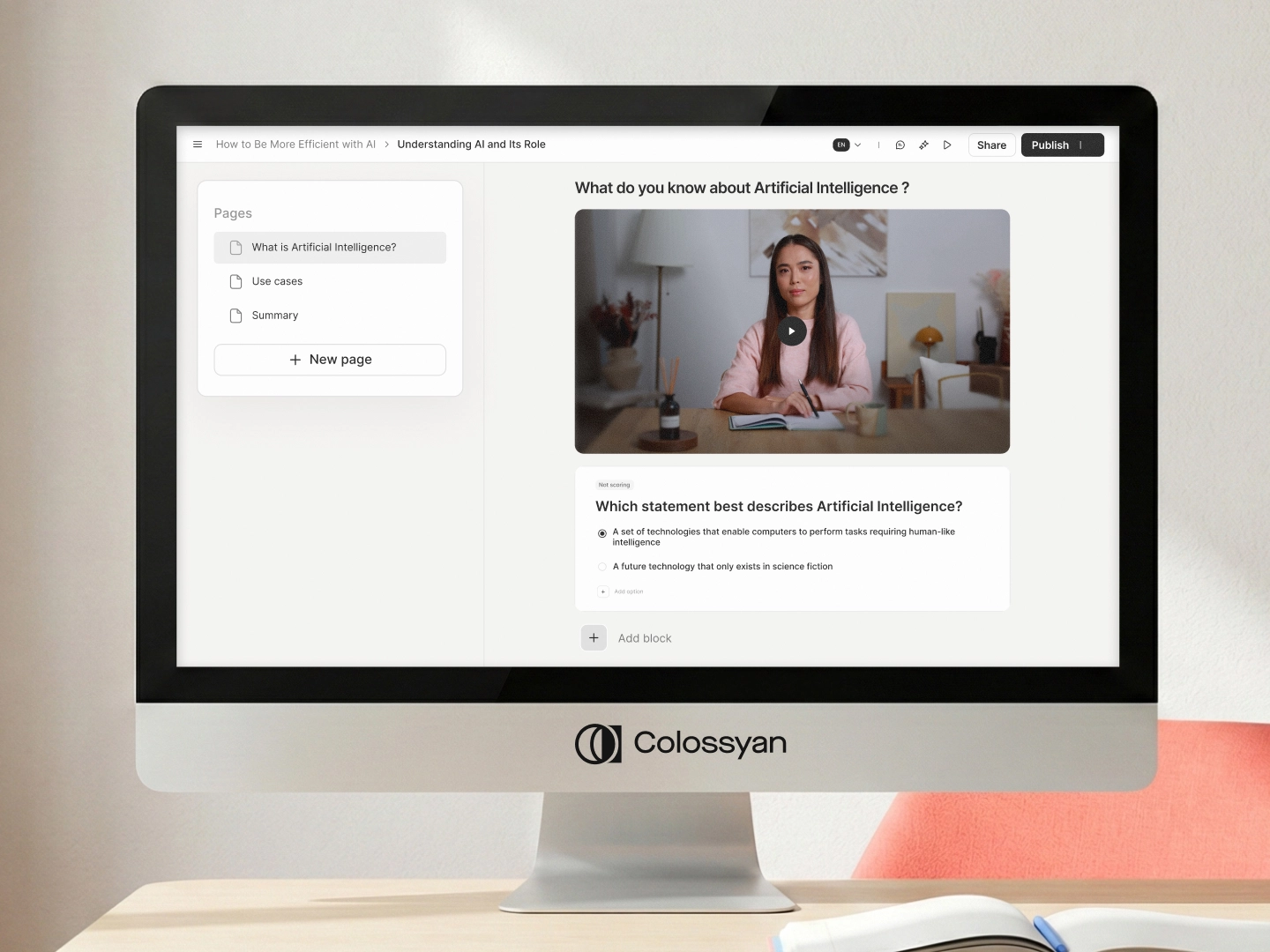
Colossyan Learn: course authoring with AI avatar videos, page structure, and built-in quizzes in one editor. Source: Colossyan product.
6. CapCut
Zero dollars. No watermarks. 1080p export. That's the CapCut pitch, and it's accurate. Owned by ByteDance (TikTok's parent company), CapCut is the default answer to "what's the best free AI animation generator?" because nothing else comes close on price.
The AI generation capabilities are more limited than dedicated tools like Runway or Pika. You won't get the same motion quality or prompt adherence. What you get is a surprisingly capable editor with AI generation bolted on, stock footage, music, effects, and templates that cover most social media formats.
Export options cover all major formats and aspect ratios. The AI generation features are improving with each update, though they remain a step behind the paid-first platforms on raw output quality. A Pro plan exists for premium stock assets and advanced AI features, but most users won't need it.
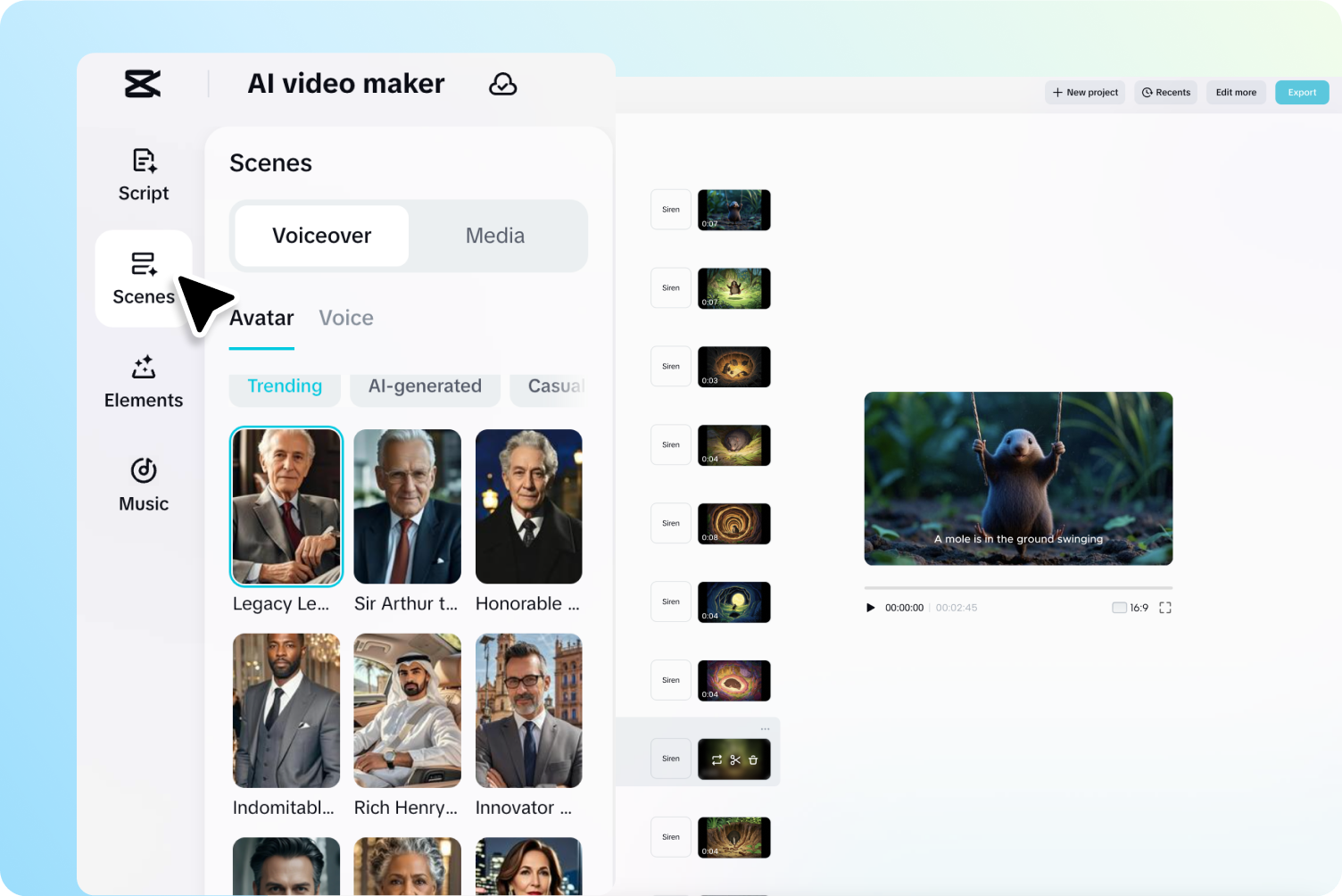
CapCut's AI video maker: scenes panel, avatar selection, and video preview in one editor. Free with no watermarks. Source: capcut.com.
7. Animaker
If you want 2D animated characters rather than photorealistic or stylized AI video, Animaker occupies a different category than most tools on this list. It's a template-driven animation platform where you select pre-built character models, backgrounds, and props, then arrange them into scenes with drag-and-drop controls. The AI component handles transitions, lip-sync to voiceover, and auto-layout.
This approach produces a different kind of output. Animaker animations look like the explainer videos you see on SaaS product pages and YouTube tutorials. They're clean, branded, and predictable. You won't get the creative surprise that prompt-based generators deliver, but you also won't get the inconsistency. Every frame looks exactly like the template you chose.
The free tier includes watermarks and limits exports to lower resolution. Paid plans start at $10/month for Basic (billed annually) and remove restrictions, with Starter at $19/month and Pro at $49/month. The template library is extensive, covering business, education, healthcare, and marketing categories.
Best for: Marketing teams and educators who need consistent, branded 2D animated explainer videos without prompt engineering.
Pricing: Free (watermarked), Basic $10/month (annual), Starter $19/month (annual), Pro $49/month (annual).
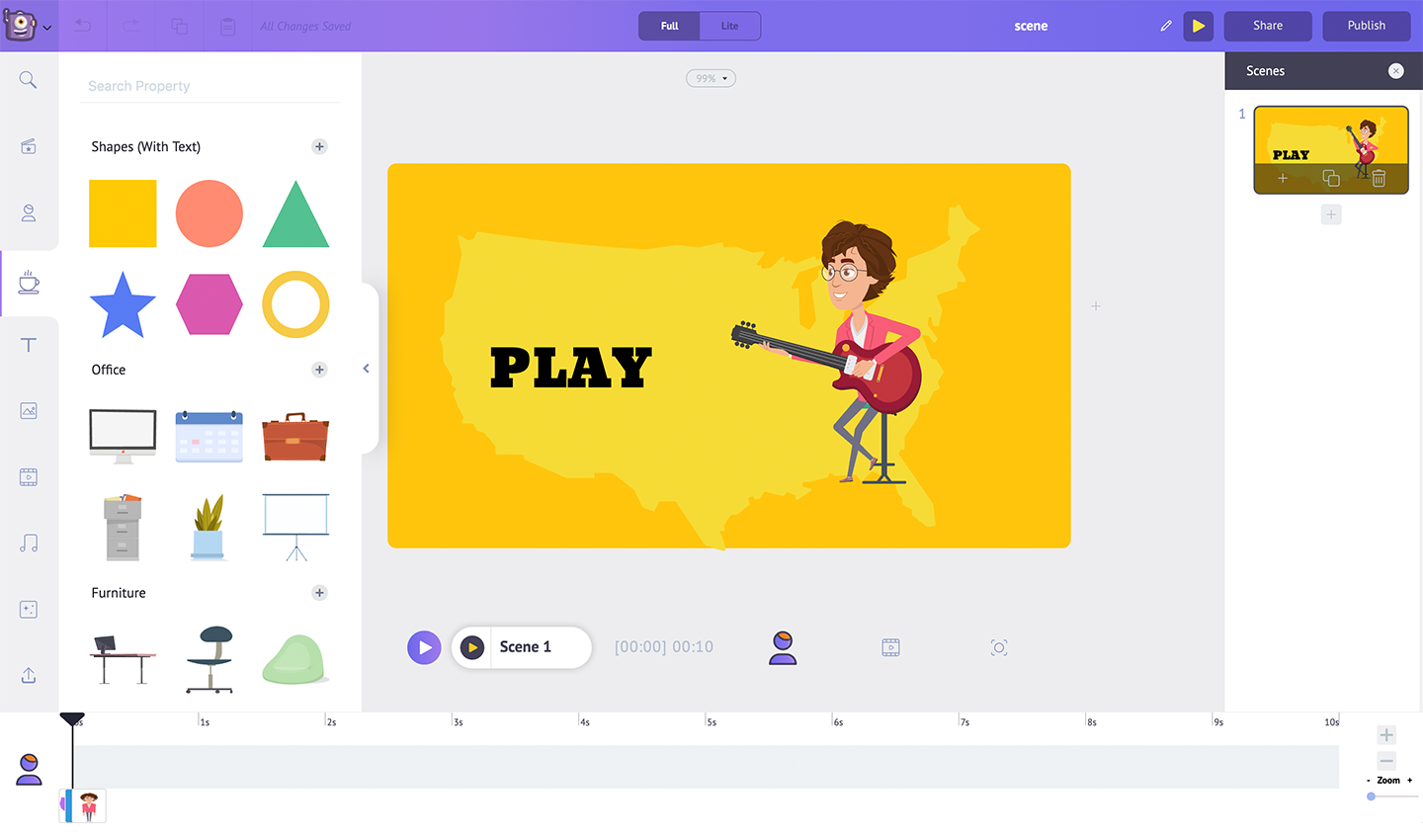
Animaker's drag-and-drop editor. Characters, backgrounds, and props are pre-built templates arranged into scenes. Source: animaker.com/press.
8. InVideo
InVideo positions itself against YouTube creators. If your primary output is 3 to 10 minute explainer videos, product reviews, or educational content for YouTube, InVideo's text-to-video workflow starts with a script and builds the full video around it. You type a topic or paste a script, and the AI assembles footage, transitions, text overlays, and background music into a complete edit.
The comparison to Runway or Pika isn't quite fair because InVideo isn't generating animation frame-by-frame. InVideo assembles and edits existing assets (stock footage, motion graphics, text animations) using AI to handle the editorial decisions. The output looks more like a produced video than a raw AI generation. For YouTube content, that's often a better result.
InVideo AI (the text-to-video feature) is free to use with watermarks. The Plus plan at $25/month removes watermarks and adds premium stock access. Export quality tops out at 1080p on paid plans.
Best for: YouTube creators, content marketers, and anyone building long-form video content from scripts.
Pricing: Free (watermarked), Plus $25/month, Max $60/month.
9. DomoAI
At $9.99/month for the Basic plan, DomoAI is the cheapest paid entry point on this list. It's also the most specialized. The tool focuses on style transfer: feed it existing video footage or a text prompt and it converts the output into anime, pixel art, cartoon, or illustrated styles.
Where Runway and Pika produce output that tends toward a "default AI look," DomoAI's anime and cartoon conversions are genuinely stylized. The pixel art mode is particularly strong for game-related content and retro-aesthetic social posts. Text-to-animation generation quality is decent but trails Pika and Kling on motion smoothness. The free tier allows limited daily generations with watermarks. Standard ($27.99/month) and Pro ($69.99/month) tiers add resolution and speed.
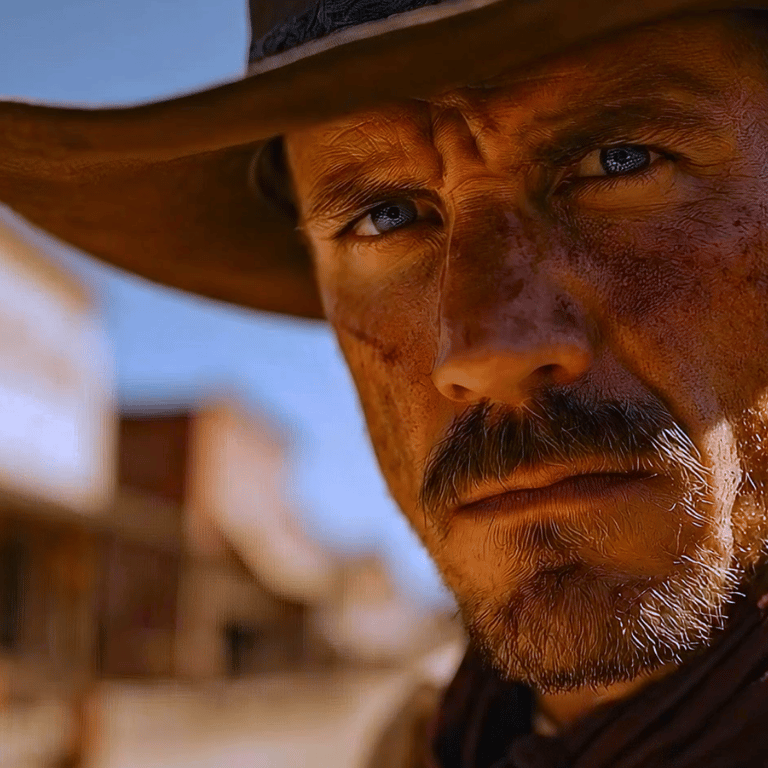
DomoAI style transfer output. The tool converts text prompts or existing footage into stylized formats including cinematic, anime, and pixel art. Source: domoai.app.
Quick comparison: AI text to animation tools
Best free text to animation AI tools
The phrase "free AI animation generator" appears in thousands of monthly searches. Here's what "free" actually gets you on each platform, because the gap between marketing claims and usable output is wide.
CapCut is the only tool that offers a genuinely free experience with no watermarks, 1080p export, and access to core AI generation features. The catch is that CapCut's AI generation is less advanced than dedicated platforms. For social media clips, it's more than sufficient.
Pika 2.5 offers a free tier with watermarked output at 720p resolution. The generation speed is fast (15 to 30 seconds), but the watermark placement makes free-tier output unusable for professional contexts. It works for testing the platform before committing to a paid plan.
Runway Gen-4 provides limited free generation credits. Output is watermarked on the free tier. Credit allotments are small enough that most users exhaust them within a single session of serious testing.
Animaker has a free plan that includes watermarks and limits export resolution to standard definition. The template library is partially accessible. It's useful for prototyping an animated explainer before committing to a paid plan.
InVideo allows free text-to-video generation with watermarked output. The AI-assembled videos are usable for internal review and concept testing, but watermarks block professional distribution.
Colossyan offers a 14-day free trial with access to the avatar library and video export without watermarks. The trial doesn't include SCORM export or custom avatars, but it's enough to test the platform's training video workflow.
The honest take: If you need free, watermark-free animated output today, CapCut is the only viable option. Every other platform uses free tiers as trial mechanisms, not as sustainable free products. Budget accordingly.
How to create animation from text: step by step
Creating a text to animation video follows a similar workflow across most platforms. Here's the general process, with notes on where tools differ.
Step 1: Write your prompt or script. For prompt-based tools (Runway, Pika, Kling, Veo, DomoAI), you write a description of the scene you want animated. Be specific about visual style, camera angle, character actions, and setting. For script-based tools (Colossyan, InVideo, Animaker), you write the narration or dialogue that drives the video.
Step 2: Choose your output style. Most tools default to a specific aesthetic. Runway defaults to photorealistic, Pika to stylized, DomoAI to anime/cartoon. Specify the style in your prompt or select it from the platform's options. This is where most first-time users get unexpected results, because "animation" means different things on different platforms.
Step 3: Set technical parameters. Resolution (720p, 1080p, 4K), aspect ratio (16:9, 9:16, 1:1), and clip duration. Higher settings increase generation time and credit consumption. Start with lower settings for testing, then upscale your final output.
Step 4: Generate and review. Hit generate and wait. Times range from 15 seconds (Pika) to 3+ minutes (Runway at high resolution). Review the output for consistency errors, artifacts, and adherence to your prompt. Expect to regenerate 2 to 3 times before getting a usable clip.
Step 5: Edit and extend. Most platforms include basic editing tools. Runway and Kling support clip extension (generating additional seconds from your existing clip's last frame). For longer animations, generate multiple clips and stitch them using the platform's editor or an external tool like CapCut or DaVinci Resolve.
Step 6: Export. Download in your target format and resolution. Check for watermarks if you're on a free tier. For training content built in Colossyan, export as SCORM or xAPI packages for direct LMS upload.
Common mistakes to avoid:
- Writing vague prompts ("make a cool animation") instead of specific scene descriptions
- Expecting a single generation to produce a usable 60-second video
- Choosing the wrong tool for your style (using Runway when you wanted cartoon, using DomoAI when you wanted realistic)
- Burning through credits on high-resolution test generations
Where Colossyan fits: AI animation for training and enablement
Text to animation AI tools fall into two categories that rarely overlap. Creative animation tools (Runway, Pika, Kling, Veo, DomoAI) generate short clips from visual prompts. Production tools (CapCut, InVideo, Animaker) assemble longer videos from templates and stock assets. Neither category solves the training content problem.
Training teams need something different. They need animated presenters who deliver structured content. They need interactive checkpoints like quizzes and branching scenarios embedded in the video. They need SCORM packaging for LMS delivery. They need the same content translated into dozens of languages without re-recording anything. And they need to update a process document and regenerate the video in minutes instead of weeks.
That's what Colossyan does. It's an AI video generator designed for learning and development teams, not for generating flying dragons or cinematic trailers.
The platform includes 200+ AI avatar presenters that speak naturally in 70+ languages with accurate lip-sync, or you can create a custom avatar from a 2-minute recording. Interactive elements (branching scenarios, quizzes, clickable hotspots) are built into the authoring workflow, not bolted on after the fact. Finished content exports as SCORM, xAPI, or cmi5 packages that drop directly into your LMS. Training teams typically produce a complete module in hours instead of the weeks required for traditional video production.
For a deeper look at how AI is changing training content production, see our guide on AI training video generators. If you're searching for a text to animation AI tool specifically for workplace learning, compliance training, onboarding, or customer education, explore Colossyan's training video maker or check pricing to see what fits your team size.







.avif)


%20(1).avif)




.webp)
.webp)





