


Blog
AI Instructional Videos: How To Create Training Content 10x Faster

AI instructional videos are training videos generated or enhanced using artificial intelligence. They can turn documents, slides, or scripts into engaging narrator-led videos - automatically adding voices, avatars, and interactivity - without filming or special equipment.
Why does speed matter? Because L&D teams need evergreen content, fast global rollouts, and near-instant course updates to meet compliance or business changes across languages.
Below is a practical workflow that L&D teams and instructional designers use to cut weeks off their video production timeline. I’ll reference actual benchmarks from the market, and I’ll share my opinion on where this technology actually makes a difference.
Why “10x faster” is now realistic
The numbers have changed. “10x faster” isn’t a stretch anymore if you look at how modern AI video workflows are built.
What this looks like with Colossyan
Colossyan is designed specifically for workplace learning and training at scale. L&D teams use it to turn documents, slide decks, and scripts into fully branded instructional videos—without filming, studios, or long production cycles.
Teams using Colossyan consistently report major time savings across the entire production pipeline, especially for compliance, onboarding, and global enablement content.
Key outcomes teams achieve with Colossyan include:
- Minutes instead of weeks to convert PPTs, PDFs, or docs into narrator-led training videos
- Mass updates at scale, where a single script or brand change can be applied across hundreds or thousands of videos
- Instant translation that duplicates an entire video into multiple languages while preserving timing, layout, and interactivity
- Faster review and iteration, thanks to templates, brand kits, and in-app comments
- Lower cost per video, eliminating actors, studios, reshoots, and manual localization
Colossyan supports:
- AI presenters and narration
- Branded templates and reusable layouts
- Interactive elements like quizzes and branching
- SCORM 1.2 and 2004 exports for LMS delivery
- Built-in analytics for engagement and assessment tracking
- Caption exports and accessibility support
Product overview and learning use cases:
Colossyan for Learning & Development – https://www.colossyan.com/learning-and-development
The takeaway:
When you combine document-to-video automation, reusable templates, brand consistency, interactivity, and instant localization in one platform, “10x faster” becomes a realistic baseline—not a marketing claim. For most internal training and compliance workflows, Colossyan removes the slowest steps entirely.
Synthesys
Synthesys talks about producing spokesperson-led training videos in about five minutes using their “Humatars.” They claim these videos are more engaging than text or slideshows and support full multi-language personalization. Their tips are simple: keep scripts short, visuals clean, and pick avatars that fit your context.
Coursebox
Coursebox states their users produce professional training content in minutes instead of months. They offer 500+ avatars, 100+ language support, SCORM exports, and quizzes, and are used by over 150,000 training providers.
Guidde
Guidde reports video documentation speed-ups of 11×, with users regularly making step-by-step guides in under 10 minutes and full instructive videos in under five. One enterprise cut repetitive questions and guide creation time by 40–60% with AI.
Practitioners on Reddit
Practitioners want mostly two things: convert slide decks to videos and update old content to keep it current. Their needs are clear - text-to-speech, branding, captioning, simple edits, and minimal tech load.
AI skills market growth
AI awareness itself is spreading fast. Job postings asking for AI skills jumped 108% in two years, and roles needing these skills pay 56% more.
Source:
Google AI Market Trends – https://grow.google/ai/
The takeaway:
If you combine document-to-video, templates, and brand automation with translation, you’ll reach “10x faster” for most internal and compliance video work. The market data backs this up.
The 10x faster workflow (end-to-end)
1) Centralize your inputs
First, gather your SOPs, PPTs, PDFs, SME notes, or LMS outlines.
At Colossyan, I use PPT/PDF Import to convert each slide into its own scene, and speaker notes become the spoken script automatically. If I have only a doc or a knowledge base article, I use Doc to video or Prompt to video, which builds a script and visuals from scratch.
2) Auto-generate the first cut
Let AI stack your content into scenes with narration and the right layouts.
I apply a Template for visual structure, and Brand Kits set fonts, colors, and logos across every scene - no manual restyling. I pick an avatar in the Script Box for a human presenter, or just narration.
3) Polish for clarity and engagement
Keep the script sharp and short - microlearning beats hour-long dumps. Match tone and outfit to the subject. Don’t crowd the screen.
Colossyan’s AI Assistant can rewrite or shorten the script, correct grammar, or clarify jargon. The Pronunciations feature lets me fix how product names or terms sound. I add gestures or pauses so avatars don’t feel robotic, and use Conversation Mode for role plays between avatars.
4) Add interactivity and practice
Regular video isn’t enough. Knowledge checks are needed for real learning.
Colossyan has Interactive elements like Multiple Choice Questions and Branching - learners make decisions and see outcomes. Analytics tells me who watched, their scores, and average performance.
5) Localize and scale globally
Translation is usually the slowest step, but not with modern AI.
Synthesia highlights instant translation and supports 140+ languages. Coursebox offers the same at scale.
At Colossyan, Instant Translation clones the whole video into a new language while keeping the timing and layout. I can tweak text for languages that need more space, assign native speaker voices, and export captions for accessibility.
6) Distribute via your LMS and measure outcomes
Export the video as SCORM 1.2 or 2004, set pass marks for quizzes, and upload to your LMS. Share via link or embed on a portal. Analytics shows engagement and quiz results. For compliance, this data proves completion.
Practical, real-world examples
Example 1: Convert a 30-slide onboarding deck to microlearning
- Use PPT Import; each slide becomes a scene
- Apply the onboarding Template and Brand Kit
- Add an avatar and fix acronym pronunciations
- Insert quizzes every 3–4 scenes and add Branching
- Export as SCORM and track pass rates
Example 2: Update legacy training to new branding
- Import old scripts or slides
- Apply new Templates and Brand Kits
- Change avatar outfits or clone a branded voice
- Reuse assets from the Content Library
- Export captions and SCORM for audits
Example 3: Global rollout in days, not months
- Create a master English version
- Use Instant Translation per language
- Assign native voices and adjust layouts
- Export SCORM files per language and monitor analytics by locale
Quality checklist for AI instructional videos
Script: Clear objectives, short content, natural pauses
Visuals: Grid alignment, consistent branding
Audio: Clear narration, correct pronunciations
Engagement: MCQs, branching, pacing checks
Accessibility: Captions, strong color contrast
Localization: Spot-check translations with local experts
Measuring ROI and proving impact
Track:
- Time from draft to final
- Cost saved per video
- Engagement and quiz performance
- Localization turnaround time
Enterprise-scale considerations
- Workspace Management for roles and access
- Foldering and drafts for content governance
- In-app comments for reviews
- Brand Kits, Templates, and Content Libraries for reuse
- SCORM, captions, and analytics for compliance
Step-by-step quick start (using Colossyan)
- Import PPT/PDF or doc
- Apply Template and Brand Kit
- Edit script, pronunciations, gestures
- Add quizzes or branching
- Preview and fine-tune timing
- Translate with Instant Translation
- Export SCORM and track analytics
With document-to-video conversion, branding, interactivity, instant localization, and analytics, L&D teams can deliver high-quality AI instructional videos in days - not weeks. The benchmarks and real workflows show that 10x faster production is achievable with the right tools and process.
How To Use AI To Edit Video Step-By-Step (Beginner Friendly)

Editing video used to mean hours of dragging clips on timelines, endless cuts, and tedious voiceovers. Now you can automate huge chunks of the work-and skip most of the technical headaches. If you’re new to this, here’s how to use AI to edit video, Step by Step. I’m also going to share honest opinions on which tools make the process easiest, what still needs human input, and where my company Colossyan fits for training or educational videos.
What “AI video editing” actually means in 2025
There’s not just one kind of “AI video editor.” The big guide from Zapier shows three major categories:
AI-enhanced editors: These are classic video editors with AI features. For example, Adobe Premiere’s Object Mask beta can automatically detect and mask people, pets, and objects across frames, so you don’t have to rotoscope anything by hand. Wondershare Filmora offers smart silence detection, background removal, and other AI power-ups-even if the old-school timeline still hides underneath.
Fully generative text-to-video: These tools create entire videos “from scratch” based on a prompt-think Runway’s Gen-4 model or Google Veo. You tell the tool what story or scene you want, and it tries to generate visuals, transitions, sound, and sometimes even dialogue. Note: Many of these export with watermarks or credit limits, and not every result hits the mark.
Productivity/repurposing: These AI tools let you edit video by text (not timeline), auto-create clips, or use templates. Descript is a good example-you cut the video by editing the transcript. Riverside’s Magic Clips break up podcasts into social-ready clips. In this category, Colossyan converts a document or PPT straight into a narrated training video with scenes and AI avatars.
Bottom line: For talking head or L&D content, script-first editors save the most time. For GoPro or action footage, auto cleanup and template-based tools work best. For social marketing explainer videos, prompt-to-video systems are usually faster than starting from scratch.
Step-by-Step: Edit your first AI video (beginner friendly)
Step 1 - define the goal, audience, and channel
Before you start, decide what you’re making and who it’s for.
Are you building new-hire security training, a 60-second TikTok, or a YouTube GoPro highlights reel? Your goal determines your workflow, video style, and what AI features matter.
If you want to hit SEO, think about intent-driven keywords like “automatic video editing,” “AI GoPro editor,” or “AI training video creator.”
Step 2 - choose the right AI workflow
If you have docs or slides: In Colossyan, you can upload a PDF, PPT, or Word doc. Each page or slide becomes a scene with narration; speaker notes import automatically.
If you have a long recorded talk: Riverside turns video into a transcript and lets you edit the video by editing text. It even supports 100+ languages at high accuracy. Gling auto-removes silences and filler words and can save literal days of editing.
If you need to create from a prompt: Invideo AI builds scripts, finds stock clips, voiceovers, and music. You edit with short commands (“delete scene 2,” “switch 16:9 to 9:16,” “translate to French”).
If you want instant, mobile-friendly editing: Captions by Mirage auto-adds zooms, transitions, B-roll, and music, and can even generate a photorealistic AI twin from just a selfie.
Step 3 - bring in your source content
Colossyan: Upload your training PDF or slide deck; every slide turns into a new video scene.
Riverside: Record or import footage up to 4K and high-quality audio.
Gling: Drag in your raw talking head video or tutorial.
Invideo and Renderforest: Paste scripts or prompts, select a visual style.
Step 4 - auto-clean the rough cut (save hours)
Let AI strip away filler words, long silences, and background noise.
With Gling, this removes “many hours to whole days” of work according to creators with over 6M combined subscribers. Riverside and Captions correct eye contact and clean up noise.
If you’re a beginner-always do this before making creative edits. It’s the single largest time-saver.
Step 5 - edit by text (no timeline stress)
You don’t need to drag around timeline clips. With tools like Descript, you edit the video by editing the transcript: Cut a line of text and that chunk disappears from the video.
Invideo’s “Magic Box” lets you issue chat-like commands: delete scenes, mute audio, change up voiceover and aspect ratio in seconds.
In Colossyan, I can rewrite my training script in the AI Assistant, insert pauses or animation markers, and update the whole video instantly. Zero timeline fiddling.
Step 6 - add voice, presenters, and correct pronunciations
Colossyan makes this straightforward. Assign a voice in any language (or clone your own voice for branding) and pick from our avatar library-or make an “Instant Avatar” from a short video of yourself.
This matters for training. If you need exact pronunciation (brand names, acronyms), add custom Pronunciations so the AI gets it right every time.
Scenario example: a compliance video where two avatars do a phishing awareness role-play, using a cloned company voice for intros and prompts.
Step 7 - style with templates, brand kit, B-roll, and music
Colossyan’s Templates + Brand Kits lock in your fonts/colors/logos for every video. Add on-screen shapes, upload product footage, insert stock clips, layer music.
Captions by Mirage will automatically insert B-roll, transitions, and zooms to fit the rhythm of TikToks or Shorts.
Step 8 - add captions and accessibility
Subtitles boost accessibility and global reach.
Captions, Riverside, and Colossyan all support auto-captions with high precision in dozens of languages. Export subtitles as SRT/VTT files if you need.
With Colossyan, use Pronunciations and Brand Kits to ensure names and technical terms stay correct on screen and in narration.
Step 9 - resize for each platform
Invideo can flip from 16:9 landscape to 9:16 vertical for TikTok or Instagram Reels by prompt.
In Colossyan, resize your canvas in the editor, and the grid helps align all elements cleanly for every aspect ratio.
Step 10 - localize and scale
Want your training in 10 languages? With Colossyan Instant Translation, you duplicate the video draft and everything-scripts, on-screen text, voices-gets auto-translated. You can assign multilingual presenters and voices. Each draft stays editable if you need to adjust layouts for longer/shorter text.
Step 11 - make it interactive and track results (training use case)
Colossyan lets you add MCQs (multiple-choice) or branching scenarios for interactive learning. Export the final video to SCORM format (1.2/2004) so your LMS will track completion and pass rates.
In Analytics, see how many learners started, finished, passed, and where they dropped off.
Step 12 - export and share
Colossyan supports MP4, audio-only, SCORM, or subtitles. Share via link, embed in your LMS, or download. Note that on free plans in Invideo, Renderforest, and some others, videos might carry watermarks or be limited in length/minutes.
Real-world beginner workflows (copy-and-adapt)
A: Turning a 10-page security policy into a training video
Upload to Colossyan as Doc/PDF, auto-generate scenes, add an avatar intro, sprinkle in MCQs, style with Brand Kit, and export SCORM for the LMS. Check analytics for pass rates.
B: Making Shorts and highlights from a Zoom presentation
Use Riverside to strip filler, output Magic Clips for Reels/TikTok, then Colossyan to create branded intros/outros and final captions.
C: GoPro “one-click” edit reality
Creators on Reddit say there’s no truly one-and-done solution yet. The best stack: Gling for sync/cleanup; Captions for automated transitions and B-roll; Invideo for script and music polish; Colossyan to add a quick avatar intro if you need a personal touch or safety note.
Tool quick picks and market examples
Captions by Mirage: Fast mobile edits; photorealistic AI twins; styled AI captions; auto B-roll/zoom; end-to-end in minutes for creators and small businesses. See feature list.
Riverside: Studio + editor; 4K/48kHz; AI Producer; Magic Clips; transcript editing; 99% caption accuracy.
Invideo AI: Command-based prompt editing; 50+ styles; 16M+ stock assets; instant translation and aspect ratio adjustment.
Adobe Premiere (AI): Classic editor with smart AI masking and "object find" in beta; gets tedious manual work out of the way.
Gling: Auto-cuts bad takes/silences for YouTubers; saves hours per edit; integrates with major NLEs. Endorsed by large creators.
Renderforest: Browser-based; thousands of templates; prompt-to-video generation; 34M+ users.
How Colossyan helps beginners specifically (L&D and beyond)
With Colossyan, I don’t need any video background to make professional learning content. I can upload a policy doc or training PPT and turn it into a narrated, scene-based video in minutes. Applying a Brand Kit means every video is instantly on-brand, no fiddling with colors or logos.
AI avatars deliver the script-either from a diverse stock library or an Instant Avatar based on one of our real trainers or execs. With Pronunciations, exact product or compliance terms come out right every time.
I can drop in interactive quizzes (multiple choice or branching), export as SCORM for our LMS, and track analytics: who watched, how long, who passed. Instant Translation lets us scale globally, duplicating a module into 10+ languages while keeping the flows and visuals consistent.
Most importantly, I don’t have to start from scratch or waste time re-recording if a policy changes. I edit the script, regenerate, and it’s done.
Beginner tips, pitfalls, and performance notes
Free tool versions may watermark or cap exports-removing these often costs more than expected.
Filmora and similar editors may lag on low-end PCs; test short edits before big workloads.
“Fully generative” tools can look generic if you don’t tweak; mix in branded assets and custom layouts where possible.
AI avatars can feel slightly uncanny at large/fullscreen sizes. For best results in training, I keep avatars smaller beside slides or UI walkthroughs.
A true “one-click” AI GoPro editor doesn’t really exist yet, despite market hype. For now, combine auto cleanup and templating for best results.
The Best AI-Based Video Makers for Fast Professional-Quality Videos
Fast doesn’t always mean professional - here’s what today’s tools really deliver
AI video generators have evolved quickly, but there’s still a gap between “fast visuals” and professional, repeatable, scalable video production. Yes, you can generate a gorgeous 15-second cinematic shot in minutes - but building long, consistent, on-brand, spoken-narration content is a very different story.
Most AI models still cap out at 1080p (Veo 2 hits 4K). Shot durations are short: Sora 5–20 seconds, Runway Gen-4 and Pika around 16 seconds, Luma/Artlist ~10 seconds, Firefly ~5 seconds. A few tools can chain scenes (Kling ~3 minutes, Google Veo 2 ~120s), but stitching clips together still means lots of manual editing, narration fixes, and continuity cleanup.
Generation time is also unpredictable - 2–3 minutes in some cases, hours on others (especially on free plans). And photoreal humans? Still tough. Motion and faces often fall into the “uncanny valley,” which is why stylized output often looks better.
Power users know the workaround: refine images first, then animate them with image-to-video. And many assemble workflows across multiple models - Midjourney → Runway → Kling - just to get one polished clip.
What the “best” AI video makers look like in 2025
For photorealism with lip-sync, Google Veo 3 leads, with Kling and Runway Gen-4 close behind. For camera moves, lighting, and weather changes, Runway, Kling, Firefly, and Vidu offer control. Nearly every tool offers image-to-video now - except Google Veo 2 and Luma Dream Machine.
For regulated industries, Adobe Firefly stands alone with fully licensed training data - essential for brand safety.
Matching the right AI video maker to your task
For stunning photoreal clips
Google Veo 3 nails lip-sync, audio, and scene extensions. Runway and Aleph let you swap angles and props. Kling chains multiple scenes (with long waits on free plans).
For brand-safe short visuals
Adobe Firefly delivers clean 1080p 5-second shots from licensed data - great for cinematic B-roll.
For high-volume social content
InVideo AI, Capsule, Peech, and revid.ai quickly create templated multilingual social videos and auto-generate scripts, stock, and captions.
For avatars and talking-head explainers
Synthesia excels at global multi-language avatars; HeyGen adds real-time interactive characters; Vyond generates animated characters for HR and L&D.
For team-based creation
Google Vids integrates with Google Workspace and supports collaborative storyboarding.
For ideation and film workflows
LTX Studio helps with film pre-production; Luma Dream Machine is great for stylized loops and environments.
For turning existing assets into video
Descript edits video by editing text; Pictory converts text/PPT/URLs into branded video.
For “give me access to every model”
Renderforest bundles many major models under one plan.
Where every other tool falls short - and exactly where Colossyan leads
Here’s the industry’s open secret:
Almost all major AI video models are built for short clips, not complete training.
- They don’t parse documents into full lessons
- They don’t maintain global branding
- They don’t handle multi-language updates
- They don’t track learner analytics
- They don’t deliver SCORM
- They don’t offer branching, quizzes, or assessments
- And they don’t scale training across departments
That gap is exactly what Colossyan was built to solve.
Colossyan: purpose-built for end-to-end training, not just visuals
With Colossyan, you’re not stitching shots - you’re building complete learning modules in minutes:
1. Upload → Auto-Build Video Training
Upload a Word doc, PDF, or PPT and Colossyan automatically:
- Parses your content into scenes
- Generates narration
- Adds images
- Applies pacing
- Uses speaker notes as script
- Keeps everything editable
A 30-page compliance policy becomes a 7-minute video in hours - not weeks.
2. Brand identity is automatic
Brand Kits apply fonts, colors, and logos across every single video - globally and consistently.
3. Instant translation at scale
Not just voice translation:
- On-screen text
- Animations
- Sync timings
- Captions
…all updated automatically across every language.
4. Industry-grade pronunciation controls
Perfect for technical, legal, medical, and enterprise-specific terminology.
5. Built-in interactivity
MCQs, branching scenarios, and multi-avatar conversations - no external tool needed.
6. Real tracking & analytics
Completion, scores, drop-off points, interaction analytics - and raw data export.
7. LMS-ready exports
Full SCORM 1.2 / SCORM 2004 support: plug into any LMS, track everything.
8. Built for teams
Role permissions, workspace management, versioning, foldering, comments, and seamless collaboration.
9. Update once - regenerate everywhere
Change one policy line → update every video → update every language → update every SCORM file.
This is where Colossyan becomes more than a video tool -
it becomes your training production system.
Blending cinematic AI models with Colossyan for real results
You can pair the best visual models with Colossyan’s training engine:
- Generate photoreal intros in Runway or Kling
- Bring them into Colossyan
- Add narration, captions, and interactions
- Localize
- Export to SCORM
- Track completion
This hybrid workflow is what modern training teams are adopting.
Know the limits before you choose a tool
Most tools still have:
- Watermarks
- 720p limits
- Short scenes
- Credit caps
- Rendering delays
- No interactivity
- No SCORM
- No branding
- No analytics
For marketing, that’s fine.
For training, it’s a deal-breaker.
Example real-world workflows
Social sprint:
InVideo AI → Colossyan for branding + localization + analytics
Compliance updates:
Adobe Firefly visuals → policy PDF in Colossyan → MCQs → SCORM
Sales role-play training:
Runway/Kling intro → Colossyan branching role-play → analytics for coaching
Bottom line: match tools to outcomes
- Short, cinematic visuals? Google Veo, Runway, Kling, Firefly
- Social content at scale? InVideo, Capsule, Peech, revid.ai
- Talking-head avatars? Synthesia, HeyGen, Vyond
- Complete training that is fast, interactive, branded, multilingual, measurable?
👉 Colossyan should be your first stop.
Because fast + professional doesn’t come from a single great clip.
It comes from a system that takes your documents, your brand, your scaling needs, and your analytics seriously.
That’s Colossyan.
6 AI Video Makers That Turn Scripts Into Polished Videos
There’s a flood of people looking for fast, affordable ways to turn their scripts into finished videos - especially for training, social, or marketing content. On Reddit and other forums, creators keep asking the same question: Is there an AI that can take my script, add a voiceover, match b-roll, and highlight keywords, all without hiring an editor? They want to speed up production, keep costs down, and avoid manual editing.
Today’s “script-to-video” tools do just that. They split your script into scenes, generate narration, add stock visuals, and automatically include captions. Many let you export for Instagram, YouTube, or a corporate LMS. For training leaders or small creators, this can cut hours of video work down to minutes.
But not all tools fit every job. Some focus on measurable outcomes for L&D teams (think SCORM exports and detailed analytics). Others excel at making quick social videos or supporting dozens of languages. Here’s what you should look at before you pick a platform:
What to evaluate in a script-to-video AI
Script support: What’s the character limit? Can you upload doc, PPT, or PDF? Does the AI rewrite your text, or keep it verbatim?
Narration: Can you use AI voices, voice cloning, or upload your own recording?
Visuals: Does it have a deep stock library? Can it auto-match b-roll, or do you pick yourself? Any support for avatars, templates, or brand colors?
Editing: Do you get a multi-track editor or a simple guided workflow? Can you control animation timing or text highlights?
Localization: How many languages can it translate or dub?
Collaboration: Are there features for teams, comments, roles, or shared links?
Exports: Can you get MP4, captions, custom aspect ratios, or SCORM for learning systems?
Speed and limits: How fast does it generate? Max video length?
Security: Does it support SOC 2 or GDPR for compliance?
Integrations: Will it plug into your LMS, creative tools, or productivity platforms?
Now, let’s look at six script-to-video platforms, each with a real use case and how Colossyan can fit your workflow. I’ll focus on the practical - not the hype.
1) Colossyan - best for L&D teams needing scalable, on-brand training videos
You can upload doc, PPT, or PDF and Colossyan will split it into scenes, with AI avatars reading your exact words. Have tricky brand terms or medical names? Just set the correct pronunciation once and apply it across all your videos.
Brand kits make sure your fonts, colors, and logos are consistent everywhere. For real engagement (and measurement), add quizzes or branching scenarios. Export in SCORM 1.2/2004, set pass marks, and upload to any major LMS. The Analytics dashboard tracks views, quiz scores, and completion rates.
If you need multi-language training, click once to create Spanish, German, or dozens of other variants. The platform preserves timing and layout so nothing looks “off.” Assign permissions so only the right people can edit or view each project. That keeps compliance tight and drafts organized.
Specific example: Upload a 20-page onboarding PDF, auto-split it into scenes, attach a branded AI avatar, add a quiz about “Security Incident Reporting,” and export a SCORM 2004 package. Use Analytics to review average quiz scores for each department.
Where does Colossyan work best? Product training, compliance modules, customer education - any case where you need professional, measurable learning content across locations and languages. For interactive video creation, SCORM export, quiz tracking, and brand control, it’s purpose-built.
2) Visla - best for creators who want verbatim script fidelity with fast B-roll matching
Visla stands out for keeping your script exactly as you write it - no AI rewrite, no “interpreted” scenes. You can paste up to 10,000 characters, add a 2,000 character description, and the system auto-splits it into scenes. It supports English, French, Italian, German, Dutch, Spanish, and Portuguese. AI assigns b-roll, adds a single music track, and makes fully customizable subtitles.
Exports are always MP4 in the format you want (9:16, 1:1, or widescreen). You can record, clone your own voice, or just pick an AI voice. Workspaces make sharing easy, and Visla has deep integrations: Slack, Zoom, Canva, Adobe Express, Zapier, and even a ChatGPT plugin.
Use case: Paste a 900-character script and get a vertical LinkedIn video in minutes - narration is verbatim, and you can tweak subtitle colors to match your brand.
If you use Colossyan, this can work alongside Visla. For example, use Visla to create quick video clips or b-roll, then drop those into Colossyan’s editor for interactive quizzes, translation, or SCORM export.
3) CapCut - best free option for quick social-first script-to-video builds
CapCut is free, browser-based, and doesn’t put a watermark on your exports. It gives you five script versions per prompt and two modes: one for narration (AI-generated) and one for commercial (manual). With one click, it builds a full video using relevant stock. You can upload your own clips, set aspect ratios, and fine-tune with a multi-track editor. CapCut comes with an AI upscaler, auto-captions, TTS, transitions, and basic voiceover tools.
You can export by naming your project, choosing your resolution or frame rate, and setting format - handy for Reels, Shorts, or ads.
Example: Make five ad variations in seconds, pick the best, then manually edit the hook for a strong 15-second Reels spot.
If you’re building longer or interactive content, use Colossyan for the main course and CapCut to make short teasers or social snippets that push traffic to your training.
4) Pictory - best for turnkey stock-driven videos with captions included
Pictory is all about speed with a large stock library. Scripts up to several hundred words are turned into captioned videos - 3,000,000+ stock clips/images, 15,000+ music tracks, all royalty-free forever. Captions are always on, and you can use either AI voiceover or your own recording.
It’s cloud-based, so there’s nothing to install, and Pictory meets SOC 2 and GDPR. For teams, there’s an enterprise API and integrations that suit larger content needs.
Turn a 300-word update into a promo video using stock visuals and music, captioned by default - share via a link, no hassle.
To make this measurable or interactive? Pair a Pictory segment with Colossyan, where you can add knowledge checks, analytics, or SCORM packaging.
5) Invideo - best for cinematic AI models and multi-language content at scale
Invideo lets you use advanced AI models like OpenAI Sora 2 or Google Veo 3.1, right inside the app. You can build in up to 4K, with a huge media library (16M+ licensed clips). Avatars/actors and dubbing in 50+ languages are included, along with voice cloning.
Editing is storyboarded; you can prompt changes by text, add backgrounds, or use templates for ads, product demos, or brand films. It’s strong for explainers that need to go global or look cinematic.
Example: Prototype a product film in English and Spanish using AI actors, then tweak the timing and visuals before publishing.
For tracked training, you’d handle curriculum and quizzes in Colossyan - using brand kits, pronunciation settings, and SCORM export for compliance - while Invideo might produce your initial creative draft.
6) Kapwing - best for fast turnarounds with clear script-length-to-runtime guidance
Kapwing is fast - about thirty seconds per minute of video generated. It’s clear about script length: 750–900 characters for a minute, 300–600 for thirty seconds. Each AI b-roll cut is brief (<5 seconds), powered by Google Gemini. You can translate into over 100 languages and dub in 40+. Avatars can be built with a simple talking-head clip.
Great for Shorts or microlearning, as videos are best kept to five minutes or less.
Try this: Write a 900-character script to target a 60-second YouTube Short, automatically match b-roll, and autogenerate subtitles.
If you’re mapping a full learning journey, use Kapwing’s script limits for scene planning, but assemble the interactive course in Colossyan for engagement and measurement.
Honorable mentions (when you need a different style)
VEED combines script writing, avatars, captions, and stock in one free browser workflow. Users report about 60% less editing time, and you can try it without an account.
LTX Studio lets you fine-tune every scene with cinematic controls, camera moves, and aesthetic presets. It exports both MP4 and XML for more advanced editing.
Practical workflows you can adapt now
Turn a policy PDF into a tracked course: Import into Colossyan, auto-build scenes, add branded AI presenter and end-of-section MCQs, export as SCORM 2004, and check Analytics for pass rates.
Build a multilingual series: Use Colossyan for a 1-minute (750–900 character) microlearning segment, then instantly translate and localize visuals and narration for every region.
Create a teaser plus course: Draft the interactive training in Colossyan; make a 15-second teaser from the script in CapCut to boost engagement on your internal channels. Use the same colors and font styles for visual continuity.
Key takeaways
Colossyan is best for L&D teams that need document/PPT-to-video, interactive quizzes, SCORM export, analytics, and custom branding - especially for global, measurable training.
CapCut and Kapwing are strong for short, quick-turn social videos.
Pictory handles stock-heavy, automatically captioned content on tight deadlines.
Invideo covers high-fidelity, multi-language projects and offers advanced AI video models.
Visla is your pick for keeping every script word untouched, with simple b-roll and subtitle control.
Every tool speeds up production, but your use case - and the need for branding, localization, or tracking - should guide your choice.
Best Employee Learning Platforms To Improve Workplace Skills
Most companies know their employees need regular training, but with over 800 corporate learning platforms on the market, picking the right one feels overwhelming. Should you go for an LMS (learning management system), an LXP (learning experience platform), or piece together free tools? And do you invest big or start small and scale later?
The truth: the “best” platform always depends on your use case - what problems you need to solve first, what formats your team will actually use, and which integrations you can’t live without. There’s no single tool that works for everyone. But there are clear patterns that separate the strong from the weak. Here’s what matters most, with examples and opinionated guidance from what I see at Colossyan every day.
How to choose an employee learning platform (fast)
Start by mapping your need - not the features list.
If you’re doing compliance, onboarding, or certifying skills for audits, you want dead-simple reporting, reliable completions tracking, and built-in roles/permissions. Your must-haves are SCORM and/or xAPI support, the ability to issue certificates, and a secure admin setup.
If you’re focused on upskilling, career mobility, or "future-proofing" your workforce, it’s less about completions and more about surfacing the right skills, assessments, and career pathing. Here you want skills intelligence, personalized pathways, and high-quality content suggestions.
For microlearning - short, actionable training, often via mobile - you need a platform that actually works offline, pushes reminders, and lets you slice content small.
Training external partners? Look for multi-tenant portals, eCommerce, SSO, and custom branding options.
No matter your use case, ignore the hype and check for pragmatic interoperability: SCORM, xAPI (Tin Can), LTI, cmi5, HPML, and IMS Caliper all help ensure your content works now and if you ever switch systems. The best advice from practitioners: trial everything with your actual content before you buy.
Free plans almost always limit users, analytics, or integrations. That’s fine for a pilot, but set a baseline ROI (like time-to-competency or turnover change) early to prove value.
And don’t expect “AI-powered” features to solve everything - unless a vendor shows real value, not just buzzwords, move on. As Alexander Salas puts it, “Vendors that don’t adopt AI will struggle.” Test for actual AI help: tagging, content suggestions, voice coaching, or analytics.
Top LMS picks for corporate training
iSpring Learn (best for rapid creation + blended learning)
iSpring stands out for speed. Author courses (including quizzes and interactive PowerPoints) directly in the platform. Good mobile apps, 24/7 support, and 20+ language options help global teams. It's strong for blended learning, and customers like SIMAC run 700+ global learners through it.
Where it falls short: no xAPI or LTI, and social/AI features are basic. Price starts ~$4.50/user/month.
Where Colossyan helps: You can take your SOP docs and convert them straight into SCORM video lessons using our Doc-to-Video feature, complete with avatars and scenario-based training. Add quizzes, branch for different job roles, and use our analytics for data you can feed back into iSpring for tracking who’s actually completing and passing.
TalentLMS (best budget + multi-tenant LMS)
TalentLMS is the “get started quick for less” platform. Multi-tenant portals, SCORM, SSO, and a solid course library. AI-assisted course building and tons of integrations. Reviews are high (G2, Capterra ~4.6) and case studies (like 42 North Dental) show real impact on lowering turnover.
Reporting can feel basic and some features are behind paywalls, but you won't find much else at ~$109/month for 40 active users plus a free plan for micro-pilots.
Pair with Colossyan: Import our interactive SCORM videos directly, or turn your onboarding decks into searchable, branchable video modules. Use voice cloning for industry terms, and track which quizzes are being failed - then quickly improve the weak spots.
Docebo (best for social/informal learning with AI)
Docebo does social feeds, informal learning, and AI auto-tagging well (if you want a "learning marketplace" feel). Integrations and 40+ languages help global teams. Admin can be complex and features are often add-ons, but for networked knowledge sharing, it delivers.
With Colossyan, you can quickly film SME (subject matter expert) knowledge via avatars without ever bringing them into the studio - capture explainer videos or coaching scenarios, embed as SCORM for analytics, and improve engagement using our pre-upload metrics.
Adobe Learning Manager (best for multilingual/partner training)
Need strong multilingual support and detailed reporting for external or partner audiences? Adobe Learning Manager fits - with external group support and robust analytics. But authoring is not native, branding isn’t very flexible, and security trails some peers.
We bridge that gap: Create on-brand, multi-language interactive videos in Colossyan, export as SCORM, and track completion perfectly inside Adobe LM. This covers the lack of built-in authoring and keeps the experience on-brand.
Litmos (best for simple lms plus course library)
Litmos is for companies that just want to plug in, upload users, and go. Its automation, multi-brand portals, and bundled course libraries (on higher tiers) make acting fast easy. Weak points: customization and native authoring are limited.
Colossyan lets you top up Litmos by making scenario intros, role-plays, or compliance refreshers as video - then export as SCORM to keep your Litmos analytics accurate.
Honorable mentions: LearnUpon (multi-portal/unified reporting), Moodle Workplace (great for tech teams who want full control), and Tovuti (best if you want interactive authoring in one place).
Skills-driven LXPs and content platforms
Degreed (best for skills intelligence & AI upskilling)
Degreed is all about mapping skill gaps and upskilling at speed (think Capgemini’s 150,000 employees trained in 10 weeks on generative AI, or Ericsson upskilling 30,000 people last year). Its skills signals plug directly into talent decision workflows.
We support this with Colossyan’s rapid “micro-sprint” video creation - produce AI upskilling modules from your SOPs or playbooks, create scenario branches for ethical decision-making, and use Analytics to see what’s resonating before you publish in Degreed.
360Learning (best for collaborative authoring)
If you want “learning as team sport,” 360Learning lets SMEs author, give feedback, and coach sales teams by video. AI helps find content, and sales enablement features are strong.
Our Instant Avatars scale this - turn your best people into on-screen coaches, create realistic conversation simulations, and drop directly into the authoring flow.
LinkedIn Learning (best quality expert-led content)
LinkedIn Learning combines 24,000+ expert courses, deep skills insights, and AI coaching/roleplay. Large organizations can tie internal data to the massive LinkedIn user graph for skills mapping.
Often, pure LinkedIn Learning pathways need context. Use Colossyan to make quick “intro” or “how this connects here” videos to localize and operationalize content - add captions, translate, and embed for your teams.
Best free or low-cost options to pilot
If you’re running a no-budget pilot, pick according to your needs:
- ProProfs is great for small teams (up to 10 free learners, then $1.99/user/month). Easy course creation, simple quizzes, and branded certificates.
- EdApp is forever free with mobile-first microlearning, but no SCORM.
- TalentLMS has a free tier (5 users, 10 courses).
- Whale, Coggno, ATutor, Sakai, and Scribe round out options with various feature sets.
In every case, pilot with Colossyan: convert your PDFs or slide decks into short videos (SCORM export if the LMS supports it), drop in a few questions, and use our Analytics to judge learner reactions - often faster and easier than fiddling with Excel reports inside the LMS.
Interoperability, security, and governance checklist
Don’t gamble on this. Whatever you pick, confirm real support for SCORM (1.2/2004), xAPI, LTI, or cmi5 before rolling out big. Security certifications (ISO 27001, SOC 2, GDPR) aren’t optional anymore. Multi-tenant and eCommerce features matter if you’re training outside partners.
For global workforces, check translation workflows and caption/device support. Always run a real-world test: export a Colossyan video with quiz and pass mark, load it in the LMS, and confirm the result appears in LMS reporting. If not, ask why.
Implementation blueprint (30/60/90 days)
Days 0–30: Pilot one use case (e.g., AI basics or onboarding). Use Colossyan to rapidly turn written training into video; check completion tracking works.
Days 31–60: Scale up - add languages via Colossyan Instant Translation, build conversational scenarios, set up skills analytics.
Days 61–90: Refine based on data; use Colossyan Analytics to find drop-offs and rework content for clarity. Automate enrollments, roll out SSO, and define ROI.
Real-world scenarios you can model
AI upskilling: Like Capgemini, break your AI training into several short Colossyan videos, branch by department, export to Degreed, and badge completions.
Onboarding: Shorten ramp time by importing existing slide decks into video modules, include quizzes, track pass/fail.
Skills signals: Use Colossyan completion/quiz data to trigger skill signals in your LXP and inform mobility or talent decisions.
How Colossyan accelerates success across all platforms
Here’s my honest take. Most learning platforms are good at tracking, some excel at content, only a few help you scale production. That’s where Colossyan fits in. We let you turn your SOPs, PDFs, and decks into interactive videos in minutes. Use avatars, branch scenarios, cloned voices - whatever your workflow requires. Export SCORM or MP4, trigger quizzes, translate instantly to any major language, and pull analytics to see what’s working.
Governance is built in - brand kits, roles, workspaces. Our export options mean you’ll work across any LMS or LXP without hitting dead ends. No “AI magic” promises - just practical tools for L&D teams getting real work done.
In summary: pick your platform for where your business is today, check interoperability before you scale, run a small high-impact pilot, and use Colossyan to make your content fast, engaging, and globally accessible. That’s how you build real skills - without drowning in options.
6 AI Tools For Making Videos Faster And Better
6 AI Tools For Making Videos Faster and Better
AI video creation has changed a lot in the last year. In 2025, “faster and better” video means something different: you can script, generate, localize, and brand full explainer or training videos - sometimes without even opening a video editor. It’s possible to make scenes, backgrounds, avatars, and even quizzes with a few clicks.
But not every tool works the same way. From recent testing, I see three main types of AI video tools: assisted editors, fully generative models (prompt-to-video), and repurposing/productivity apps. Pretty much every mainstream app now outputs at least 720p (most are 1080p); only a few get you actual 4K. Entry-level plans limit you with watermarks, short clips (5–20 seconds for many new generative models), or credits. Support for multi-language output and text-driven editing is quickly becoming standard. Generative models still struggle with complex physical actions or close-ups, so cartoon or stylized looks are common to sidestep that.
If you’re a social team pushing out clips fast, a marketer building explainers, or part of L&D trying to transform old PDFs into real training with SCORM tracking, this list is for you.
How we picked the tools
I didn’t include every hype product; I tried the ones that deliver quickly, give you real creative control, support collaboration, and are clear about what features you get at each price. These tools stand out on:
- Speed-to-first-draft: free trials, fast draft generation, and options to use text or transcript-driven edits and repurpose existing material
- Amount of control: camera movement, lip-sync, consistent style/lighting, and b-roll creation
- Scale/team-readiness: strong voice/avatar libraries, templates, analytics, and compatibility with LMS and SCORM
- Pricing clarity: no hidden gotchas, clear limits on resolutions, watermarks, credits, or length
Here are the 6 best AI tools for making videos faster and better this year.
1. Colossyan (best for L&D teams needing scalable, on-brand training with LMS tracking)
If you’re turning boring training docs into measured learning, Colossyan solves the headache. I work at Colossyan, so I get how big companies really use the platform: upload your policy doc or SOP, and scenes, scripts, and visuals are built for you. We support document-to-video, PowerPoint/PDF import, and you can add customizable avatars - either from our library or use “Instant Avatars” by just uploading a short clip of your presenter.
You can apply a Brand Kit to lock in fonts/colors/logos for all your training, insert interactive quizzes, use Conversation Mode for two-character scenarios, and track everything with built-in Analytics. Export as SCORM 1.2 or 2004 for real LMS reporting, not just a video view count. Instant Translation and custom Pronunciations mean you get global training with accurate product or brand name pronunciations.
Real workflow: import a safety manual (PDF), have two avatars role-play an incident, add MCQs, set pass marks, export SCORM, and track average scores and time watched. Multi-language? Clone your English course to Spanish in seconds and fix layout issues in the translated draft.
2. Runway gen-4 + Aleph (best for cinematic generative b-roll and realism)
Runway’s latest model really does best-in-class b-roll, with options to change camera angles, lighting, weather, and props - all on your existing footage. Full-body motion and facial/hand details work better than other generative tools, though it’s not perfect. Free gets you 125 credits; $15 per month unlocks 625 credits and watermark-free output - but you’ll wait 10–20 minutes to render under heavy load.
Mix Runway with Colossyan: generate b-roll of a realistic warehouse, import it as a scene background, and let your avatar handle the scripted policy update.
3. Google Veo (veo 3/3.1) (best for high-fidelity, longer shots and lip-sync)
Veo shines for long, clean, realistic shots (up to 120s at 4K with earlier versions, most recent at 1080p/4K is gated). Lip-sync and audio sync are near flawless. The Flow editor is simple, with Fast vs. Quality toggles. You’re limited by credits and watermarks unless you go for the highest plan ($19.99–$249.99/mo).
I use Veo’s generative shots as context environments in Colossyan - think, a new assembly line animated in Veo, layered behind your training avatar presenting new procedures.
4. OpenAI Sora (best for storyboarded, multi-scene concepts and stylized landscapes)
Sora offers a storyboard mode for multi-scene consistency and remixing. It’s strongest for stylized scenes and environments, weaker for people/character interaction. Plans start at $20/mo for 10s 720p clips (watermarked), up to $200/mo for 20s 1080p (no watermark), but access is limited as video gen is “on hold” for many accounts.
Want an onboarding story in multiple locations? Make your scenes in Sora, then assemble and pace them with Colossyan’s scripting and quiz interactions.
5. Adobe FireFly Video (best for brand-safe, licensed training b-roll and motion graphics)
Firefly Video churns out 5-second 1080p clips - perfect for layering b-roll or product animations without rights headaches. You get control over shot angle, motion, lighting, and style, and everything is trained on Adobe Stock and public content. No sketchy licensing. Free tier is small, more if you pay via Creative Cloud.
For L&D, create 3D/motion graphics in Firefly, then use them as animated scene elements inside Colossyan - regulations teams love the brand safety.
6. InVideo ai (best for fast prompt-to-video with stock, voiceover, and templates)
InVideo lets you turn a prompt into a video - using 16M+ stock assets, AI avatars, voiceovers in 50+ languages, and plenty of templates. The “Magic Box” editor lets you alter scenes or voice accents just by typing. Free gets you watermarked videos, 2 min/week, and starter avatars. Paid upgrades remove limits.
Use it for fast social clips and YouTube intros, then shift your formal training to Colossyan for SCORM and quizzes.
Time-saving workflows with ai video tools
Here’s what the “fast lane” looks like if you want to avoid the usual grind:
- Import a policy doc into Colossyan, auto-generate scenes, apply Brand Kit, add your real trainer’s Instant Avatar, fix pronunciations, insert quizzes, export to SCORM for the LMS, then monitor scores and watch time in Analytics.
- Build cinematic lab or product b-roll in Runway or Firefly, drop it into Colossyan as a scene background, script narration with correct pauses.
- Localize entire courses: in Colossyan, hit “Language,” pick Spanish or German, and regenerate script, on-screen text, and avatars automatically.
- Train on behavior, not just facts: simulate conversations with two avatars in Colossyan; add branching questions and see, through Analytics, where learners get tripped up.
Budget and practical trade-offs
4K is rare. Google Veo supports it (waitlist/pricey); most tools offer 1080p and 5–20s shots max. Entry plans always watermark and cap minutes or credits harshly - Sora gives 10s watermarked at $20; Firefly does 5s clips free, more with upgrades. For bargain hunters: Luma, Firefly, and Vidu run ~$8–$15/month. Most serious teams mix tools: perfect your still image, animate it, then do narration/assessment in a tool like Colossyan.
Best practices for prompting and iteration
Be painfully specific: describe camera moves, style, shot distance, and lighting. Test as a still, then animate for quality and credit control. You won’t nail it first time; practice and adapt. For close-ups or “uncanny valley” risks, favor stylized or cartoony looks, or rely on real avatars.
Automation ideas
Take advantage of Zapier where it’s available (Runway, Colossyan) for auto-generation, cloud upload, or notifications in Slack. Store final assets centrally (I recommend Colossyan’s Content Library), assemble interaction/assessment there, then export SCORM for full LMS tracking.
Quick summary
- L&D/assessed training: Colossyan
- Cinematic b-roll: Runway, Google Veo
- Stylized short-form: Sora, Luma, Firefly
- Fast social: InVideo
Final thoughts
In 2025, nobody’s using just one tool. You build short, dramatic scenes or b-roll with generative video AI, but the actual learning, branding, translation, and results tracking happen somewhere like Colossyan. That’s what delivers both speed and real outcomes, not just a fast video draft.
How To Use Software To Create E-Learning Courses Step by Step
Creating e-learning courses isn’t as simple as picking the first tool you see online. The software market is crowded, and every tool claims to be “the best.” If you’re building your first online training, you have to ask: which features actually matter, and how do you get from blank page to a finished course that works on every platform? I’ll walk you through a full process using the latest practical tools - including ways i’ve seen Colossyan help teams move faster and get reliably better results.
Step 1 - Define goals, audience, and constraints
Before you touch any software, get clear:
What do you need learners to do differently after this training? Is this about compliance (pass/fail tracking is mandatory), a skills demo (video and branching scenarios), or general awareness (maybe just a video is fine)?
Map out outcomes. Decide what type of content suits each outcome - like demo videos, quizzes, or roleplays.
Now, check your limits: Do you need SCORM or xAPI tracking? (Corporate compliance or regulated industries always do.) What about accessibility? (Follow WCAG/508 if you have any US or government users.) Need to serve mobile devices as well? Is translation required? And do you have rules about where data lives (for GDPR or ISO 27001 reasons)?
Example: If you’re rolling out cybersecurity onboarding across the US and Europe, you’ll probably want SCORM 2004 courses with a pass mark, mobile layouts, and the ability to translate content into Spanish and German.
Step 2 - Choose your software stack (authoring, video, lms/lrs)
Most first-timers get stuck here because feature lists are overwhelming. Focus on a few things that actually make a difference: standards support, usability, translation, tracking, collaboration, and price.
Look for tools that support SCORM 1.2/2004, xAPI, cmi5, and HTML5 output - this gives you the most LMS/LXP compatibility. If you want to avoid re-uploading files every time, dynamic SCORM (auto-syncs updates) saves a ton of trouble.
For fast builds, prioritize drag-and-drop interfaces, AI assistance, and quality templates. Cloud tools make collaboration and real-time review easier - these also scale better for bigger teams. For translation, integrated auto-translate or multilanguage variants make global rollouts much simpler.
There are over 200 authoring tools tracked by industry sites. The top-reviewed (iSpring Suite, for example) have wide adoption, but cloud-centric options like Elucidat, Articulate 360, and Easygenerator are consistently called out for speed, collaboration, and rapid updates. Some desktop tools (Storyline, Captivate, iSpring) give you deeper control, but collaboration and updates are slower.
Example stacks - if you want:
- Speed and simplicity: Easygenerator (dynamic SCORM, translation) + Colossyan (AI video modules) + your LMS
- Enterprise: Articulate 360 or Elucidat (all-in-one, translation, collaboration) + Colossyan (branded video) + LRS for analytics + LMS
- Budget/open-source: Open eLearning for course packaging, Colossyan for video, and Moodle for hosting/tracking
How does Colossyan fit? I’ve seen teams save hours using doc-to-video to instantly convert policies or PDFs into video, import PPTs with speaker notes as narration, and apply brand kits for consistency. SCORM 1.2/2004 export, completion tracking, instant script translation, and workspace collaboration give you what you need to stay compliant, look professional, and move quickly.
Step 3 - Prepare your source materials
Pull together policies, SOPs, existing slide decks, interview notes from experts - whatever forms your content foundation.
Standardize wording, terminology, and tone before you start authoring. This avoids hours of rewriting.
If using Colossyan, I can upload a PDF policy, and doc-to-video builds the scenes and narration automatically. Slide-heavy? Import your PPT - slides become scenes and narration, then just add avatars or visuals as needed. Want to gamify? Port content sections into Genially, lay over quizzes or leaderboards, and use their built-in translation (83% of employees feel more motivated when training is gamified).
Step 4 - Script and storyboard your learning path
Now sketch out the learning journey - intro, objectives, key concepts, practice/demo, quiz, wrap-up.
Decide where you want interaction: knowledge checks, branching dialogue, “what would you do next?” decision points.
In my work, I script narration directly in Colossyan’s Script Box. If something sounds off, the built-in AI assistant can rewrite or tighten up language fast. For tricky brand or technical terms, custom pronunciations avoid mispronunciation. When I want a scenario, Conversation Mode lets me add multiple avatars and script a back-and-forth (think: manager and employee roleplay).
Step 5 - Build the course (modules, media, and interactions)
In authoring tools, drag in widgets for click-to-reveal, hotspots, branching. For video modules, I:
1. Pick a template and apply the Brand Kit (brand colors, fonts, logos-this keeps things on-brand without fuss).
2. Add an avatar and voice. Sometimes I even clone a voice for true consistency.
3. Drop in media as needed - screen-record my app for a demo, or generate images with AI.
4. Add in-video checks - MCQs for quiz completion, or branching scenes for adaptive paths.
5. Preview each scene and the full course, fine-tuning pausing and animation until it flows right.
For technical skills, I record the screen to show a process flow, have the avatar narrate, add “What would you do next?” checkpoints with branching, and then export SCORM 2004 for direct LMS upload - including pass mark criteria and quiz tracking.
Step 6 - Localize and personalize at scale
Translation kills most e-learning projects’ timelines. The only way to deliver fast is with built-in auto-translate.
Tools like Elucidat, Articulate 360, Easygenerator, Mindsmith, and Genially all support bulk translation - from 30 up to 160+ languages. In Colossyan, I select a target language, and all scripts, on-screen prompts, and interaction text are translated instantly. I can choose a local voice or assign a cloned voice to each locale, and if text expansion makes things ugly, I just export a draft for manual layout fixes.
Step 7 - QA, accessibility, and mobile readiness
You need to check every standard: alt text for visuals, color contrast, keyboard navigation, closed captions, and clear reading order.
In authoring platforms, look for built-in accessibility checkers - Lectora is strong on this. Cloud tools like Elucidat, Rise, and Gomo auto-adapt layouts for mobile screens, but I always preview layouts on multiple devices before release.
Within Colossyan, I can export captions in SRT/VTT, reformat the canvas for mobile aspect ratios (16:9, 9:16, or 1:1), and use grid tools to maintain alignment and clarity, scene by scene.
Step 8 - Publish, integrate, and track
The final output is usually a SCORM (1.2/2004) or xAPI package for your LMS/LXP. Some tools offer dynamic SCORM - one upload, instant course updates thereafter. Mindsmith, Easygenerator, Genially, and Elucidat all support some form of auto-update.
With Colossyan, I can export a video to SCORM (with pass/fail for interactive checks), plain video, audio, or just the captions. I share drafts by link or upload to our LMS. In-video analytics let me see play counts, average watch time, and quiz results - exported to CSV for deeper analysis or reporting.
Step 9 - Measure outcomes and iterate
Once it’s live, don’t stop. Track completion rates, time-on-task, average scores, drop-off points, and language-specific results.
If you use Colossyan, the analytics show scene-by-scene drop-offs and quiz scores. If a scene loses half the viewers or a quiz question has low scores, I fix the content, regenerate the updated video, and re-upload. Using templates and brand kits, batch updates are easy, so every course in a series stays consistent.
Real-world examples you can model
Safety microlearning: Doc-to-video on Colossyan (with instant translation) + Easygenerator course shell + LMS. Export as SCORM, publish, and track instantly.
Sales scenario: Use only Colossyan for scenario-based roleplays with branching. Export to SCORM, set pass mark, analyze performance post-launch.
Budget academic: Open eLearning (desktop, free) for course build, Colossyan for AI videos via PPT import, Moodle for hosting.
Tool shortlists by need
Cloud/fast: Elucidat, Articulate Rise, Gomo, Evolve, Easygenerator
Desktop/custom: Adobe Captivate, Storyline, iSpring
Translation: Articulate, Elucidat, Easygenerator, Gomo, Genially, Mindsmith
Gamification: Genially
Accessibility: Lectora, Mindsmith
Open source/free: Open eLearning
Checklists and templates
Pre-production: Set objectives, standards (SCORM/xAPI), accessibility, brand, languages
Authoring: Choose template, apply brand kit, map interactions, plan analytics, mobile test
Localization: Translate scripts, assign voices, QA layouts, review in-market
Launch: Check SCORM version and pass mark, LMS test, attach captions, validate analytics
Glossary
SCORM: LMS-ready package with built-in tracking.
xAPI: Flexible tracking for granular learning activities.
cmi5: Both SCORM-like package and xAPI tracking.
LTI: Standard plug-in for platform integration.
WCAG/508: Accessibility standards.
Dynamic SCORM: Auto-updating SCORM package, no new upload needed.
Where Colossyan fits
I use Colossyan at these stages:
- Prepare: Convert docs or slides to video fast, apply brand kit, add avatars/voices.
- Author: Script scenes, add quizzes or branching, use Conversation Mode for role-plays.
- Localize: Instantly translate script and UI, assign local voices, export variants.
- QA: Export captions, resize for mobile, grid-align visuals.
- Launch: Export as SCORM with pass mark, upload to LMS or share link, export analytics.
- Iterate: Repair or refine scenes based on analytics, leverage templates for mass updates.
Final takeaway
Start with sharp learning goals, pick tools with necessary standards and fast workflows, and don’t overlook translation or analytics. Community resources are helpful for comparing options, but clear checklists and software with good templates, instant export, and built-in video modules (like Colossyan) make your first-or next-course launch a lot smoother.
7 Best E-Learning Video Software Tools for Clear, Engaging Content
Video is now the first choice for workplace learning. It's not just preference-over 80% of learners say they’d pick video over written or audio content for instructions (source). Short videos (3–6 minutes) boost knowledge retention, help people reach full productivity faster, and can cut training costs or onboarding time (source). But picking the right tool is harder than ever.
Instructional teams rarely have big design skills or weeks to spare. On Reddit, teams say they want clear interfaces, fast production, interactive options, and straightforward pricing. Advanced, legacy tools like Adobe are seen as overkill. Teams are increasingly interested in AI avatars, easy collaboration, and outputs that plug into existing LMS systems.
When comparing e-learning video software, focus on a few criteria: simple UX, device-agnostic playback, captions, easy sharing, interactivity (quizzes, branching), quick editing, analytics, SCORM/xAPI support, translation, and permissions controls. Below are the top solutions, how they fit real teams-and how Colossyan (where I work) stacks up for those who want to move fast, stay on brand, and keep content interactive.
The 7 best e-learning video software tools (with examples, pricing snapshots, and ideal use cases)
1) Colossyan - best for AI-driven, on-brand training videos with interactivity and SCORM at scale

Colossyan lets you take a document or slide deck and turn it into short, interactive training videos featuring AI avatars-no advanced skills required. Everything you need for compliant, on-brand, and measurable e-learning is built in.
Here’s how it works. You drag in a doc or PPT. Colossyan splits it into scenes, writes initial narration, and suggests avatars. You can clone your own voice, set up company colors and logos with a Brand Kit, and even define exact pronunciations for tricky words. Need quizzes or scenario practice? Add multiple choice or branching interactions by dragging them in.
You can translate the whole video, script, and interactions in one click-useful for global teams. Export in SCORM 1.2/2004 so your LMS tracks pass/fail and scores. Built-in analytics show plays, time watched, and quiz performance. For large organizations, workspace roles and centralized libraries make governance smooth.
For example, I’ve turned a 20-page safety policy into five 3–5 minute micro-training videos, each with an 80% quiz threshold. Colossyan’s analytics told me exactly which sections had drop-off, so I added a branching remediation scene there.
If you want to keep videos engaging, split longer scripts into several microlearning videos using Colossyan’s timeline. It drastically reduces manual editing-ideal given most learners decide in the first 5–10 seconds if a video is worth watching.
One watchout: define your visual and word rules up front-AI is only as good as the style and pronunciations you set for company names and jargon.
2) Loom - best for rapid screen and webcam captures with effortless sharing
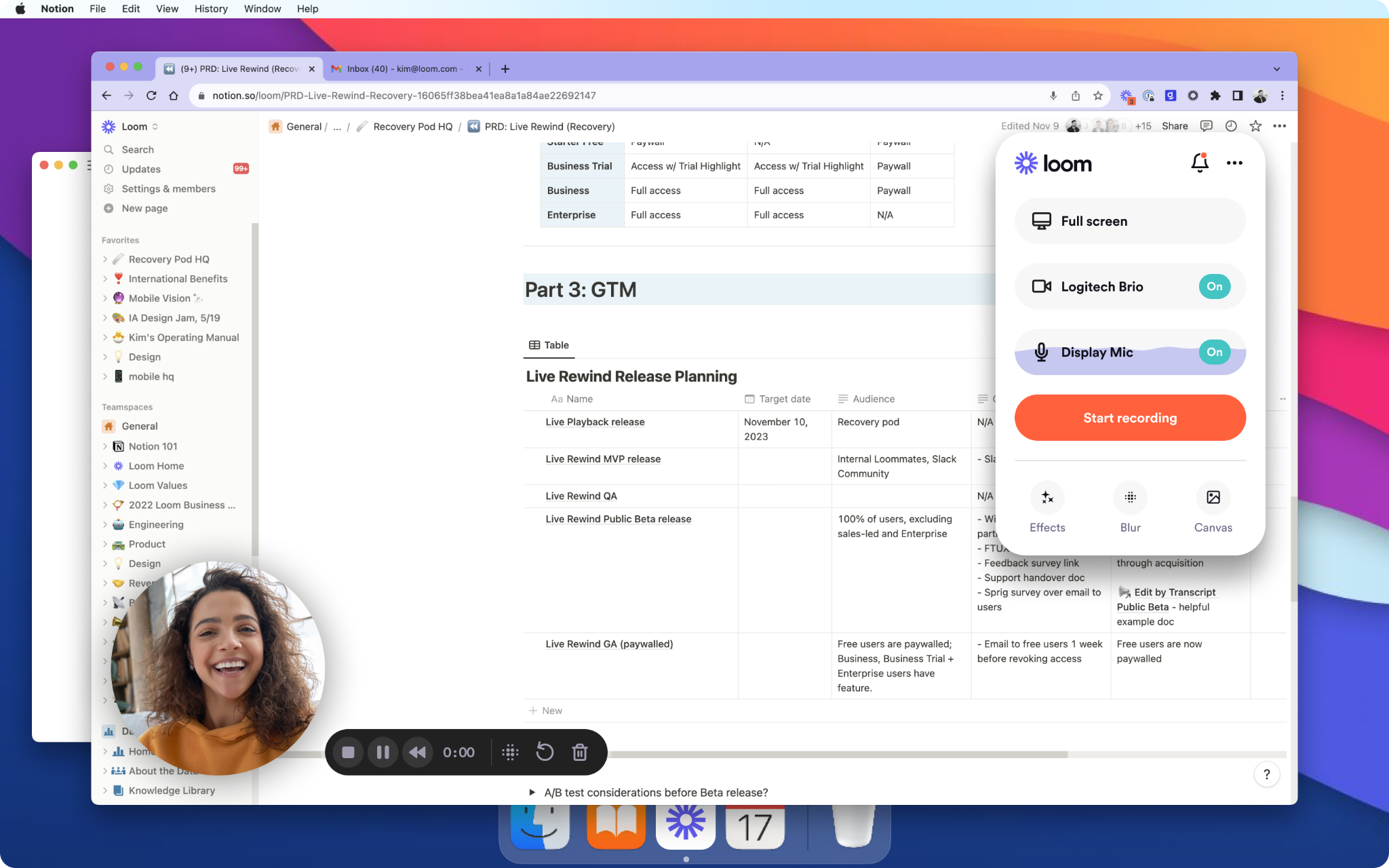
Loom is frictionless: click, record your screen (or webcam), share a link. The free tier gives you 25 five-minute videos with unlimited transcription. Paid plans (~$12.50/user/month) bring unlimited length, advanced AI add-ons, editing while you record, and password-protected sharing.
Use Loom when you need quick demos, walk-throughs, or async knowledge capture. The tradeoff: editing options are basic, and interactive assessments or SCORM packaging aren’t native.
But you can import Loom screen recordings into Colossyan, add avatar intros, or embed a quick quiz before exporting it as SCORM for tracking.
3) Camtasia - best for powerful desktop editing and polished screen-record training
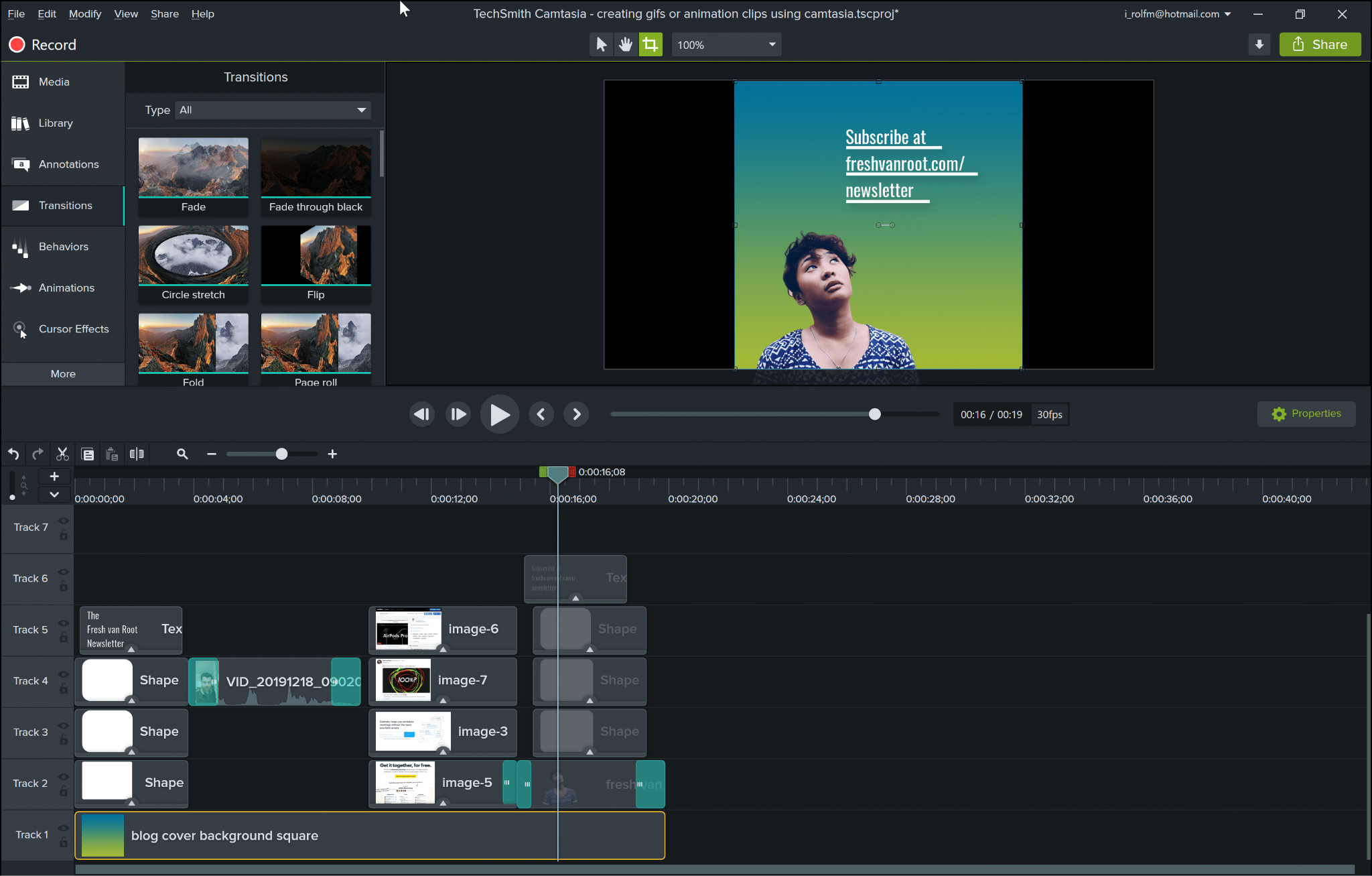
Camtasia is the gold standard for desktop-based video editing-think detailed tutorials or technical demos with fine-grained control. You get quizzes, PowerPoint integration, pro transitions, and effects. Subscriptions are around $180–$225/year.
It’s less cloud-friendly, collaboration can slow down, and output is still manual. Editing mastery takes time, and Mac users report some snags.
If you need to add presenter intros or translations, create those segments in Colossyan (with brand avatars/voice) and splice them into Camtasia. Or take your finished Camtasia video, import to Colossyan, layer on quizzes, and export in SCORM without rebuilding.
4) Vyond - best for animated explainer videos with large asset libraries
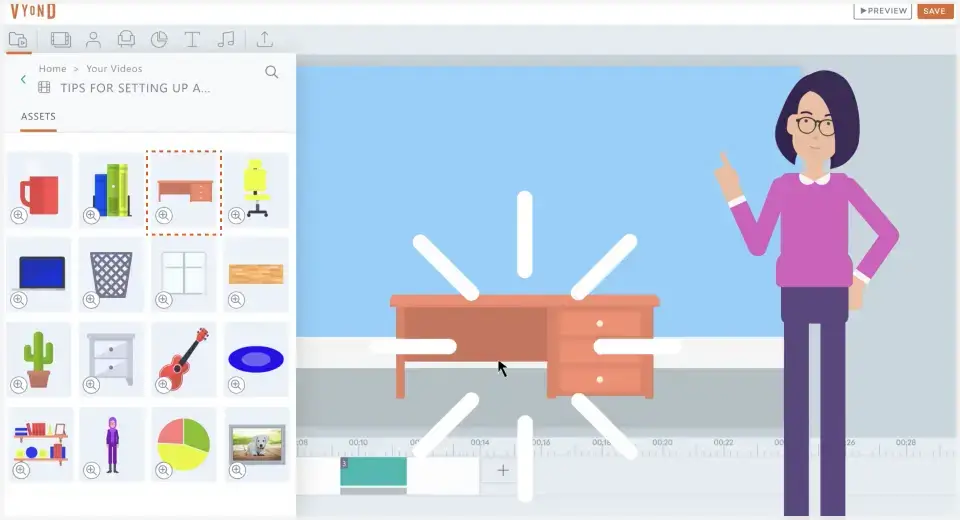
Vyond stands out for its huge animated prop library and character styles (over 40,000 props, 70+ languages, auto lip sync). Pricing often lands at $25/month or $299/year.
If you need animated stories rather than presenter-led courses, Vyond is a strong choice-though cost comes up a lot as a concern on Reddit. Videos with more than 100 scenes can’t be previewed at once.
If you need a realistic presenter or fast translations, use Colossyan’s AI avatars (styled for your brand), keep scenes short, and drop in interactive MCQs for comprehension. Then export as SCORM.
5) Articulate 360 - best for end-to-end course authoring with AI and multi-tool suite
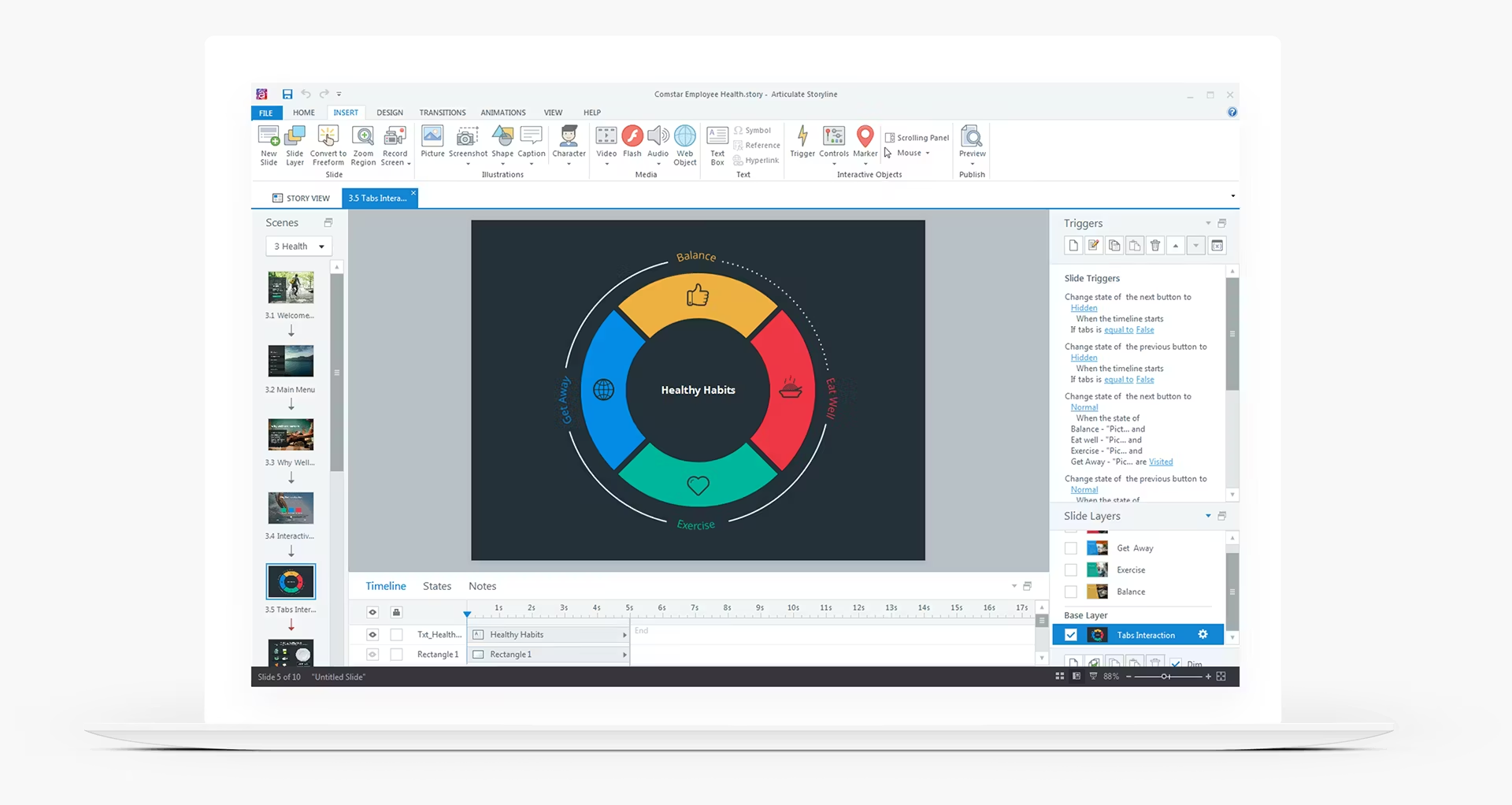
Articulate 360 is a full ecosystem: you get AI upgrades that turn static docs into interactive courses, suite-wide collaboration, analytics, translations, and localization. Output supports nearly every compliance need (SCORM/xAPI/Reach).
Go here if you’re building full e-learning courses with multi-slide branching, deep logic, or compliance tracking. It’s more than you need for pure video, but you can embed Colossyan videos inside Storyline/Rise modules, or use Colossyan for rapid video creation where a “full course” is overkill.
6) Panopto - best for secure video management, lecture capture, and enterprise search
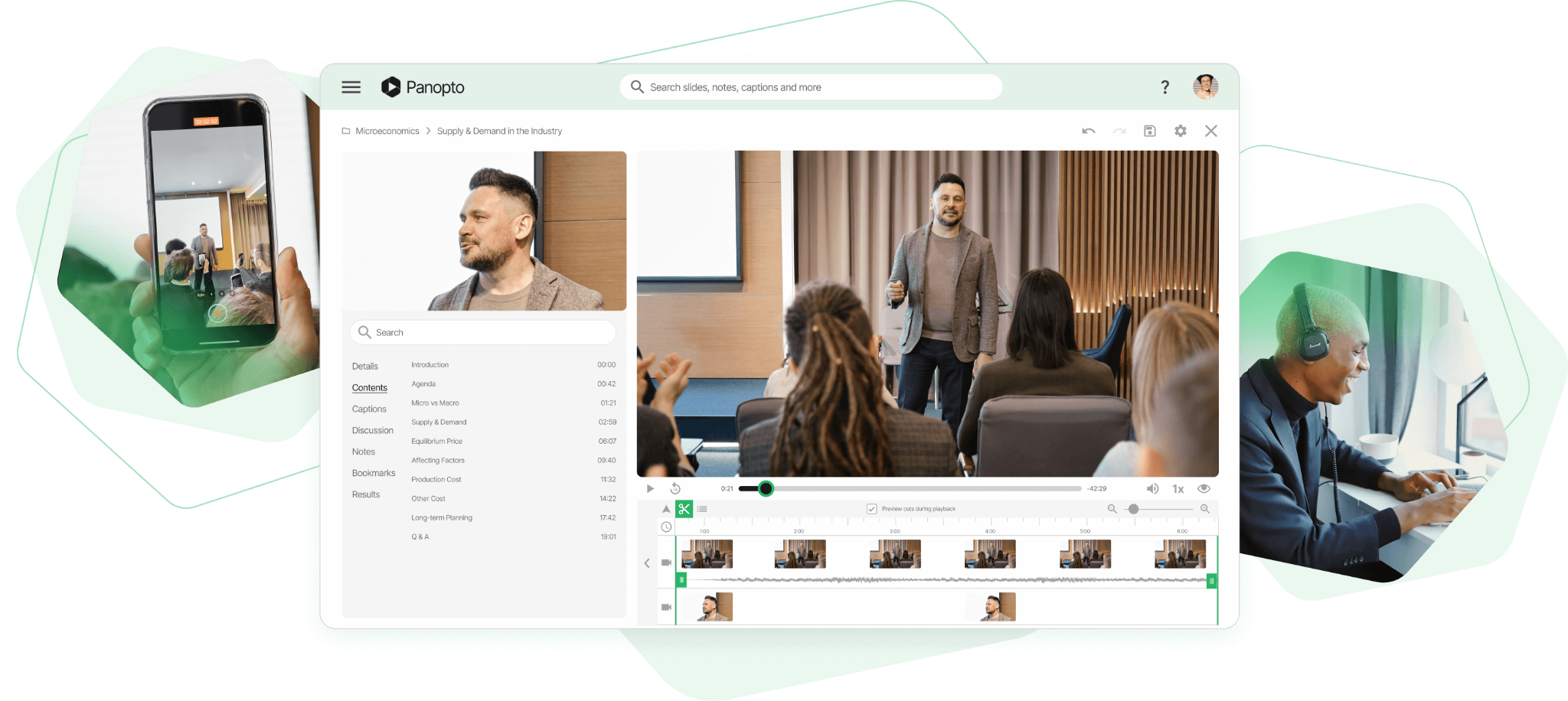
Panopto is about centralization and control. It’s widely used in higher ed and enterprise. You get secure video storage, AI-powered keyword search, quizzes, LMS integrations, automatic translation, and on-demand or live broadcast.
It’s not a video creator-think robust video management. When making new content, I produce avatar-led training in Colossyan, export as MP4 or SCORM, and let Panopto handle discovery, permissions, and analytics.
7) iSpring Suite AI - best for powerpoint-first teams needing standards-compliant outputs

iSpring Suite AI transforms PowerPoint slides into SCORM/AICC/xAPI packages; you can add narration (text-to-speech), quizzes, and rapid translation. It’s a desktop tool (~$1,290/year, discounts for academia/freelancers), with rapid course assembly and compliance coverage.
If you build everything in PPT, this is about as streamlined as it gets. But reviews and collaboration are slower compared to cloud solutions. Accelerate by importing your PPTs into Colossyan to auto-generate scene-based, presenter-led video, drop in interactivity, export in SCORM, or back-embed MP4s for richer results.
Honorable mentions (quick picks)
- Adobe Captivate: AI-first eLearning authoring, rapid image gen, PPT-to-interactive, responsive layouts.
- LearnWorlds: Interactive video with built-in analytics; best for full course hosting.
- ScreenPal: Affordable screen recording, cloud editing; watermark on free, analytics on higher plans.
- Vimeo: High-res hosting, quizzes, and video analytics.
- WeVideo: Interactive layers (polls, quizzes), real-time analytics, multi-editor collaboration.
How to choose: map needs to tools (and how to accelerate with Colossyan)
If you want speed and minimal upskilling, start with Loom or Colossyan. Colossyan’s strengths are in automating doc-to-video flows, adding AI avatars, quizzes, and SCORM export for compliance. If you do advanced desktop editing, Camtasia is best-supplement with Colossyan’s translation, interactive, or avatar features. For animated stories, Vyond is strong, but when you want a human presenter or fast language variants, Colossyan takes the edge.
If you need course-level structure and compliance, Articulate or iSpring lead the pack-importing Colossyan videos lifts engagement without slowing production. If hosting and governance matter most, Panopto is the home base, and Colossyan is where you make the source material.
Best-practice design tips backed by the research
Stick to each video’s 3–6 minute engagement window. Split scripts into shorter micro-videos-Colossyan’s scene timeline makes this easy. Hit your main point in the first 5–10 seconds; open with a clear avatar statement of “here’s why you’re watching.” Reinforce with short quizzes (target 80% pass rates) inside the video.
Optimize for mobile. In Colossyan, resize canvas or auto-translate for seamless global rollouts. Use analytics: see play rates, quiz scores, and drop-off points, then iterate.
Real-world buying signals and examples you can reference
Most teams want speed, cost-effectiveness, and simple workflows-not feature overload. The shift away from heavy, desktop-only software toward cloud tools is clear (Reddit insight). Many businesses stick to LMSs for tracking, but async video tools with analytics, central storage, and mobile playback are increasingly preferred (Atlassian insight).
Teams replace week-long production cycles with same-day Colossyan scripts: take a static slide deck, add an Instant Avatar, insert interactive branching, export SCORM, and release on your LMS. Speed plus engagement-no deep expertise needed.
Implementation checklist to go live quickly (with specific colossyan steps)
Set your Brand Kit up front (fonts, colors, logos) for consistency. Import docs or PPTs, draft narration with AI, and correct key pronunciations. Add MCQs or branching (for interaction), set pass marks, and export in SCORM format for LMS tracking. Localize instantly where needed, assign workspace roles, and review content with team comments in-app. Use scene-level previews to catch issues, share quick-links for review, and track engagement and scores in Colossyan’s built-in analytics.
Closing note
No tool or workflow is perfect for every team. Start by mapping what matters most for your L&D goals-speed, scale, compliance, and language support. Try shortlist pilots with your real content. Aim to launch one short, interactive, and, if you need, multilingual module end-to-end to judge speed and outcomes. That’s the real test of whether a tool fits your needs and delivers the clarity your learners deserve.
Content Authoring Software: Expert Picks for 2026

The content authoring tools market in 2026 is busy and quickly changing. New AI features, cloud-first platforms, and mobile-friendly outputs are the norm. At the same time, desktop tools still have a place when you need deep simulation or customization. Standards like SCORM and xAPI are almost always required, and the costs (including updates and translation) can add up fast. Picking the right content authoring software means carefully judging what your team actually needs, what your LMS can (and can’t) do, and how you’ll manage content at scale over time.
Here’s a clear look at what matters in this space, who stands out, and how to shape a practical training stack - including where Colossyan can help if you want to modernize with AI-powered video.
TLDR: expert picks by use case
Best enterprise cloud authoring: Elucidat. Editing and publishing is fast - templates reportedly make teams 4x quicker than traditional tools, and updates flow instantly to all learners. Branding and asset control is strong, and translation workflows let you update all versions centrally.
Best for custom interactivity: Articulate Storyline (in Articulate 360). If you need detailed branching, complex triggers, or full control, it’s the top desktop choice (with a higher learning curve).
Best rapid mobile courses: Articulate Rise. You get simple, attractive, mobile-ready courses - very quick to build but limited in deeply custom features.
Best for rich simulations/VR and accessibility: Adobe Captivate. Good if you want step-by-step software training, VR/360 content, or need to meet strict accessibility requirements.
Best PowerPoint workflow: iSpring Suite. It runs inside PowerPoint, making fast SCORM-compliant courses familiar for many. Well-rated by clients, especially in education and compliance.
Best for global language output: Gomo. It supports 160+ languages and manages responsive layouts for teams with heavy translation demands.
Best customizable LMS cloud authoring: Evolve. Over 50 interactive blocks, real-time publishing into Intellum LMS, and built-in translation help frequent editors or instructional designers.
Best for quick analytics and compliance: Easygenerator. Fast to spin up new modules and get data, popular for microlearning and basic tracking.
Best low-cost gamification: Genially. It comes with 20+ game elements and claims 83% of employees are more motivated by gamification. Dynamic SCORM means you don’t re-upload for each update.
Best emerging AI simulation: Nano Masters AI. Focused on AI-driven role-plays; claims dramatic time savings in creating soft skills scenarios.
Best for AI video authoring: Colossyan. Turn docs and slides into video with avatars, quizzes, branching, SCORM tracking, instant translation, analytics, and brand kits.
Authoring tools vs lms (avoid the trap)
Authoring tools exist to make and package courses (SCORM, xAPI, cmi5, etc.). Hosting platforms or LMSs are for delivery, tracking, and enrollment. Don’t expect a delivery platform (e.g., Thinkific, Intellum without Evolve, or Articulate Reach) to offer full authoring flexibility. Some platforms bundle in basic authoring, but updates and customization are often lacking.
What works in real life: Create your content with a proper authoring tool, export it (as SCORM or xAPI), then manage enrollment and tracking in your LMS. For video-led training, Colossyan lets you turn SOP docs or PowerPoint decks into interactive SCORM videos. You export and upload just like any other authoring tool’s package.
What to prioritize in 2026
Output quality needs to fit your brand and your standards - responsive, interactive, and accessible by default. Look for deep customization, gamification, surveys/polling, and usable reporting.
Speed and efficiency matter everywhere. Cloud tools lead here: real-time review, instant publishing, multi-authoring, translation workflows, and the ability to update without chasing down a dozen files in your LMS.
Scalability is a real concern as your team and content library grow. Can you control brands and assets from one place? Are variations and role permissions handled easily? Does the cost model make sense as you scale?
Standards and analytics: SCORM 1.2 or 2004 is a must. xAPI is now widely supported and is key for deeper reporting. Some tools offer built-in analytics - like Easygenerator or Colossyan, which gives you video play and quiz data in-platform or exports it as CSV.
Mobile and accessibility: Cloud-first tools like Elucidat, Rise, Gomo, Evolve, and Genially handle mobile outputs well. Desktop tools often need extra setup. Not all tools are equal on accessibility - Captivate is noted as strong; Rise less so.
Translation and localization: The best tools now offer instant translation and version management - not just script translation but UI, feedback, voice, and more. Colossyan instantly translates video scripts, captions, and avatar narration, including correct pronunciation for brand terms.
Types of authoring tools and when to use them
Desktop-based tools (e.g., Storyline, Captivate) work offline and allow the most granular control. Use them for complex simulations, VR, or strict security environments.
Cloud-based tools (Elucidat, Gomo, Evolve, Rise, Genially) enable teams to co-author, review, and update quickly with less versioning pain. This fits distributed teams and projects that change often.
Rapid authoring tools make compliance and basic microlearning quick (Easygenerator, Rise, iSpring).
Game-based tools (Genially, Evolve, Articulate Storyline to a degree) make use of leaderboards and branching for soft skills and engagement-heavy content.
Text-based tools (markdown editors, knowledge-base builders) help you create job aids or policies that need frequent updates, but may lack rich media.
Video-based content is rising fast. Tools like Colossyan let you make interactive video with quizzes and branching, something that’s now essential for keeping up with shorter attention spans.
AI-powered authoring (Articulate 360, Nano Masters AI, Colossyan) means you can quickly draft content, translate instantly, and automate much of the grunt work for scale.
LMS built-in tools are simple and quick, but not enough for deep interaction or compliance reporting.
Expert picks and best-fit cases
Elucidat: Enterprise-grade and fast with template-driven workflows, bulk updates, and advanced analytics. A practical use: rolling out a policy refresh to 50 countries. I would use Colossyan to convert the same policy docs into video explainers, match brand assets, drop in avatars and quizzes, then use Instant Translation to create localized video versions - all SCORM-ready for upload.
Articulate 360: Combines Storyline’s deep custom powers with Rise’s rapid mobile output. Good for layered learning paths. For scenario-based sales enablement, I’d use Colossyan’s Conversation Mode to create role-play videos that match the training content, then clone your top sales voice and embed scenario questions - again, with full SCORM export and tracking.
Adobe Captivate: Strong for simulations, VR, and accessibility. If you’re delivering software training, I’d complement with Colossyan for intro/summary/”why it matters” videos and demo overlays using screen recordings plus in-video quizzing.
iSpring Suite: Great for PowerPoint-heavy workflows. For quick compliance or blended learning, Colossyan can import the same PPT deck, auto-create a talking-head video with your branding, and export with closed captions and SCORM tracking.
Gomo: Multilingual ready, fits big international teams. Colossyan adds instant video translation and can manage pronunciation for product names and terms - plus provides analytics on watching and quiz completions by geography.
Evolve: Flexible, frequent editing and integration to Intellum LMS. For ongoing product updates, generate and embed Colossyan videos to stay visually current. Organize versions using workspace foldering.
Easygenerator: For quick, simple compliance or microlearning, pair Colossyan to push out SOP micro-videos, add in-line knowledge checks, and export the analytics to supplement the built-in tracking.
Genially: For engaging, gamified eLearning or compliance that requires easy updates without LMS friction. I’d use Colossyan to design brief pre-roll explainer videos with avatars and quizzes, helping learners before they jump into the core Genially module.
Nano Masters AI: If you want to try AI-generated role-plays at scale, I’d still use Colossyan for scenario-based video, especially if you want multi-avatar, branched conversations with realistic (even cloned) voices. Then track how people answered for real outcome data.
Standards, analytics, update workflows
SCORM 1.2/2004 is table stakes. Most leading tools support xAPI for richer event tracking. If your ecosystem needs cmi5, LTI, or IMS Caliper, check upfront.
Cloud tools cut down review and re-upload pain. Update once and changes push everywhere. With desktop tools, every update is usually a re-pack and re-upload.
If you want analytics beyond what your LMS shows, pick a tool with built-in dashboards or export capability. With Colossyan, you get clear data on video plays, time watched, and quiz pass rates - exportable for combining with other sources.
Mobile readiness and accessibility
Cloud-first tools usually auto-adapt to all screens. Desktop-first tools, especially for custom layouts, can be more work for microlearning or phone use.
For accessibility, validate every tool - don’t trust the label. Captivate is a strong bet. Rise has gaps. With Colossyan, you can export videos in multiple aspect ratios, generate closed captions, check pronunciation, and apply brand-based color choices for higher visual clarity.
Translation and localization at scale
Multilingual demand is rising. Tools like Gomo (160+ languages) and Elucidat (centralized management) lead here. Many others are English-only or require more manual work. With Colossyan, you can instantly translate scripts, captions, and avatar speech, use multilingual voices, apply custom pronunciation, and export copies for design tweaks, all while keeping brand consistency.
Pricing and deployment
Cloud/SaaS is the default for most buyers - access anywhere, always up to date. But every update and added seat has a cost, so know your future team and storage growth plans.
Desktop/self-hosted means full control and offline reliability, but more local IT overhead and often slower update cycles.
Pricing models are still split between subscriptions (predictable but add up) and one-time licenses (sometimes misleading if you need major version updates or extra features later). Freemium models can become expensive with add-ons.
For a quick, real scenario: If your compliance update must launch next week to 10 countries, picking a cloud tool with instant update propagation and Colossyan for instantly translated video can shave weeks (sometimes months) off the process and prevent re-upload nightmares.
Build your 2026 learning tech stack
For most mid- to large-scale companies, best-of-breed means combining a major cloud authoring platform (like Elucidat for the core) with Colossyan for all video and scenario content - including instant translation, SCORM tracking, and analytics - all delivered into whatever LMS you already have.
If you do heavy simulations, pair Captivate with Colossyan video for policy intros, change management, or blended learning snippets.
If your goal is rapid microlearning, use Easygenerator or Articulate Rise for quick builds and Colossyan for short, interactive, quiz-led videos.
For global teams, Gomo or DominKnow for the structure, Colossyan for the localized, on-brand video in every language needed.
RFP/evaluation checklist
When choosing tools, ask vendors:
- Are SCORM 1.2/2004 and xAPI supported? What about cmi5 or LTI?
- Is output responsive and accessible (WCAG/Section 508)?
- How do you support branding, central assets, and update cycles?
- How are multi-language versions managed and updated?
- Are analytics dashboards built-in? Can we export quiz/item data?
- Is SSO, data residency, and GDPR/SOC 2 covered?
- What’s the cost model for seats, storage, translations, and upgrades?
- Can you demo a real-world scenario: updating a course in 20 languages and tracking quiz data without LMS re-upload?
Closing thought
Most organizations in 2026 are best served by mixing a strong collaborative authoring suite with targeted AI video generation. Careful selection of authoring software ensures compliance, easier updates, and top-quality learner experiences. For everything video - rapid conversion of documents and slides into on-brand, interactive modules, localizing at the click of a button, and adding real-time analytics - i think Colossyan is worth evaluating as part of any modern L&D stack. Match the tool to your workflow, not just the feature sheet. That’s what makes scale sustainable.
5 AI Video Ad Generators to Boost Your Marketing Results
AI video ad generators are changing how marketers create, test, and scale ads. You don't need expensive crews, hours of editing, or specialist skills. Instead, you get faster production, lower costs, and more variants for testing across TikTok, Instagram Reels, YouTube Shorts, and paid social. And, in many cases, better results.
A few stats underscore the shift: video ads deliver 2.7x more leads than static images, see 1.7x higher ROI, and production costs drop by 90% according to Creatify’s summarized benchmarks. Invideo reports customers who monetized new channels in under two months, and that production time can drop from half a day to just 30 minutes per ad, with sales doubling in some cases. Meanwhile, marketers openly discuss producing several AI UGC style ads for $40 - versus $100–150 for just one "standard" influencer spot - then testing across channels with about $1,000 in media to see what sticks. There’s still skepticism: AI UGC ads won’t always beat human UGC if you don’t tailor to each channel and iterate quickly, but the economics and speed are hard to ignore.
Below, I'll break down five leading AI ad makers, give example workflows, and show how those same ideas can be recreated using Colossyan - for times when you need fast, on-brand, and multilingual ads at scale.
How to evaluate AI video ad generators (what matters for ROAS)
If you’re benchmarking AI video ad tools, focus on what actually moves revenue and efficiency:
- How fast can you go from prompt, document, or URL to a workable video draft?
- Are there template shortcuts for TikTok, Instagram Reels, YouTube Shorts, and other vertical formats?
- Can you control scripts, timings, transitions, and the small details (gestures, pronunciations, styles)?
- Do they give options for AI avatars, real actors, or user-generated content hooks?
- How good is the localization? Can you easily generate accurate variants for major markets?
- Is there a workflow for team collaboration and asset approvals?
- What about safety, consent, and brand governance?
- How’s the pricing - by credits, unlimited, API, or seat?
- What outputs/formats do you get?
Not every platform nails each point. Below, I’ll show how the market leaders stack up and compare ways you can map these flows onto Colossyan’s toolkit.
The 5 best ai video ad makers right now
1) Colossyan
Colossyan generates high-performing ad creatives fast — turning scripts, briefs, or product pages into polished videos with AI or Instant Avatars. You can clone your brand voice, maintain visual identity with Brand Kits, and auto-translate entire videos (voice, captions, on-screen text) for multi-market campaigns in minutes. Animation Markers control pacing and camera shifts, making content more dynamic than static talking-head ads.
Brands use Colossyan for TikTok, YouTube Shorts, UGC-style ads, and product explainers — but the real advantage is scale and iteration speed. You can produce dozens of hooks, swap CTAs, localize for 5+ countries, and compare performance with analytics that show watch time and engagement. No reshoots, no freelancers, no waiting.
Example workflow:
Paste your product page into Doc-to-Video → select 9:16 for TikTok → apply Brand Kit → choose an AI Avatar or create one from your team → clone voice + adjust pronunciations → drop in B-roll from Media Library → generate multiple hook variations → translate to Spanish/French/German instantly → use Analytics to determine winners before scaling spend.
2) Creatify
Trusted by a million+ advertisers, Creatify boasts 2.7x more leads, 1.7x ROI, and 90% cost reduction compared to static ads. Agency clients saved 97% of time, ecommerce brands saved $10k per video and doubled their output, and a single editor created 300+ assets per quarter. You get 1000+ avatars, 29 languages, and API-driven mass production.
For example, an ecommerce company might produce hundreds of monthly ad variations via API, saving $20k/month and lifting CTR by nearly 50%.
I build similar at scale using Colossyan by setting up “base” UGC or explainer templates, then duplicating and swapping hooks, visuals, and CTAs with AI script rewrites. With Conversation Mode, I can simulate testimonial chats or problem-solving moments. Localization and style are enforced by Brand Kits, and analytics sort top performers for further investment.
3) Arcads
Arcads claims millions of users, over 1,000 AI actors, 30+ translation languages, and shows splashy stats - creatives getting 18.5K+ views for $90K+ revenue, or 25K views for $16K. Their creators show follower and like increases in the tens of percent range. These are directionally strong numbers but not always apples-to-apples with traditional creative - it's good for social proof and building the case to test, but you should benchmark against your own KPIs.
In Colossyan, I focus on building multiple first-scene hooks for one product, keeping the framework identical using Animation Markers, and swapping only the opening angle or assertion. Those variants are then regionally translated, with careful script timing adjustments to maintain pacing in languages like German or Spanish. I use Analytics to see which hooks hit best before investing media spend.
4) HubSpot video ad creator
HubSpot ties its video ad creator into a bigger platform play: using their suite led to 129% more leads, 36% more deals, and better support closure rates year-over-year. HubSpot’s AI tools offer quick business templates, landing pages, campaign assists, and GPT-driven workflows. The direct ad maker is more SMB-focused, but works for testing “ads-in-context” - for example, a new product feature announcement that instantly matches your CRM-connected landing page.
In Colossyan, we keep our production workflow tight by locking in brand kits, cloning voices for consistent narration, and using workspace comments for cross-functional review. Video is exported as MP4 for landing pages, and approvals happen directly in the platform.
5) Deevid
Deevid speeds up ad creation from text, images, or URLs and drops platform-ready videos (UGC, testimonials, promos) in minutes with auto voiceover, animation, branded transitions, and an AI-powered outfit changer. It supports TikTok, Instagram Reels, YouTube Shorts, and Facebook/Google multi-platform outputs, but doesn’t publish hard stats. Their main pitch is rapid seasonal or variant testing.
Inside Colossyan, I can duplicate video drafts, change avatar outfits or seasonal overlays, keep everything styled with Brand Kits, and customize canvas dimensions for 9:16 (stories), 1:1 (feeds), or 16:9 (YouTube). Quick product demos can be dropped in using a screen recording for extra trust.
What marketers are seeing: costs, skepticism, and a 30-day test plan
Marketers on Reddit report $40 is enough to create several AI UGC ad variants, compared to $100–150 for a single human UGC spot. Testing tends to look like $1,000 in total spend to see what works. Most admit - AI UGC still lags behind "human" content on ROAS unless you keep creative native to each channel, test hooks fast, and iterate on structure. Structured testing wins: same format each time, only swapping hooks/offers to learn what’s working.
A 30-day test plan I use with Colossyan goes like this:
Week 1: Map core angles (problem/solution, before/after, expert demo) and write ten hooks per angle.
Week 2: Produce 15–20 variants in each intended format.
Week 3: Launch across platforms, optimize based on first 3- and 6-second engagement.
Week 4: Cut losers, rewrite the best hooks, add new language variants, repeat test.
Colossyan lets us generate, duplicate, tweak, and localize all those variants in a few hours, not days. Animation Markers keep timing perfect. Brand Kits lock visuals, and Analytics quickly surfaces the videos that deserve paid traffic.
Multilingual and localization playbook
Colossyan, Creatify, Arcads and other leaders all support broad language options. The best approach is to start with your top winner and translate that - don’t try to localize everything on day one. Remember to tweak length for language fit, and update any region-specific visuals, offers, or pricing.
In Colossyan, Instant Translation rebuilds the same timing and layout into Spanish, French, German, and more. On-screen terms and voiceover are updated at once. Pronunciations lets us teach the platform to handle brand names and technical jargon, and Analytics helps us compare which markets engage more with which messages.
Brand safety, compliance, and governance
AI ad makers are starting to address the issues of consent and governance. Colossyan, for example, blocks unauthorized faces using matching tech; Creatify is SOC 2 compliant. You need to maintain your own approval trails for avatars, real faces, and brand voice assets.
In Colossyan, workspace management lets admins control teams and asset permissions. Brand Kits and the Content Library keep approved visuals centralized. Voice clones are safeguarded with permission controls, and all regulated or industry-specific terms are managed in Pronunciations. These controls are essential when scaling video output or localizing in regulated industries.
Final thoughts: where Colossyan fits
If speed, consistency, and localization matter, Colossyan covers the essential workflows - Prompt/Doc to video, fast template duplication, customizable avatars and voices, and full control over style (Brand Kits, Transitions, Media). For global teams, our Instant Translation bridges language gaps fast, while Workspace roles and asset permissions keep governance simple.
Pick the tool or mix that fits your workflow. Ad generation now is about relentless testing, multichannel speed, and always-on brand control - make the platform work for you, not the other way around.
4 Best Employee Training Software Tools To Upskill Your Team
Upskilling and compliance are no longer nice-to-haves for most teams. According to the latest benchmarks, 68% of employees say training makes them more prepared for the future of work. But training still has room to improve - 49% note that AI is advancing faster than their company’s learning programs, and 63% think their training should be better. The fastest way to close this gap is to match the right employee training software with high-quality, modern content.
Motivation is a big piece of the puzzle. 83% of employees feel more motivated when their training platform uses gamification: badges, points, leaderboards, and similar game-like features (source). The right LMS or training platform makes it easier to deliver engaging, compliant training with measurable outcomes.
This guide covers what to look for in an LMS, profiles the 4 best employee training tools (with lessons from real-world case studies), and explains how to use Colossyan’s AI video platform to upgrade your content strategy - at scale.
How to choose employee training software (selection checklist)
Not all training platforms are the same. Here’s what matters most:
Interoperability and standards.
Always check for SCORM (1.2, 2004), xAPI/Tin Can, LTI, cmi5, or IMS Caliper support. Choosing by standards isn’t just technical - practitioners rely on them for clean data flows and to avoid vendor lock-in.
Analytics.
Good software lets you see learner progress, quiz scores, completion rates, and export reports (ideally CSV). You’ll need this to prove impact and connect results with your HRIS or BI tools.
Content.
Some tools have large course libraries, some expect you to create your own. Decide between prebuilt modules and your own custom content for compliance, role-based tasks, and company-specific training.
Engagement.
Look for gamification. Microlearning (short, focused lessons) and interactive quizzes drive completions and retention. With gamified training, motivation jumps to 83% (source).
Integrations.
APIs and prebuilt connectors for Slack, Zoom, or Google Workspace save admin time and keep your system data accurate.
Security and compliance.
ISO/IEC 27001, GDPR, SSO, and audit trails are musts for most organizations.
Pricing and scale.
Free plans often cap active users (5–10 is typical), and restrict analytics/integrations. Always plan your upgrade path before scaling.
1) TalentLMS - best all-around lms for SMBs to mid-market
TalentLMS is trusted by 70,000+ teams. In one real-world case, a dental chain dropped turnover from 40% to 25% by standardizing training and tracking completions. TalentLMS stands out with a library of over 1,000 microlearning modules (most under 15 minutes), robust compliance features, and strong automation to save admins dozens of hours on assignments and tracking. Their support team gets a 96% customer satisfaction rate.
Pricing: There’s a forever-free plan for up to 5 users. Paid tiers start at about $119/month for 40 users and go up from there.
If you need a fast, flexible LMS with built-in courses, smart reporting, and easy rollouts, this fits. When you add gamification - which 83% of learners say motivates them (source) - TalentLMS helps turn compliance or skills training from a check-the-box task into something people actually complete.
How do we at Colossyan pair with TalentLMS? Start by uploading your own SOPs or compliance docs into Colossyan and turn them to video with Doc2Video. Pick avatars to deliver the content, plug in interactive quizzes and branching, then export as SCORM (1.2 or 2004). When you drop these files into TalentLMS, you get pass/fail tracking, analytics, and a library-style experience without paying extra for outside vendors. You can localize each module with Instant Translation and reuse your Brand Kit to keep colors, fonts, and logos unified.
2) Trainual - best for process documentation and onboarding playbooks
Trainual does something most LMS platforms don’t: it brings together SOPs, playbooks, handbook modules, and training into one searchable place. That’s why 10,000+ teams use it. Onboarding is much faster - some customers say it cuts time-to-competency from a month to two weeks.
Getting onboarding right makes a big difference: you can boost retention by 82%, raise new-hire productivity by 70%+, and even lift profit margins by 24% (source). Trainual is good for companies that want to centralize know-how, formalize recurring processes, and keep role guides up-to-date.
Pricing is subscription-based. Most teams start small, then expand as needed.
With Colossyan, you can turn messy or outdated SOP documents into short, clear onboarding videos. Use Doc2Video, apply Brand Kits for visual consistency, and have a real team member’s Instant Avatar explain your culture or process. Export as MP4 or share via links inside Trainual. Each module can be followed by a quiz or knowledge check (hosted by Colossyan), and real analytics show you who’s ready to work and where you need to clarify.
Pronunciations are a big Colossyan feature here - no more misreading of your company jargon or product names by synthetic voices.
3) iSpring Learn - best for teams that want LMS plus a robust authoring workflow
iSpring Learn hits a sweet spot for teams that need control. Pair it with iSpring Suite to build your own assessments and structured courses. You get an LMS and an authoring platform under one roof. Pricing is transparent: about $6.64/user/month (100 users, annual plan). Prebuilt course libraries aren’t included, so you’re expected to design your training content.
This is often the pick for L&D specialists who want to build slides, capture quizzes, and track completion deeply.
As an employee at Colossyan, I regularly see teams import powerpoints or policy PDFs into Colossyan, let our platform auto-build video scenes, and then add screen recordings for real-world walkthroughs. Role-plays are made easy with conversation-based Avatars and Branching. Export your results as SCORM 2004 and upload right to iSpring Learn. For multilingual teams, Instant Translation delivers full language variants in minutes, preserving all timing and animation. Accessibility is easy with SRT/VTT caption exports, so nobody is left out.
4) SkillSoft Percipio - best for enterprise-scale content libraries and leadership skills
Enterprises and global teams often outgrow homegrown libraries and need real breadth. Skillsoft Percipio is the answer here, with thousands of leadership and technical courses, available in 29 languages via in-app translation. They use digital badges for motivation. Some customers wish updates and support were faster, but for coverage across industries and regions, Percipio is hard to beat.
Use cases shine when you have both employees to train on universal topics and complex, region-specific rules to cover company policy.
A common issue: Skillsoft’s libraries rarely cover every org-specific topic. That’s where I’ve seen customers fill gaps with Colossyan. We help you create microlearning modules tailored to your workforce - just convert your sources to video with Doc2Video, layer in AI Voices, and export to SCORM for tracking inside Percipio. Consistent pronunciation and localized Voices are key for this audience. Our analytics export as CSV, so you can analyze module performance side-by-side with standard Percipio content.
Buyer tips and real-world examples
Check interoperability. If your LMS needs xAPI, cmi5, or specific reporting, confirm it before buying - many teams hit a wall here. At Colossyan, we support SCORM 1.2 and 2004, so you can rely on tracked completions and quiz scores when using almost any mainstream LMS.
Free plans help pilot but watch the limits. TalentLMS is free for 5 users (10 courses). ProProfs Training Maker is free for 10 learners. But analytics and integrations are often locked down. Pilot with a small group, set goals like time-to-competency, and don’t wait to plan your next tier.
Onboarding speed pays off. In some companies, standardizing SOPs via Trainual or interactive SCORM modules has halved onboarding time. Measured impact includes faster onboarding, lower turnover, and productivity lifts.
Integrations and admin controls matter at scale. Prebuilt connectors help. Colossyan Workspace Management lets you delegate, invite, and monitor user roles, so large teams don’t get lost.
Sample implementation playbooks
Playbook A: New-hire onboarding in 30 days or less
Week 1: Use Colossyan Doc2Video to convert your handbook and top SOPs; apply Brand Kits; add Avatars; export to SCORM with quizzes.
Week 2: Upload to TalentLMS or iSpring Learn; set up microlearning paths and gamification progress bars.
Week 3: Clone into other languages with Instant Translation; republish SCORM for regional teams.
Week 4: Review analytics, find areas where learners struggled, and tweak videos/scripts.
Playbook B: Leadership essentials with a blended approach
Start with Skillsoft Percipio’s baseline modules. After each one, add a 3–5 minute Colossyan video recap with your own executive’s avatar. Attach interactive questions on real job scenarios, export as SCORM, and track mastery. Export analytics data to compare engagement rates.
Quick comparison snapshot
TalentLMS: 70,000+ teams, free tier, ISO and GDPR certified, microlearning library, and proven ROI.
Trainual: Consolidates all your process documents, onboarding material, and training content into one. Cuts onboarding time and boosts retention and margins.
iSpring Learn: Authoring-first, structured design for teams who want to build their own comprehensive modules.
Skillsoft Percipio: Massive content library, 29 languages, digital badges, and a strong choice for large companies.
Where Colossyan fits in your stack
Content production at scale: Transform Word, PDFs, or PowerPoints into video with Doc2Video and PPT import. Add screen recordings for process training.
Engagement: Use Avatars, music, transitions, MCQs, and Branching to turn static slides into practice-based learning.
Brand and accuracy: Brand Kits lock in style guides. Pronunciations keep tricky jargon clear. Cloned or multilingual Voices let you speak to everyone.
Measurement: Export SCORM for tracking in any LMS; analyze video plays, quiz scores, and more with Colossyan’s analytics.
Localization: Create language variants fast with Instant Translation, keeping your visuals and timing exactly right.
When you pair a strong LMS or training platform with scalable, engaging video from Colossyan, your team upskills faster - and you finally get data you can trust. The right foundation pays real dividends in onboarding, compliance, engagement, and retention.
5 Tips To Pick The Best Tutorial Video Maker For Your Business
Video is no longer optional for business learning. People expect it. 96% watch explainer videos to learn about a product or service, and 85% want even more. Employees remember up to 83% more information from tutorial videos half a year later and watching video is the main way half of US YouTube users learn new things.
But picking the best tutorial video maker for your business isn’t as simple as searching “best video app.” The difference between a smooth L&D process and ongoing frustration usually comes down to five factors: speed, clarity, accessibility, measurement, and scalability. Here’s where the market stands - and my real opinion on what separates a gimmick from a reliable business platform, using Colossyan as the lens.
Prioritize speed from script to screen
If your tool drags out production, you will never scale content, no matter how pretty the videos.
Vendors like Guidde and FlexClip claim their platforms are ten times faster than manual methods. InVideo touts prompt-to-tutorial workflows and automatic scene generation. The point: speed matters because it means employees can learn faster and you can react to change (think process updates or new compliance rules) immediately.
To pick a tool, test these things:
- Upload a 5-page SOP or a PPT file with speaker notes. Time how long before you have a first video draft. Does narration match? Are scenes logical?
- Can you lock your fonts, logos, and colors once, so every output stays on-brand - and skip manual restyling?
- What's the lowest-friction way to update content when info changes?
At Colossyan, this is where we focus. I use document to video to upload a Word doc or PDF; it auto-breaks content into scenes and writes the first draft script. PPT import carries over speaker notes for narration, and each slide becomes a scene. Brand Kits apply the correct styling instantly. If the script needs editing, the AI Assistant inside the Script Box can rewrite or shorten - no need to bounce between tools. Finished versions go straight into organized folders.
What matters isn’t robot-generated video for the sake of novelty, but how rapidly you get a useful draft, polish it, and get it out the door. If your competitor can update staff on a policy change in four hours but you take four days, you’re losing.
Ensure software-demo clarity (cursor, zoom, blur, highlights)
The best tutorial video maker makes it obvious what viewers should look at. But in practice, this is a pain point - on Reddit, content creators debate whether Premiere Pro can handle quick, repeatable cursor-zoom effects, or if they need to use After Effects or OBS plugins.
Simple reality: most video editors aren’t optimized for business screen recordings. You need:
- Fast, built-in screen recording that lets you narrate.
- Clear, easy annotations (arrows, highlights, callouts).
- PIP (picture-in-picture) to show a presenter’s face or avatar.
- A straightforward way to sync highlights to the spoken steps.
Try recording a short software demo and see how quickly you can add step-by-step pointers. If it takes more than ten minutes or you’re clicking through endless menus, skip it.
Colossyan shrinks this process: record your screen inside the Editor, then drag Shapes or Text for step callouts. Animation Markers in the script match highlights to narration precisely. Want a “human touch”? Drop a presenter avatar in PIP mode. If you need something specialized, like OBS cursor zooms, capture the video in OBS and import it - Colossyan then handles narration, overlays, and subtitles. Step-by-step clarity should not require a postgrad in video editing.
Bake in accessibility and global reach from day one
If your training isn’t accessible, you’re creating problems - for your people and your business. Scribe’s guidelines are simple: every video should include captions, transcripts, and on-screen annotations. Why? Not everyone can watch with sound; not everyone is fluent in the default language.
InVideo and Vmaker promote massive language support (sometimes with inconsistent claims; double-check the numbers). But it’s not just about “more languages” - it’s about the quality: are captions accurate? Are voiceovers clear and human-sounding? Can you handle the correct pronunciation of your own brand’s niche terms?
Test each platform by producing a short video, exporting captions, generating a version in another language, and listening to the result. If it sounds robotic or mangles product names, look elsewhere.
Colossyan automates captions (SRT/VTT exports), on-screen text, and script translation in one go using Instant Translation. You can set custom pronunciations for anything - so we get names and jargon right, every time. Multilingual voices and region-specific avatars are built-in. Language should never be a blocker, and fixing an error should take minutes, not hours.
Make outcomes measurable and LMS-ready
If L&D can’t show numbers, it doesn’t have a seat at the table. You need analytics: who watched, for how long, did they answer required quiz questions, did they pass?
Some vendors are all templates and music - fine for social media, useless for business impact. Others, like Guidde, prove value with real case studies: more guide views, fewer helpdesk tickets, faster onboarding. The platforms that actually move the needle integrate quizzes, SCORM exports (for your LMS), and data you can export and analyze.
My workflow in Colossyan:
- Add quizzes and branching right in the editor.
- Export the video in SCORM 1.2 or 2004 (set pass marks, completion criteria).
- Generate a link or file for your LMS.
- Open Analytics for watch time, quiz results, and completions - then export to CSV for reporting.
This isn’t just a box to check. It means you improve every cycle, and never get stuck wondering if training landed.
Plan for scale, governance, and brand consistency
Most teams start with five videos. In a year, they have fifty. By year three: several hundred. If your platform doesn’t help you keep order, it becomes chaos.
Adobe Express earns praise for collaboration, but I recommend you go further: what happens when you hire ten more trainers, or your branding changes?
Look for these:
- Roles and permissions: who can edit, approve, or just view?
- Libraries and folders: can you organize by team, project, region?
- Brand kits/templates: global update once, not slide by slide.
- Commenting: can reviewers leave feedback in the tool, or are you back to email threads?
With Colossyan, Managing Teams means inviting, assigning, or reassigning users with granular roles. The Content Library and folders keep assets and drafts tidy. Brand Kits apply styling everywhere instantly - change a color or logo once, and it updates across all templates. In-video Commenting streamlines review, and sharing via link or embed is a click. When you want governance, not guesswork, this matters.
Real-world examples
Take an onboarding SOP. In Colossyan, I upload the document via Doc2Video, review the auto-created scenes, assign a presenter avatar, add three MCQs, and export as a SCORM 1.2 package for my LMS - with a 70% pass mark. Version updates are a breeze: replace the doc, review, and re-export.
For software demos, I record screens, layer avatar PIP for explanation, add Text and Shapes synced with Animation Markers, and if I need advanced cursor effects, I capture via OBS and import the video for final polish.
For accessibility, I enable Closed Captions, translate entirely to Spanish and German, use Pronunciations for brand names, and assign local avatars and voices.
On measurement, I run variants: the 10-minute full walkthrough and a condensed microvideo, and compare engagement and results via Analytics.
Scaling to new teams, I spin up workspaces for HR, Sales, or Support, impose role-based access, keep content organized by folder, and enforce brand consistency with Kit. Reviews happen within the draft, not in endless Slack chains.
Vendor questions checklist
- Can I upload a doc or presentation to auto-generate scripts and scenes?
- Does your editor have native screen recording, annotations, and PIP? Can I import footage from OBS?
- Are captions, translations, and custom pronunciations easy to produce?
- Do you export full-project translations - and how accurate are voices in different languages?
- Are quizzes, analytics export, and real SCORM (1.2/2004) exports supported?
- Can I control team roles, folder structure, templates, and review cycles in-platform?
- Are stock assets and generated media cleared for enterprise use?
- On which plans will I hit feature or export limits?
Conclusion
There’s no universal “best tutorial video maker.” The real test is speed, clarity, accessibility, measurement, and how painlessly you scale. You need a tool that respects L&D realities - stakeholder expectations, changing info, brand guidelines, and ever-present deadlines.
Business training, onboarding, and product education don’t need more hype or mystery - they need to be simple, efficient, and accountable. Pick a platform (like Colossyan) where every one of these five areas works with you, not against you. That’s how business video gets done.
How To Use an AI Video Generator From Script to Final Video
The fastest way to go from script to finished video is to paste your text into an AI video generator, which auto-splits scenes, matches b-roll, adds voiceover, music, and captions, and lets you fine-tune visuals and timing. Modern tools also support avatars, multi-aspect exports, translations, and collaboration - so you can generate a draft in minutes, then refine. Below is a practical, step-by-step workflow using industry best practices and how to achieve them in Colossyan for training content.
What “script-to-video” really means now
Script-to-video tools have changed a lot in the last few years. Now, it usually means you paste in a script, and the AI keeps your exact words (no changes), splits the content into scenes, adds relevant b-roll, voiceover, background music, and subtitles that you can edit. This automation makes the first draft in minutes. For example, it can take about 30 seconds of compute per 1 minute of video to process a draft Kapwing speed guidance.
You’ll get editing controls to rearrange scenes, swap stock clips, adjust voiceover, and tweak graphics or transitions. Most tools default to using 3–5 second b-roll clips based on script keywords for the pace Kapwing Smart B-roll. The most popular format right now is a clear voiceover, fast-moving clips, and strong kinetic text - a format especially in demand for creators working with small budgets r/NewTubers.
Differences between tools come down to how deep storyboard control goes, preset styles, type of SFX and export options, library sizes, watermark policies, and collaboration features. Tool choice can depend on how much you want to adjust the style, whether you need advanced compliance (like SCORM), or if you just want something free and fast for social.
Plan your script: word counts, structure, and safe prompts
Before starting, write your script with video pacing in mind. Based on common benchmarks, aim for about 80–90 words for every 30 seconds, or around 125–150 words per minute Kapwing. If you want to generate a script using AI, a good formula is: [Topic] + [target audience] + [goal] VEED.
Start strong - a good hook in the first three seconds can help, and keep your lines simple and direct. Avoid prompts or language with hate, threats, self-harm, sexual, or violent content, as these triggers may block your input in almost every tool VEED.
At Colossyan, I often use our Doc to video feature, which lets me upload a Word or PDF and have the AI break it into scenes, generate a rough script, and put down first visuals. I use the Editor’s Script Box AI Assistant to polish intros or make dense parts clearer, and add Pauses or Animation Markers to match the pacing and emphasize key terms.
Picking a tool: quick comparisons from user learnings
Most well-known tools all claim some version of “paste your script; the AI preserves your exact words, splits into scenes, auto-selects relevant b-roll, adds a single cohesive background track, natural TTS, and editable subtitles” Visla. Some, like LTX Studio, add storyboard-level editing per shot/camera or cinematic presets, while CapCut and Pictory focus on free or browser-based workflows and massive template or clip libraries. VEED promotes unlimited script generations and a ~60% time-saving on editing. Invideo supports 4K, 50+ languages, and voice cloning.
Where Colossyan stands out for training content is in handling entire source documents, not just scripts; editable AI avatars (including instant presenter cloning); brand kits to keep every video on-point; interactive quizzes and branching scenarios; and SCORM compatibility. We also offer instant translation, advanced analytics, and dedicated features for collaboration.
Step-by-step: script to final video in Colossyan
Step 1: Bring in your content
Upload your training manual as a Word, PDF, or a PowerPoint. Doc to video turns it into scenes and a draft script. I can also paste content straight into the Script Box if the input is short.
Step 2: Refine narration and scenes
Reorder scenes using Scene Selector. In Script Box, choose Narration Only for voiceover - or add an AI avatar, picking from our library or one I’ve created. Assign any supported voice, including a cloned one if you want it to really sound like your team. I add Pauses for better flow, and input tricky terms (like “SAML” or “GDPR”) with custom Pronunciations.
Step 3: Visuals and kinetic text
For backgrounds, pick a branded color or add stock clips; for screens, upload product shots or do screen recordings. Animation Markers in the script give precise timing for on-screen keywords - so things pop right when you discuss them. Fast-moving, keyword-highlighted text is exactly what small creators are asking for r/NewTubers.
Step 4: Audio polish
Pick music under Music tab and drop the volume under dialog. At this stage I do scene-by-scene previews to spot pacing or mispronunciations.
Step 5: Add interactivity for learning
Insert MCQs or Branching Scenarios right in the Interaction section for knowledge checks. Use Conversation Mode for scene-based role-plays with multiple avatars.
Step 6: Apply branding and format
Click Brand Kit, apply company fonts, colors, and logos. Adapt the Canvas aspect ratio for desktop or mobile - most tools let you flip from 16:9 to 9:16 or 1:1 for different destinations.
Step 7: Get approvals
Add your compliance lead or SME as a Viewer or Editor. They can leave comments directly on the video for feedback. Organize drafts in folders by project or team.
Step 8: Localize and check accessibility
With Instant Translation, make a Spanish or French copy in seconds. Assign a new voice or avatar as needed. Export SRT or VTT captions and check on-screen layouts for any fit issues.
Step 9: Export and track
Export as MP4, SRT, audio-only, or SCORM 1.2/2004. For interactive videos, set passing scores. Use the Analytics tab to check plays, watch times, and quiz results - then export data as CSV if you need it for audits.
Example build: a compliance training video from scratch
Say you’re making a 3-minute “New Hire Data Security 101” module (~375–450 words).
First scene, you have an avatar (maybe your IT lead’s clone) mention “Three security mistakes new hires make” - then overlay quick highlights with Animation Markers: “Passwords,” “Phishing,” “Data sharing.” Add background music at a low volume.
Next, show password hygiene - insert a screen recording of your password manager setup, and use Pronunciations for product names.
Scene three, build a phishing simulation; drop a branching MCQ with immediate feedback after each choice.
Fourth, “Data sharing”: two avatars face off, one attempts risky sharing; kinetic text pops up: “Use approved channels.”
Last scene, quick recap and subtitles on. Export in vertical format for your mobile policy portal, check Analytics next week for pass rates.
Editing faster: timing, pronunciations, and visual polish
With Colossyan, I can use the AI Assistant to shorten lines or set a lower reading level for wider accessibility. I insert Pauses so narration isn’t too fast or flat, and download audio per block for quick spot checks. Pronunciations fix strange voice outputs once and are saved for reuse. I stay light on transitions for interactive videos to keep flow smooth. Fine-tuning the audio mix and adjusting subtitle font gives a pro-level finish - just as most tools recommend.
Localize, reformat, and scale for teams
With Instant Translation, it only takes seconds to add a Spanish or German draft that keeps animation timings. I assign the right regional voice/avatars and adjust layouts. Changing formats between 16:9 desktop and 9:16 mobile is as simple as a single click, and organizing work by workspace ensures the right people have access.
Export and track performance in your lms
SCORM export lets you set quiz pass marks and track completions, then upload directly to your LMS. Built-in Analytics will show me views, watch times, and quiz scores - plus I can export as CSV for compliance checks. Some competing tools offer XML exports for other editing suites, but most L&D teams need straightforward SCORM/LMS compatibility, which is our focus.
Final checklist: from draft to done
- Script matches length guidelines and is cleared for safe prompts.
- Brand Kit is applied and voice/avatars are final.
- Kinetic text and animation markers are timed.
- Audio, music, and subtitles are balanced.
- Interactivity is in place and tested.
- Accessibility features are checked.
- All variants localized and checked for fit.
- Exports ready: MP4/SRT/SCORM.
- Comments resolved, foldered for easy access.
- Analytics baselined and scheduled for review.
The current generation of AI video tools saves real time and opens up interactive formats without heavy manual edits. At Colossyan, we focus on helping teams convert training documents, policy PDFs, and PowerPoints into interactive, trackable videos. Our tools help with every step - from content import, voice and avatar assignment, kinetic visuals, and instant translation, right through to SCORM export and analytics for real LMS impact. For training teams, it means more engaging content, less bottleneck, and better measurement - all without advanced design skills or a big video budget.
How AI Video and Voice Generators Are Transforming Content Creation
The shift: from production bottlenecks to on-demand content at scale
A few years ago, making a training or marketing video took weeks. You’d line up scriptwriters, voice actors, on-site cameras, editors, meetings - for every new language or update, that timeline exploded. But now, AI video generators and AI voice tools allow teams to build high-quality content in hours or less.
Platforms like HeyGen state they make video production 10 times faster, with companies like Miro creating 5 times more video content after adopting it. HeyGen supports over 175 languages and has more than 1,000 avatars, letting global businesses target multiple markets without extra effort. Their API and collaboration features enable teams to work together, while privacy credentials (GDPR, SOC 2 Type II, and CCPA) support enterprise compliance.
Synthesia is used by 90% of the Fortune 100, and their clients see up to 90% reductions in production time and costs. One case saw localization slashed from 100 hours to just 10 minutes. Fliki says it cuts content-making by 5 times while supporting 80+ languages and offering a library of 2,500+ ultra-realistic voices. InVideo gives teams four free AI voice exports every week, with bigger features (voice cloning, watermark-free) unlocked on paid plans; creators even monetize AI voice videos on YouTube if they meet the guidelines.
On mobile, LatentApps offers 60+ voices in 20+ languages - with requests from users for longer-form avatar content and improved workflow length.
These shifts mean new opportunities for speed, maintainability, and consistent messaging. When global businesses need to roll out training, compliance updates, or product explainers, these barriers are no longer a problem.
What “good” looks like in AI video and voice today
Quality means you can go from a finished script to a shareable video in under an hour. You want to update, localize, or fix errors in just a few clicks. Voice matters, too. Modern AI voices hit tone, pacing, emphasis, and pronunciation with a realism that goes way beyond robotic text-to-speech. Some teams even use voice cloning to keep a single narrator’s style across a whole program (with their consent).
Localization is built-in. Leading platforms let you translate and lip-sync in dozens of languages, batch produce subtitled variants, and use regional accents. Avatar choices now cover a broad range of looks and formats, including side views and multi-presenter “conversation” scenes - for role plays or dialogue-based learning.
For collaboration, you’ll see roles and permissions, brand kits to stay on-brand, and centralized analytics. Privacy and compliance must be checked - SOC 2 and GDPR are the minimum for bigger teams.
HeyGen supports 175+ languages with natural lip-sync and pacing. Synthesia users create, localize, and publish in minutes, not weeks. Fliki advertises 2,500+ ultra-realistic voices.
Practical use cases across teams
It’s not just marketing. Learning and development (L&D) teams convert SOPs, policy docs, and slides into interactive training videos - then track real quiz results across thousands of learners. Sales teams quickly create personalized explainers and update pitches. HR rolls out onboarding and culture intro videos, while internal comms departments push leadership updates or new policies with easy language variants.
Teleperformance, an enterprise with 380,000 employees, used Synthesia to scale training worldwide - a sign that these tools work at high scale.
For smaller teams, fast voiceover and avatars mean short-form social and campaign content hits more channels, in more languages, clear and on-message.
How Colossyan accelerates L&D and enterprise training specifically
At Colossyan, we focus on making L&D and enterprise video painless. Our “doc to video” feature lets you drag in a PDF or Word manual, and our system builds scenes and scripts automatically. If you upload a slide deck, we keep your speaker notes as voiceover. You don’t need to start from scratch - just upload, review, and tweak.
You can make learning interactive. Add multiple-choice questions and branching scenarios to any video. We track scores and quiz completions, so you see how your learners do in real time. Assign pass marks, export SCORM files for your LMS, and review analytics to spot weak points.
Our Brand Kits keep every video on-plan (fonts, colors, logos). If you manage a big team, Workspace Management gives you full seat and role oversight. You control who can edit, review, or just watch.
For voice and avatars, pick from dozens of languages or clone your own voice (with consent). We built a Pronunciations feature; say you have a product called “AcmeX-12” - with us, every video pronounces it consistently. Add pauses or gestures to get specific delivery for tricky moments.
Want to use an executive or trainer? Create an Instant Avatar from a short video clip, complete with voice cloning. For conversational scenes, add up to four avatars for demo or dialogue formats.
Localization is simple. Instant Translation handles scripts, on-screen text, and interactive elements. You can export each language with one click - full SCORM, audio-only, or caption tracks. We show you per-learner analytics, quiz scores, and time watched, so you can prove outcomes and iterate.
You can turn a 20-page safety manual into an interactive training module like this:
1) Upload the doc and let us auto-build scenes.
2) Add a trainer avatar and, if needed, clone their voice; set up your brand styles with the Brand Kit.
3) Insert MCQs at checkpoints, use Branching to let users make real decisions.
4) Fix technical term pronunciations using our Pronunciations tool; add pauses for clarity or emphasis.
5) Use Instant Translation for Spanish and German; export SCORM, set your pass mark, and let your LMS track completions.
6) Review analytics, spot drop-offs, and update weak points fast.
One other benefit - you can standardize terminology so “AcmeX-12” is always pronounced right, no matter who’s presenting.
Voice-only and hybrid workflows (filling a content gap)
Content creators want workflows that automate voiceover, captions, and editing, but step-by-step guides are rare. Here are some options:
In Colossyan, script to voice is seamless - you generate narration, export audio (for podcasting or radio), and grab SRT or VTT captions. You can make the audio in one place, assemble visuals in another editor, and if needed, bring it back to Colossyan to add avatars or interactive quizzes.
For talking head and screen demo videos, you can start with an Instant Avatar intro, cut to a product screen-record, then return to the avatar - adding a quiz or troubleshooting scene at the end.
Want localization on slides? Import the PPT, keep the voiceovers from speaker notes, apply the Brand Kit, run Instant Translation, and export SCORM in every needed language.
Comparing leading AI video and voice tools (quick buyer snapshot)
HeyGen delivers high language and avatar counts, studio-scale collaboration, and 4K support - a fit for teams with large marketing and training needs. Synthesia leads in big enterprise with localization, SCORM, strong cost/time savings, and analytics. Fliki is home for creators who value voice diversity and social workflows. InVideo’s voiceover tool is a quick way to get natural voice content for social or YouTube (with the right policy following). LatentApps gives mobile-first content, though length and pricing usability vary.
Where does Colossyan help most? If you need interactive learning - quizzes, branching, analytics, SCORM files, document-to-video, Brand Kits, full team management, conversation scenes, accurate pronunciations, instant translation, and clear outcome tracking - this is our core strength.
Quality control: getting human-level delivery from ai voices
To make AI sound natural, insert pauses and adjust emphasis in the Colossyan script box. For voice clones, dial up or down stability and style. Add gestures to avatars for line delivery. Validate brand words using Pronunciations and preview scene audio before committing.
InVideo positions its tool for human-like pacing and tone - aim for this by massaging your timing, pauses, and script delivery in Colossyan too.
Measuring impact and proving ROI
What matters: are you saving time, money, and improving outcomes? Track production time per learning module, cost per finished video, number of languages, completion and quiz scores, rework rates, and time watched. Fliki and HeyGen report 5–10x faster cycles; Synthesia says 90% faster.
In Colossyan, you get per-video plays, watch time, quiz averages, and SCORM pass/fail data - export CSVs and analyze in your LMS.
Implementation checklist for teams
Start by prioritizing your highest-value materials (SOPs, compliance). Set user permissions and apply Brand Kits for consistency. Pick and approve default voices, clone as needed. Lock down pronunciations for product/company words. Decide on quiz questions, SCORM version, and KPIs. Standardize your translation process and assign local reviewers.
Example outlines you can reuse
For a 5-minute product SOP refresher: open with an avatar, highlight three key steps, include a quick quiz, recap, then check analytics.
For a 10-minute onboarding: have your CEO avatar introduce, cover policies, run a branching scenario, do a knowledge check, export SCORM.
For a short 90-second explainer: script to video, bold on-screen titles, clear voiceover, export vertical format for mobile.
Best Practices in Training and Development: What Most Companies Miss
Even companies with large learning and development budgets often overlook simple practices that actually move the needle. Half of U.S. recruiting and retention challenges tie back to how well organizations show employees a clear path for career progression. At the same time, IBM estimates that more than 120 million workers across the 12 biggest economies will need retraining within just three years because of AI-enabled automation. But there’s hope: new research shows that when employees believe their manager helps them learn and grow, engagement skyrockets - from 80% at average firms to 94% at the very best ones. The difference isn’t flashy content or trendy tech. It's about making learning personal, manager-led, and clearly tied to business goals.
The gaps: what most companies miss in T&D
It’s common to see organizations publish long, one-way training videos or upload generic e-learning modules and call it done. But a closer look uncovers invisible gaps:
Not connecting training to role requirements and company goals. Nearly 90% of first-rate companies set clear competencies for every role; almost all top performers use formal competency models.
Ignoring employee feedback loops. Over a third of workers say nothing ever happens with their feedback - but when companies actually show they are listening, employees are 12 times more likely to stay engaged.
Delivering training as one-size-fits-all. Most employees have different learning needs based on role, experience, language, or age, but few companies personalize their approach.
Sticking to outdated, hour-long or text-heavy lessons. Microlearning in short, easy-to-digest pieces plus diverse formats (like video, scenarios, and quick quizzes) leads to stronger results.
Not involving managers deeply in learning. Employees who feel supported by their manager are much more engaged, but manager involvement doesn’t just happen; it needs to be built in.
Only measuring completion. Without clear outcome metrics - skills gained, productivity moved, errors dropped - leadership can’t see training’s real value.
Slow content updates. Training that lags behind real needs, especially with fast-moving AI, DEI, or remote work shifts, quickly loses relevance.
How do I see this at Colossyan? Many teams come to us with mountains of static slides or PDFs, unsure how to connect them to competencies or scale them to global teams. We help transform these assets into on-brand, interactive video modules. Our Doc-to-Video and PPT/PDF Import make that fast. It also gets easier to update content, track progress, and act on what learners tell you.
Align training to business goals and role competencies
Training that isn’t tied to what actually matters for the business or the employee’s job is wasted effort. Every company should anchor training to four key types - onboarding, technical, compliance/refresher, and leadership/promotion - so learning ladders directly to competencies and business objectives.
I see companies succeed here when they use frameworks like Bloom’s Taxonomy, which guides how learning should progress from basic recall up to application and creation. At Colossyan, I can help departments quickly build these progressive paths by converting existing documents into connected video series and use Brand Kits for department-specific styles. With Templates and Scene Selector, it’s easy to map content in Foundations > Applications > Scenarios.
Turn feedback into fuel (and prove you act on it)
Collecting employee feedback but then filing it away does more harm than good. When employees see what changed from their input - what we call a “you said, we did” update - they are massively more engaged.
In my experience, embedding Interactive Questions and quick pulse checks into every training module gives fast insights into learner needs. With Colossyan, Branching lets people select a path based on their interests or roles. I can use built-in Analytics to see how people are performing, and even export all data as CSVs for team review. Iteration is quick, too - subject matter experts or managers drop comments right inside the platform, and I update drafts in minutes.
Design for microlearning and multimodal delivery
Long lectures or 30-minute slide looms don’t hold attention - or help people remember much. Best practices now recommend lessons of just 5–10 minutes for single objectives, especially for courses like compliance, security, or product basics.
Microlearning is more than cutting lessons shorter. It means using different formats to match learner preferences and learning styles. That’s why the easiest training plans mix video, examples, scenarios, quizzes, and discussions. Platform usability matters too; almost 30% of L&D teams blame bugs or bad UX for low adoption.
With Colossyan, I break material into snackable chunks - say, “Password Hygiene in 6 Minutes” - and add quick quizzes at the end. The Animation Markers, Avatars, and Templates help keep lessons fresh. We also make mobile delivery simple by offering vertical video formats and SCORM-compliant exports for LMS tracking.
Personalize learning paths for role, level, and language
People learn best when content matches their background, current role, future goals, and preferred learning style. A generic video won’t cut it for a global team or different experience levels.
Here’s where AI helps. Research predicts that up to 40% of companies will adopt generative AI and NLP for personalization in training by 2024. I use Branching features to create role- or career-level-specific paths and our Instant Translation tool to ship full-language variants - with the right voice and even avatar. That way, a new sales rep in Brazil gets the same polished experience as a senior engineer in Germany.
Make managers the multiplier
Top-performing workplaces all have one thing in common: managers play an active role in skill development. It’s not enough to build L&D programs from HR and expect managers to coach on the side.
At Colossyan, we let clients create their own Instant Avatars with cloned manager voices, so anyone can record one master session and have it updated for each cohort without re-filming. Conversation Mode makes it easy to build realistic dialog scenarios - like mock performance check-ins or coaching moments - that scale manager expertise. And manager feedback lands right inside the platform’s comments, so changes happen fast.
Use ADDIE and iterate visibly
The best programs use the ADDIE framework: Analysis, Design, Development, Implementation, and Evaluation. But they keep ambition in check - don’t try to do everything at once. Prioritize the urgent or high-impact areas first (the Eisenhower Matrix is helpful).
My workflow usually starts by taking a client’s SOPs or slide decks and pushing them through our Doc-to-Video engine. This saves serious time on Development. I organize drafts, quizzes, and interactive scenes in folders, ready for a quick manager or SME review. With Analytics and quiz results, we measure pre/post-completion, fix what doesn’t work, and roll out improvements every cycle.
Measure what matters
Completion rates don’t tell you if your training actually works. Focus on a small set of simple, relevant KPIs: cost per learner, reported UX problems, completion/activity rate, quiz scores, pre/post skill test results, error rates, and retention metrics weeks or months after training ends.
We use Colossyan’s Analytics dashboard to see not just how many people started a lesson, but who finished, how well they scored, and where they dropped off. SCORM exports push this same data to any LMS. We can even run A/B comparisons on message styles or formats, then double down on the approach that works best.
Future-proof skills for AI and hybrid work
Change is constant. The half-life of skills is shrinking, so training must keep up. Skills to prioritize now: working with AI, DEI, hybrid and remote skills, cybersecurity, and especially adaptability and a willingness to “learn, unlearn, and relearn.” IBM’s research confirms this urgency.
On my end, I build scenario-based modules on AI literacy (“Prompting 101 for Non-Technical Roles”), inclusive leadership, or remote teamwork. When policies or needs shift, updates take minutes - not weeks - thanks to script and voice cloning tools. We can push translated, on-brand content to any region at scale.
Real-world examples you can cite
- At top workplaces where managers support growth, 94% of employees report strong engagement.
- 89% of best-in-class orgs define competencies for all roles, and 100% of global leaders use competency models.
- Action on survey feedback increases engagement by 12x.
- SAP’s blended onboarding - including a self-driven interactive app - serves every generation in their workforce.
- IBM projects 120M+ workers need to be reskilled quickly for the AI era.
- 29% of L&D teams point to bad UX as the reason employees don’t use training platforms.
Conclusion
Most training struggles not because there isn’t enough content, but because it isn’t aligned, personalized, or measured for real impact. Manager engagement, visible feedback cycles, microlearning, and clear connections to business and employee needs make all the difference. With the right frameworks, practical tools, and commitment to iteration, organizations can build learning programs that keep pace with rapid change and unlock real performance gains.
Best AI Explainer Video Makers for Clear, Simple Communication
Explainer videos work because they take hard ideas and make them easy. They break big topics into clear steps, use visuals and voice to hold attention, and build trust by showing - not just telling. More people finish explainer videos than text guides, especially if they’re short, interesting, and straightforward. In training, marketing, or instruction, clarity matters most.
AI changes everything. The old way - writing scripts, hiring actors, filming, editing, and translating - took weeks and cost a lot. With AI, you get automated writing, instant visuals, voiceover, subtitles, and translation, often done in minutes. Even interactivity and quizzes are possible, tracking who learns what. If you need to teach people, communicate new rules, onboard teams, or market products (especially at companies where time and budget matter), these tools make a huge difference.
This guide is for anyone who wants to explain things well at scale: L&D teams, internal comms, HR, marketers, educators, trainers, and SMBs.
How to choose an AI explainer video maker (quick criteria)
Pick tools based on your real need. Here are the things that matter.
- Clarity and control: Can you keep the story simple and decide what’s shown?
- Speed: Can you make a first draft from a doc, PDF, PPT, or prompt in minutes?
- Languages: Does it cover what you speak? Can you translate and fix pronunciations?
- Visuals and presenters: Are there avatars, diverse characters, or stock images? Can you set brand styles?
- Interactivity and analytics: Need quizzes, branching paths, data on who watched what, or SCORM for your LMS?
- Collaboration: Can you comment, version, and organize with your team?
- Output: Is it HD, can you export captions, SCORM, share by link, or embed on your site?
- Budget and scale: Does it have a free plan? Is there a cap on exports or features?
Top picks at a glance
Here’s where each tool fits best:
- Colossyan: enterprise L&D, compliance, onboarding - interactive, SCORM, analytics, on-brand training at scale.
- InVideo: marketing, fast product explainers, multilingual scripts, lots of stock media, AI actors.
- simpleshow: quick animated explainers that learn from your past projects and auto-translate.
- NoteGPT: instant animated explainers from long PDFs with AI voice/subs - great for fast repurposing.
- Fliki: rapid text-to-speech videos in 80+ languages - voice first, extremely fast.
- Steve.AI: storytelling marketing explainers - 1000+ templates, script to video in minutes.
- Animaker: team projects needing deep animation, character builder, and giant media library.
- Adobe Express: simple, free browser editing, no watermark, social scheduling.
Tool-by-tool breakdown
Colossyan (L&D-focused, interactive, SCORM-ready)
If you work in training or need to explain company policies quickly, I see Colossyan’s workflow making things easy. You upload a PPT, PDF, or old Word doc - scenes are built for you. Avatars present the info, and if you have a key trainer or executive, you can make an Instant Avatar from a short webcam clip so they appear in every video without filming again. Voices can be cloned for consistency.
Brand kits mean your fonts, colors, and logos are always right. You add quizzes, setup branching scenarios (“what would you do next?”), and see analytics on who passes or struggles. Instant Translation localizes everything. SCORM export drops straight into your LMS, recording completion and quiz scores for compliance. Pronunciations fix jargon and odd brand names.
Practical example: take a 40-page safety policy, use Doc-to-Video, add your safety manager as the avatar, embed decisions and quizzes, translate to Spanish for your US factory, then monitor scores and update weak spots. It’s simple, no specialist skills required.
InVideo
If marketing or sales is your need, InVideo is strong - 25M+ users in 190 countries, supports 50+ languages, and has 16M+ stock photos/videos. You get real-human AI presenters by region, quick scripts, subtitles, music, call-to-action buttons, and product b-roll. Free tier is capped, but it works for small projects.
Typical use: a 60-second promo with an AI actor and multi-language subtitles, cut together with pre-shot b-roll, ready for Instagram or your product page.
If you want training metrics or SCORM, InVideo doesn’t have that - Colossyan does.
simpleshow
simpleshow takes prompts, pages, or notes and auto-generates scripts, visuals, and timings. Its Explainer Engine learns from your previous projects to get better over time. Translation into 20 languages is a click. No animation experience? Fine. You just review, tweak, and get animated explainers fast, including interactivity and compliance content.
Great for: animated compliance or classroom explainers, or when you want lots of quick, similar videos for different markets.
If you need enterprise analytics, branded avatars, or exporting to a SCORM LMS, i’d still pick Colossyan.
NoteGPT
NoteGPT’s one-click workflow turns a long document - up to 80 pages - into an animated explainer in minutes, with auto voiceover and subtitles. No account needed, and you can export script and MP4 for later. Best for education, fast content repurposing, and internal quick-turn explainers. User testimonial: “under 10 minutes” for a ready-to-use video.
Handy for: busy subject-matter experts who never have time to record or design slides. Just upload, click, check, and send.
But you don’t get quizzes, SCORM, avatars, or deep branding - that’s more Colossyan’s zone.
Fliki
Fast, voice-driven explainers in any language - 80+ languages, 100+ dialects, 2,000+ AI voices, full HD export, 5x productivity jump reported. If you’re making a lot of short, spoken explainers (marketing, helpdesks, onboarding), Fliki is efficient.
Example: upload script, select language and dialect, choose voice style, and produce a localized explainer for every market in under five minutes. Great for scale.
Steve.AI
Steve.AI nails the “hook one idea, tell a story, finish in 60–90 seconds.” Stats show you keep about 70% of viewers engaged that way. Tons of templates and auto-script options make it solid for brand spots and microlearning.
Good for: product launches, internal announcements, or microlearning - where you want a sharp message and quick turnaround. The same “short, hook early, one message” rule works well in Colossyan for snackable training.
Animaker
Animaker gives teams a huge asset library, deep animation, character builders, and AI voice. Used by 30M+, world’s largest asset library (100M+ stock media), fast templates, “billions” of character combos. Results: GSK made 2,000+ videos and saved $1.4M; HR and learning teams launch onboarding in days.
Best for: extensive animation controls, building unique character casts for explainer series, or branded onboarding.
Adobe Express
Not much to learn, free browser access, no watermark on exports, and safe Adobe Stock assets. Drag, drop, trim, and animate text or graphics. Fitting videos to every platform is easy. Built-in social scheduler. Good for short how-tos, product videos, and captions.
Clear, simple, and accessible. For microlearning refreshers, you could export captions here, then remix with Colossyan avatars.
How Colossyan helps with clear, simple training communication
If you’re running training at scale, clarity and results matter. Here’s how we handle it at Colossyan:
- Convert complex docs, policies, or slides into easy video. Doc-to-video and PPT/PDF import auto-build scenes and narration.
- Use interactivity: Conversation Mode plus Branching lets you turn rules into real-world scenarios. Example: “Faced with X, what do you do?” The learner chooses, and the path adapts.
- Keep every video on brand. Our Brand Kit locks in fonts, colors, and logos. Content Library holds approved assets.
- Make your message global. Instant Translation handles script, visuals, and quiz text. Multilingual avatars/voices, subtitles, and Pronunciation controls fix brand names everywhere.
- Track real results. Add quizzes, set SCORM pass marks, export to your LMS. You can see plays, watch time, and quiz results, and export analytics for troubleshooting.
- Scale up without losing control. Workspace Management means you know who’s editing what. Draft and video folders keep things tidy. Comments are in-context, so reviews are faster.
- Keep real people as presenters - no new filming. Instant Avatar and voice clone anyone, so content is consistent and trusted, and updates never need re-shoots.
Practical workflow recipes
“90-minute SOP to 6-minute clarity”: Upload PDF, auto-generate, use Instant Avatar, add MCQs, set SCORM pass, translate, monitor scores, and revise as needed.
“Global onboarding in a week”: Import PPT deck, apply Brand Kit, add Conversation Mode for real dialogue, create region-specific branches, track drop-offs, shorten high-drop scenes, export in several languages.
“Microlearning refreshers for mobile”: Resize to 9:16, use Steve.AI’s 60-90 seconds focus, strong opening message, add captions for accessibility.
Best practices
- Keep every explainer 60–90 seconds, one clear message, quick hook (Steve.AI’s data-backed approach).
- Always add clear captions (Adobe Express) and use high-contrast, readable text.
- Structure as a story - even for policy or compliance (simpleshow’s “highlight the main idea”).
- Cover all the languages you need: InVideo, Fliki, and Colossyan offer major coverage.
- Build trust: use your brand kit, same avatars, and fix pronunciations.
- Measure: only what you track can improve. Colossyan’s analytics and SCORM let you see - scene by scene - what works.
Decision guide
- Need deep learning tracking, quizzes, branching, and brand control? Go Colossyan.
- Rich stock, global actors, and fast product videos? InVideo.
- Fast, animated, iterative teaching explainers? simpleshow.
- Turn lots of text/PDFs to video in minutes? NoteGPT.
- Instantly make voice-first explainers in any language? Fliki.
- Short, story-driven spots with templates? Steve.AI.
- Need big animation and character variety? Animaker.
- Quick, free, browser-based edits for social? Adobe Express.
Closing thought
Pick AI explainer tools for what you actually need - whether that's getting a message out fast, building interactive training, or translating content quickly. Match the tool’s features - interactivity, measurement, brand control, translation - to your goal. Start small, check the data, and improve what’s weak. Simple, clear communication is always the goal. And that’s the real measure of the best explainer video maker.
6 Interactive Online Training Software Tools That Boost Engagement
Training used to happen in a classroom. Today, most teams aren’t even in the same country. That’s a big reason companies keep looking for interactive online training software - platforms that don’t just “show and tell,” but actually get people involved.
Why does this matter? Teams that feel invested in learning stick around.
94% of employees stay longer when their company invests in their development, and 59% say training makes them better at their jobs.
But remote staff also get about 20% less feedback than in-person peers, and real-time connection can disappear fast.
In this world, training can’t just be “click next.” The solution: make learning active. Add quizzes, branching paths, conversations, polls - anything that forces you to think or make a choice. This feedback loop drives engagement, closes the gap for remote teams, and helps you see who’s learning what.
If you’re looking for tools that do this well, here are six platforms to consider - and some thoughts on how to pick the right one.
How to choose interactive online training software
Start with your delivery model. Are you mostly running live, instructor-led training? Or do you need to manage self-paced learning? Here’s the difference:
- An LMS (Learning Management System) is best for self-paced training, tracking results, and managing eLearning libraries. Good examples: TalentLMS, 360Learning.
- A TMS (Training Management System) is built for blended and instructor-led programs - handling registrations, payments, event management. Example: Arlo.
- Authoring tools are focused on creating interactive content - think videos, quizzes, scenarios - that you plug into an LMS or share elsewhere. Examples: Colossyan, Genially, Articulate Rise/Storyline.
If your organization processes 500+ registrations per year, that’s a clear sign you’ll need dedicated registration and ops tools (the simple solutions break down fast).
Must-have capabilities: cloud-based (so your team can create from anywhere), WYSIWYG editors, interactive modules (quizzes, branching, scenarios), SCORM/xAPI support for tracking, instant feedback, translation/localization features, analytics, and integrations with your existing tools (Zoom, Slack, Salesforce, etc).
Speed and scale matter too. Can you build and deploy courses quickly? Can you collaborate as a team (commenting, real-time editing)? Are access controls and compliance (GDPR, ISO, accessibility) up to scratch?
You’ll find the best value by matching your needs to these factors - don’t just pick the shiniest software.
Colossyan - AI video training with real interactivity
I work at Colossyan, and here’s the premise: training shouldn’t just be a voiceover explaining slides. With Colossyan, you can upload a document or PowerPoint, and the platform instantly turns it into a video - scene by scene, using AI avatars you can customize to match your brand or even your own team.
The real value for learning and development teams is getting interactive content at scale, without needing a designer or video editor. You can add quizzes and branching scenarios right in the video - imagine a “choose your own path” onboarding, or compliance training that adapts depending on someone’s answers. The analytics let you see completion rates, quiz scores, and time watched (all exportable for LMS import or audits).
Colossyan is also SCORM-compliant, essential if you need to enforce learning gate checks. For example: some companies use Colossyan to build onboarding modules that must be passed - only then do new users get system access (common in IT/HPC training). If you need to run training globally, instant translation and multilingual avatars mean you can create variants for all major languages without redoing the whole thing.
Key features:
- Doc-to-video/PPT-to-video conversion
- Custom avatars (even create your own from a video clip)
- Built-in quizzes, branching
- Analytics and CSV export
- Brand Kits for on-brand video production
- Interactive SCORM export (set pass/fail, support compliance tracking)
- Instant Translation with multilingual voices/avatars
If you’re already using an LMS or a TMS, Colossyan fits in easily - just export your videos as SCORM and upload them. Or use Colossyan for quick explainer or prework assets ahead of live sessions managed in Arlo or similar tools.
Articulate 360 - AI-powered course authoring and localization
Articulate 360 offers a full suite of authoring tools, including Rise 360 and Storyline 360. The platform uses AI to turn your static training material (think Word docs) into interactive courses - fast. All the modules are cloud-based (great for team collaboration), and you only need a few clicks to translate content into more than 80 languages for global rollouts.
What stands out: built-in device adaptation (your learning looks good on phone or laptop) and centralized analytics. For big companies, no need for coding or separate tools - the platform covers authoring, distribution, translation, and analytics in one package. Articulate is used by every Fortune 100 company for online training.
Good for: companies needing robust, secure, multi-language training fast.
TalentLMS - fast-track LMS with huge course catalog
If you want to get up and running quickly, especially with self-paced eLearning, TalentLMS is one to look at. AI-assisted setup means you can launch training twice as fast compared to most LMS platforms. There’s a huge content library (over 1,000 ready-made courses), and deployment is simple.
Their customer success metrics are strong (96% CSAT), and the platform is certified under ISO 27001 and GDPR. Teams have reported big outcomes - one US dental group dropped turnover from 40% to 25% after structuring training and career paths in TalentLMS.
Pricing is clear: starts at $89/month for Core, with higher tiers offering more features.
360Learning - collaborative, social, peer-driven learning
360Learning is all about social learning - forums, peer Q&A, gamification, and analytics. If you have subject-matter experts who should co-create content with HR or L&D, it’s a fit. The platform encourages sharing, feedback, and community-driven learning.
Pricing starts at $8/registered user/month with a 30-day free trial.
Genially - no-code interactivity with polls, quizzes, games
Genially is a no-code content platform used by education and enterprise teams who need quick, visually engaging interactive modules (quizzes, polls, live leaderboards) without coding. You can add live elements, real-time quizzes, gamification, and even use AI to create images, translations, or quiz questions.
For SCORM and LTI compatibility, Genially can export interactive modules for use in any LMS. It offers WCAG 2.2 AA accessibility and SOC 2, GDPR, FERPA, COPPA compliance.
Arlo - run blended, instructor-led training at scale
Arlo is designed for companies delivering instructor-led, blended, and paid training programs. It automates registrations, payments, schedules, and integrates with accounting tools. Arlo claims up to 80% admin time saved.
You can mix in-person events, live online sessions, self-paced eLearning, and facilitator/learner communities. It integrates with Zoom, Salesforce, Moodle, Slack, and more.
Pricing starts at $179/month (annual).
Which one is right for you?
- Need to quickly turn SOPs or slides into interactive training videos with quizzes and SCORM tracking? → Colossyan
- Need a global authoring suite with 80+ languages? → Articulate 360
- Want an out-of-the-box LMS with a huge content library? → TalentLMS
- Prefer social learning with peer knowledge sharing? → 360Learning
- Need quick visual interactive content? → Genially
- Running blended or paid training programs? → Arlo
Pricing benchmarks
- TalentLMS: from $89/month
- 360Learning: $8/user/month
- MoodleCloud: from $130/year
- Podia: Free; paid from $39/month
- Trainual: from $299/month
- Arlo: from $179/month
- Others: pricing on request
Accessibility, security, and compliance
Genially: WCAG 2.2 AA, SOC 2, GDPR, FERPA, COPPA
TalentLMS: ISO, GDPR
Articulate: encryption + disaster recovery
Colossyan: brand governance, SCORM pass/fail tracking, analytics
Scenario playbook
If you need to:
- Track compliance: Colossyan & Genially (SCORM).
- Train globally: Colossyan (multilingual avatars) & Articulate (80+ languages).
- Engage remote teams: Colossyan branching videos, or 360Learning peer Q&A.
- Run blended/paid sessions: Arlo.
Closing thoughts
Engagement is the core challenge in online training. Interactive online training software closes feedback gaps, improves retention, and boosts performance. The six platforms above cover every use case - choose based on your workflow, not the hype.
Colossyan’s role: fast interactive video creation, avatars, translation, analytics, and SCORM outputs - a scalable way to modernize training.
Course Development Software Checklist: What You Actually Need
Choosing course development software is confusing. The options keep multiplying, the feature lists never shrink, and everyone claims their tool is what L&D teams need. Most organizations end up overbuying: too many tools, overlapping features, not enough focus on what actually works for making - and tracking - effective training.
Here’s a pragmatic checklist. I’ll explain what to look for, why it matters, what the market data says, and how Colossyan fits in if you want to add interactive video to your stack.
Why most course tool lists are full of fluff
Browsers through Reddit, eLearning Industry, and vendor blogs see the same advice - long requirements, best-for lists, comparisons based on outdated use cases. But the best learning teams don't just buy for checklist features: they optimize for interoperability, speed, collaboration, and support for scale. Most importantly, they want proof it'll work with their real content, real users, and real reporting needs.
The minimum viable stack
You don’t need a sprawling suite if you align to the basics:
- An authoring tool for structured elearning (think Articulate 360, Elucidat, iSpring, Genially, Easygenerator)
- An interactive video tool (like Colossyan) for fast instruction, realistic scenarios, and engagement
- An LMS that can handle SCORM or xAPI, or, if you want less friction and more flexibility, a system that lets you track completion via built-in analytics or links
- Optional: A Wordpress or member site for marketing-heavy courses or public sales
Everything else is extra until you know you need it.
The essentials: course development software checklist
Below is a point-by-point list of what actually makes a difference, with real-world examples. Use it as a pilot or evaluation plan, not just a wish list.
1) Standards, interoperability, and tracking
SCORM is table stakes. If you care about deeper analytics, you’ll want xAPI, cmi5, or LTI/IMS. “Dynamic SCORM” means you can update courses without re-uploading to your LMS, which saves a lot of headaches.
- Reddit buyers care most about SCORM, xAPI, tracking.
- Genially and Easygenerator support “Dynamic SCORM.”
- Articulate Reach offers tracking without a traditional LMS.
With Colossyan, I can export interactive videos as SCORM (1.2/2004), set pass/fail rules, or share direct links and embed codes. Analytics export as CSV is built-in, useful for manual tracking or updating external dashboards.
2) Authoring speed and UX
Cloud-first tools win for velocity and collaboration. Templates and AI assists get you from idea to first draft quickly.
- Elucidat claims 4x production speed with templates.
- Fast tools: Rise, Gomo, Easygenerator, Evolve.
- Desktop authoring (Storyline, Captivate) slows multi-author workflows and requires re-upload cycles.
In Colossyan, I can turn a policy doc or a PDF into a draft video in minutes. Prompt-to-video, templates, automated scene building - all of these mean less time fiddling, more time shipping. Brand kits further remove repetitive design work.
3) Collaboration and governance
Multi-user authoring, version control, commenting, and asset libraries keep teams sane - especially as you scale.
- In-tool review and simultaneous editing: cloud tools shine.
- DominKnow praised for role permissions.
- Genially offers real-time co-editing and version history.
I manage workspace roles, folders, and share permissions in Colossyan. Comment threads on videos let reviewers give feedback without endless email chains. Asset libraries and brand kits keep things consistent across authors.
4) Scalability
Updating content centrally, managing variants, and ensuring performance as you grow content and users is a major pain point for large orgs.
- Elucidat and Gomo rated high for scalability.
- Look for brand asset management and centralized update workflows.
Brand kits and a content library in Colossyan make updating visuals or logos across dozens of videos straightforward. Bulk analytics collection works even when you have hundreds of assets.
5) Localization and pronunciation
If you’re supporting global audiences, fast, high-quality translation and pronunciation management are invaluable.
- Auto-translate tools: Elucidat and Easygenerator (75+ languages), Articulate (80+), Genially (100+), Gomo (160+).
- Pronunciation management for branded or niche terms is often overlooked.
Instant Translation in Colossyan covers on-screen text, scripts, and interactions. Multilingual voices and phrase-level pronunciation controls help with accurate, on-brand delivery across languages.
6) Mobile and format flexibility
You shouldn’t have to build separate courses for every aspect ratio.
- Responsive output: Elucidat, Rise, Gomo, Evolve, DominKnow. Manual effort: Captivate, Storyline, Lectora, iSpring.
- Microlearning needs short formats, often vertical (9:16) for mobile.
Colossyan lets me resize the video canvas (16:9, 9:16, 1:1) for any platform or microlearning scenario. It’s quick and doesn't mean reauthoring whole videos.
7) Interactivity and engagement
Branching, quizzes, scenario simulations, and game elements matter - a lot - if you want completion and retention.
- 83% of employees report feeling motivated when training is gamified.
- Tools differ in interactivity power: Captivate is best for deep simulations, Genially for game mechanics, Easygenerator is friendlier but assessment is basic.
In Colossyan, I can add MCQs and branching directly into videos - so every video can be a scenario or role-play. Conversation mode with multiple avatars makes compliance and soft skills training more realistic.
8) Analytics and iteration
Without analytics, you’re blind. You need to know who watched, what they did, how they scored, and where they dropped off.
- Only a few tools (Easygenerator, Genially) offer meaningful analytics out of the box. Many rely on LMS or xAPI for data.
- Robust analytics is a key Reddit buying criterion.
Colossyan reports total plays, watch time, quiz scores, and can identify viewers by name (when available). CSV export helps feed your own dashboards. It's enough for rapid iteration or compliance reporting.
9) Media, video, and AI capabilities
If you’re moving beyond slides, you need modern media workflows: voiceover, avatars, AI, templated scenes, screen recording.
- Camtasia, Genially, Articulate, and Elucidat: all provide combinations of these features.
- AI is moving fast - look for tools that push production speed without loss of polish.
Colossyan means I can generate AI avatars, do voice cloning, automate narration, create images, and screen record in one place. Templated scenes get the production finished quicker.
10) Security, privacy, and access controls
Data privacy, vendor certifications, user roles, and SSO might be dealbreakers - especially in regulated environments.
- Most enterprise tools claim GDPR, SOC2, ISO 27001 (Articulate, Easygenerator, Genially).
- Look for seat management and workspace-level access control.
Workspace roles, invites, and tight sharing controls in Colossyan make it easy to keep content limited to the right users.
11) Distribution options (LMS and LMS-less)
Publishing should work for both LMS-based and direct-embed/channel-based distribution.
- Dynamic SCORM, share links, or embeddable players help break free from LMS constraints.
- Articulate Reach, Genially, and Easygenerator make this a focus.
I can export SCORM for formal tracking or share a video via link/embed for quick access. Audio-only and caption exports help broaden reach.
12) Accessibility and inclusivity
Accessibility isn’t optional. Captions, structured layout, ALT text, and keyboard navigation matter, especially at scale.
- Most tools provide some WCAG/508-ready templates; Genially is above average for accessibility control.
- You still need to check - many tools oversell here.
Colossyan produces closed captions, supports scripted pronunciation for clarity, and creates output in multiple aspect ratios. This helps meet a variety of accessibility needs.
Budget: trade-offs by tier
- Adapt, Open eLearning, Evolve, and Easygenerator Pro are more budget-friendly, but have feature or assessment limits.
- Articulate 360, Elucidat, DominKnow ONE, Gomo, and iSpring are mid-to-high tier. Windows-only tools or desktop-first platforms can stall teamwork.
- Cloud delivers collaboration and rapid updates, but sometimes less custom interaction. Desktop tools offer power and control, but slow down teams and translation.
How Colossyan actually helps
I use Colossyan to fill two major gaps: scaling interactive, localized video content without requiring specialist skills, and getting analytics without heavy LMS setups.
- Turn docs, slides, or raw prompts into interactive video scenes - fast
- Auto-translate output and customize pronunciation - key for global teams
- Export for LMSs or distribute with a simple link
- Real analytics and real engagement through embedded quizzes and branching
- Role-based collaboration, asset management, and accessibility features - all built-in
That means I can complement whatever primary authoring system you pick, without trying to do everything in one place or getting stuck in version control hell.
Copy-paste checklist for your pilot
- Does SCORM 1.2/2004 work, with configurable completion and pass/fail?
- Can we go from policy doc or slide deck to video or course quicker than with our current process?
- Is collaboration (roles, comments, asset libraries) simple for reviewers and SMEs?
- Can we update visuals and copy centrally, without duplicating effort?
- Do localization and voice tools handle our target languages and brands?
- Does output look good and work on mobile (vertical) and desktop?
- Can we measure engagement and export analytics (CSV, dashboard)?
- Are security, access, and distribution controls solid?
- Is it budget-aligned, or does it require Windows or other tech limitations?
Proving it out: a two-week example plan
Week 1: Convert a training doc to a Colossyan video, add MCQs and branching, export SCORM, publish to LMS, review initial analytics.
Week 2: Localize to two new languages using Instant Translation, tune pronunciations, resize to 9:16 for microlearning, check accessibility compliance, then trial analytics and workspace roles for approval cycles.
The bottom line
Don’t be dazzled by exhaustive feature lists or “ultimate all-in-one” solutions. Start with what matters: interoperability, speed, collaboration, localization, interactivity, analytics, and the ability to scale.
Test your shortlist by running a focused pilot using the checklist above. And if you want to add flexible, interactive video to your learning stack - without creating bottlenecks - Colossyan delivers speed, engagement, and analytics right where most authoring tools leave off. Build what your team actually needs - and skip the fluff.
